Interactive Checklist With If Function, Formulas, and Conditional Formatting | Excel
TL;DR
Learn how to create an interactive checklist in Excel, with custom formatting and formulas for automated calculations.
Transcript
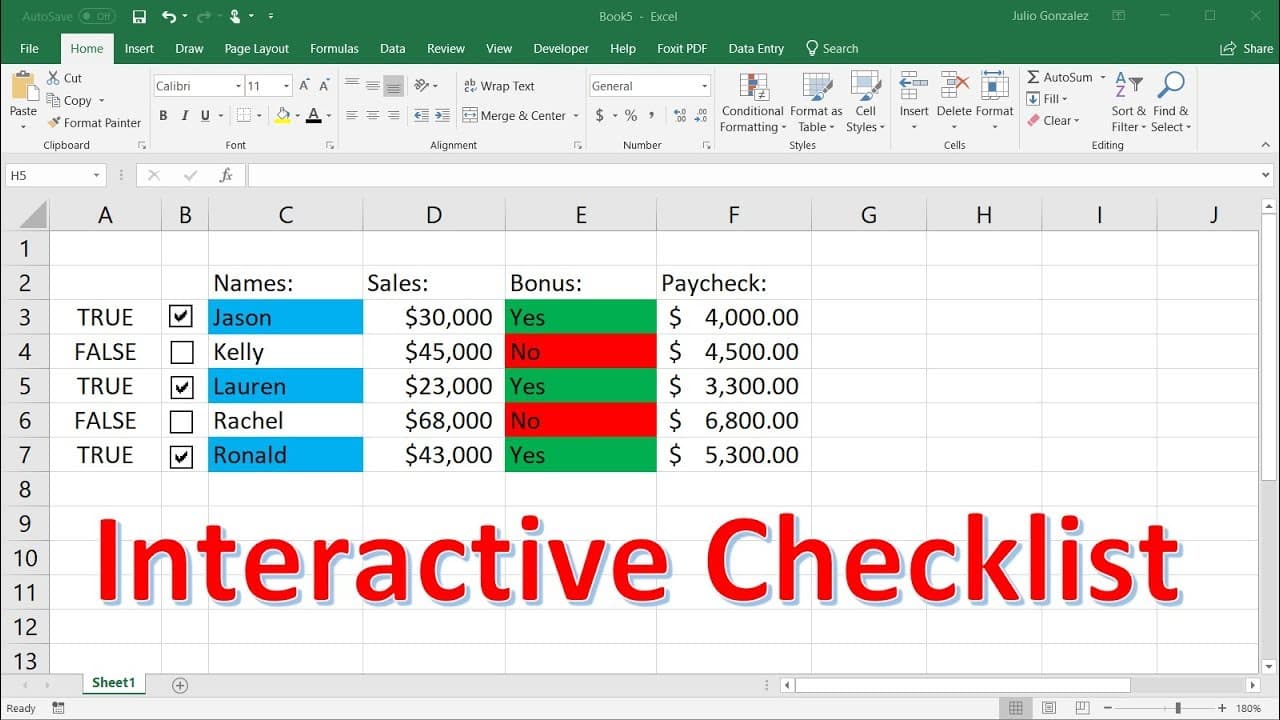
in this video we're going to talk about how we can create an interactive checklist with excel in addition to that we're going to include custom formats in the use of the if function as well as some other formulas also so let's begin in column c i'm going to write the names of a few individuals let's say jason kelly lauren rachel and ronald now to t... Read More
Key Insights
- 👻 The Developer tab in Excel allows you to insert checkboxes for creating an interactive checklist.
- 💁 Custom formatting using conditional formatting can be applied to cells based on checkbox selection.
- ⚾ The IF function in Excel can be used to apply different formulas, calculations, or text based on checkbox selection.
- ❓ Paycheck calculations can be automated using formulas that consider bonuses and sales figures.
- 🛀 Showing formulas in Excel can help verify the correctness of formulas used.
- 💁 Custom formatting and formulas can be combined to create a dynamic and interactive checklist.
- ⚾ The appearance and content of cells can change based on checkbox selection, enhancing visualization and automation.
Install to Summarize YouTube Videos and Get Transcripts
Explore YouTube Video Summarizer or Get YouTube Transcript Extractor
Questions & Answers
Q: How can I create an interactive checklist in Excel?
To create an interactive checklist, you can add checkboxes using the Developer tab and link them to specific cells. Checking/unchecking the boxes will automatically update the linked cells.
Q: How can I customize the formatting of the checklist based on checkbox selection?
You can use conditional formatting to change the background color of cells based on checkbox selection. For example, you can highlight names with a blue background color if the checkbox is selected.
Q: How can I calculate bonuses based on checkbox selection in Excel?
You can use the IF function to determine if a checkbox is selected. If it is selected, you can apply a bonus calculation or text. If it is not selected, you can display a different calculation or text.
Q: How can I calculate paychecks based on bonuses and sales figures in Excel?
By using the IF function and mathematical calculations, you can calculate paychecks based on bonuses and sales figures. You can multiply the sales figures by a commission percentage and add a bonus amount if the checkbox is selected. Otherwise, you can calculate the paycheck based on the sales figures only.
Summary & Key Takeaways
-
The video demonstrates how to create an interactive checklist in Excel using checkboxes and the Developer tab.
-
Custom formatting is applied to highlight names based on checkbox selection.
-
Formulas, such as the IF function, are used to calculate bonuses and paychecks based on checkbox selection.
Read in Other Languages (beta)
Share This Summary 📚
Summarize YouTube Videos and Get Video Transcripts with 1-Click
Try YouTube Summary with ChatGPT & Claude or YouTube Transcript Generator
Explore More Summaries from The Organic Chemistry Tutor 📚




Summarize YouTube Videos and Get Video Transcripts with 1-Click
Try YouTube Summary with ChatGPT & Claude or YouTube Transcript Generator