How Fast Can React Render Thousands of Components?
TL;DR
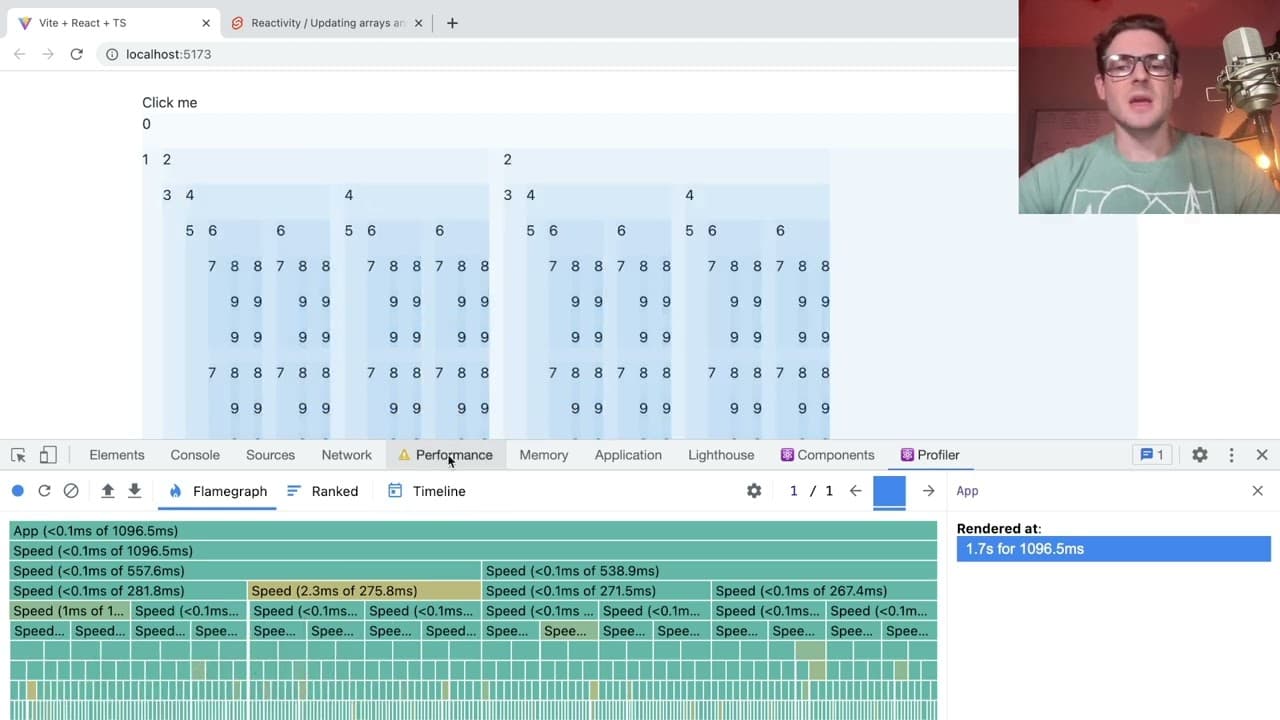
React can render thousands of components quickly; for example, rendering 4,093 components takes about one second on a fresh page. While state changes in parent components cause cascading re-renders in child components, React manages a significant number of components efficiently. Performance optimizations like React.memo aren't always necessary unless dealing with extremely high component counts.
Transcript
well i got this like react page here um that's like loaded up with vt and i have about 4093 components so every time you see like a little blue square that is a component inside that component we have children and those children have more children so if i show you the actual like recode this is just a recursive component that keeps on creating itse... Read More
Key Insights
- 💨 React's component rendering is remarkably fast, even with thousands of instances, demonstrated by a one-second rendering time for 4,093 components.
- 🎨 Recursive components can create exponential growth in instances, illustrating the limits of rendering efficiency and necessitating careful consideration of component design.
- 👪 The state change in parent components results in cascading re-renders throughout the component tree unless optimized properly.
- ⌛ Component libraries and custom components can increase complexity and render time, emphasizing the need to manage component usage carefully.
- ✋ Performance optimizations, like using
React.memooruseCallback, may be required when dealing with high-component counts but aren't always necessary for typical applications. - 🌥️ The demo showcases that rendering large numbers of components might stress CPU processing more than actual browser DOM updates, a crucial consideration for React developers.
- 👤 User experience should always be the priority; rendering thousands of components likely exceeds the visual standards and needs of web applications.
Install to Summarize YouTube Videos and Get Transcripts
Explore YouTube Video Summarizer or Get YouTube Transcript Extractor
Questions & Answers
Q: What happens when the state in a parent React component changes?
When the state in a parent component changes, React triggers a re-render of that parent and all its child components. This means that unless memoization techniques are used, such as React.memo, every component down the hierarchy gets re-rendered, impacting performance negatively, which is critical to understand when dealing with many components.
Q: Why is recursion used in the demo code?
Recursion is employed in the demo to illustrate how components can generate new instances of themselves, leading to a rapidly increasing number of rendered components. This creates a situation to benchmark performance and visualize how React handles component updates under recursive structures, making it easier to understand potential performance bottlenecks.
Q: How does throttling affect rendering performance in the demo?
In the demo, the presenter throttles CPU performance to simulate a slower environment. While it showcases how React can manage component rendering under constrained conditions, reducing CPU speed highlights the responsiveness of React, as it remains efficient even when rendering large numbers of components.
Q: Is the performance impact of updating the DOM significant?
Interestingly, in the video, it’s revealed that updating the DOM itself doesn’t majorly slow down rendering. Instead, the overhead from traversing JavaScript functions repeatedly during re-renders is where latency tends to occur. This insight suggests that rendering strategies should focus more on optimizing JavaScript logic rather than just DOM manipulation.
Summary & Key Takeaways
-
The video explores the rendering speed of 4,093 recursive React components, showing a one-second rendering time on a fresh page.
-
It explains how changes to state in parent components trigger re-renders in child components and the potential performance issues.
-
The presenter emphasizes that while optimization techniques exist, React can handle a significant number of components without major performance loss, especially if managed correctly.
Read in Other Languages (beta)
Share This Summary 📚
Summarize YouTube Videos and Get Video Transcripts with 1-Click
Try YouTube Summary with ChatGPT & Claude or YouTube Transcript Generator
Explore More Summaries from Web Dev Cody 📚





Summarize YouTube Videos and Get Video Transcripts with 1-Click
Try YouTube Summary with ChatGPT & Claude or YouTube Transcript Generator