Building Mobile Friendly Websites - Ankit Gupta - Google India SearchMasters '09

TL;DR
Ankit Gupta discusses the importance and techniques for mobile-friendly websites.
Transcript
GUPTA: Hi, my name is Ankit. I work in the mobile team here and I would like to talk about a lot more than just building mobile friendly websites. I'm going to talk about why--first of all why they are important, why we need to build them. Then, of course, I want to tell them how to build them, and then I'll move on to what the relationship is w... Read More
Key Insights
- Mobile-friendly websites are crucial due to the vast number of mobile users compared to desktop users, highlighting the importance of catering to mobile traffic.
- Mobile users have different needs and behaviors compared to desktop users, often requiring quick access to specific information while on the go.
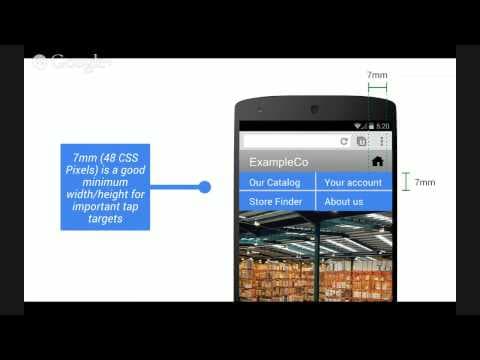
- Designing for mobile involves considering smaller and varied screen sizes, different input methods, and slower, less reliable network connections.
- Key design tips include keeping interfaces simple, minimizing horizontal scrolling, and ensuring usability without CSS.
- Technologies like XHTML-MP, Ajax, and HTML5 are essential for creating effective mobile websites, each offering unique capabilities for mobile optimization.
- Useragent detection on the server side is crucial for delivering appropriate content tailored to different devices.
- Testing on real devices and networks is vital to ensure the mobile website functions correctly under real-world conditions.
- Google's Web Transcoder can help convert desktop websites into mobile-friendly versions, especially useful for those unable to build separate mobile sites.
Install to Summarize YouTube Videos and Get Transcripts
Explore YouTube Video Summarizer or Get YouTube Transcript Extractor
Questions & Answers
Q: Why is it important to build mobile-friendly websites?
Building mobile-friendly websites is crucial because there are significantly more mobile users than desktop users. Mobile users often require quick access to specific information while on the go. Catering to this audience can significantly increase a website's reach and improve user experience, especially given the limitations of mobile devices.
Q: What are some key design considerations for mobile websites?
Key design considerations for mobile websites include adapting to smaller and varied screen sizes, ensuring simple and intuitive interfaces, minimizing horizontal scrolling, and providing quick access to essential information. It's also important to ensure usability without CSS and to design for slower, less reliable network connections.
Q: What technologies are essential for mobile web development?
Technologies essential for mobile web development include XHTML-MP, Ajax, and HTML5. XHTML-MP is a simplified version of XHTML designed for mobile devices. Ajax allows for asynchronous data fetching, improving speed and user experience. HTML5 offers advanced features like audio and video tags, local databases, and improved messaging between documents.
Q: How does useragent detection improve mobile web experiences?
Useragent detection is crucial for improving mobile web experiences as it allows servers to identify the type of device making a request. This information helps deliver appropriate content tailored to the device's capabilities, ensuring optimal display and functionality. It helps differentiate between mobile and desktop users, providing each with a suitable version of the website.
Q: What role does testing play in mobile web development?
Testing plays a vital role in mobile web development as it ensures the website functions correctly under real-world conditions. Testing on real devices and networks helps identify issues that may not appear in emulators or simulators. It ensures compatibility with various devices and network conditions, providing a seamless user experience.
Q: How can Google's Web Transcoder assist in mobile web development?
Google's Web Transcoder assists in mobile web development by converting desktop websites into mobile-friendly versions in real-time. It's particularly useful for webmasters who lack the resources to build separate mobile sites. The transcoder adapts the layout, images, and links to suit mobile devices, ensuring a better user experience without extensive redevelopment.
Q: What are the benefits of using Ajax in mobile websites?
Using Ajax in mobile websites offers several benefits, including faster load times through asynchronous data fetching, improved user experience with instantaneous link loading, and reduced bandwidth usage by only fetching necessary updates. Ajax enables prefetching, caching, and inline user actions, making the website more responsive and efficient.
Q: What are some common pitfalls to avoid in mobile web development?
Common pitfalls in mobile web development include using complex layouts unsuitable for small screens, neglecting to test on real devices, ignoring network variability, and failing to optimize for different device capabilities. Overlooking useragent detection and not setting appropriate cache headers can also lead to suboptimal performance and user experience.
Summary & Key Takeaways
-
Ankit Gupta emphasizes the importance of mobile-friendly websites due to the high number of mobile users. He explains that mobile users have different needs, often requiring quick access to specific information. Designing for mobile involves adapting to smaller screens, different input methods, and slower networks.
-
Gupta discusses technologies like XHTML-MP, Ajax, and HTML5, which are crucial for mobile web development. He highlights the importance of useragent detection on the server side to deliver tailored content to different devices. Testing on real devices and networks is crucial for ensuring functionality.
-
Google's Web Transcoder is a tool that helps convert desktop websites into mobile-friendly versions. This service is beneficial for those who cannot create separate mobile sites. Gupta's talk provides a comprehensive guide for webmasters to optimize websites for mobile users.
Read in Other Languages (beta)
Share This Summary 📚
Summarize YouTube Videos and Get Video Transcripts with 1-Click
Try YouTube Summary with ChatGPT & Claude or YouTube Transcript Generator
Explore More Summaries from Google Search Central 📚



Summarize YouTube Videos and Get Video Transcripts with 1-Click
Try YouTube Summary with ChatGPT & Claude or YouTube Transcript Generator