How to Optimize Mobile Sites for Speed and User Experience
TL;DR
To optimize mobile sites, focus on speed and user experience. Implement browser caching, optimize images, use asynchronous JavaScript, and define viewports. Avoid unsupported formats and faulty redirects. Properly size tap targets and utilize responsive design to ensure a seamless user experience across devices.
Transcript
SYED MALIK: OK. We seem to be live. Great. So welcome, everyone, to this Mobile Site Clinic Hangout. I'm Syed Malik. NITESH SHIVAPOOJA: And this is Nitesh. SYED MALIK: Yeah. So we both work for the Google Search Quality Team. And we're really excited to be doing this Site Clinic especially focused on mobile, because we know that mobile is important... Read More
Key Insights
- Browser caching is crucial for reducing load times by storing files on the user's browser.
- Optimizing images can significantly improve load speed, as images account for over 65% of data transferred to mobile devices.
- Asynchronous JavaScript allows pages to load faster by not blocking the rendering process.
- Defining a viewport ensures that content is displayed correctly on different devices, preventing horizontal scrolling.
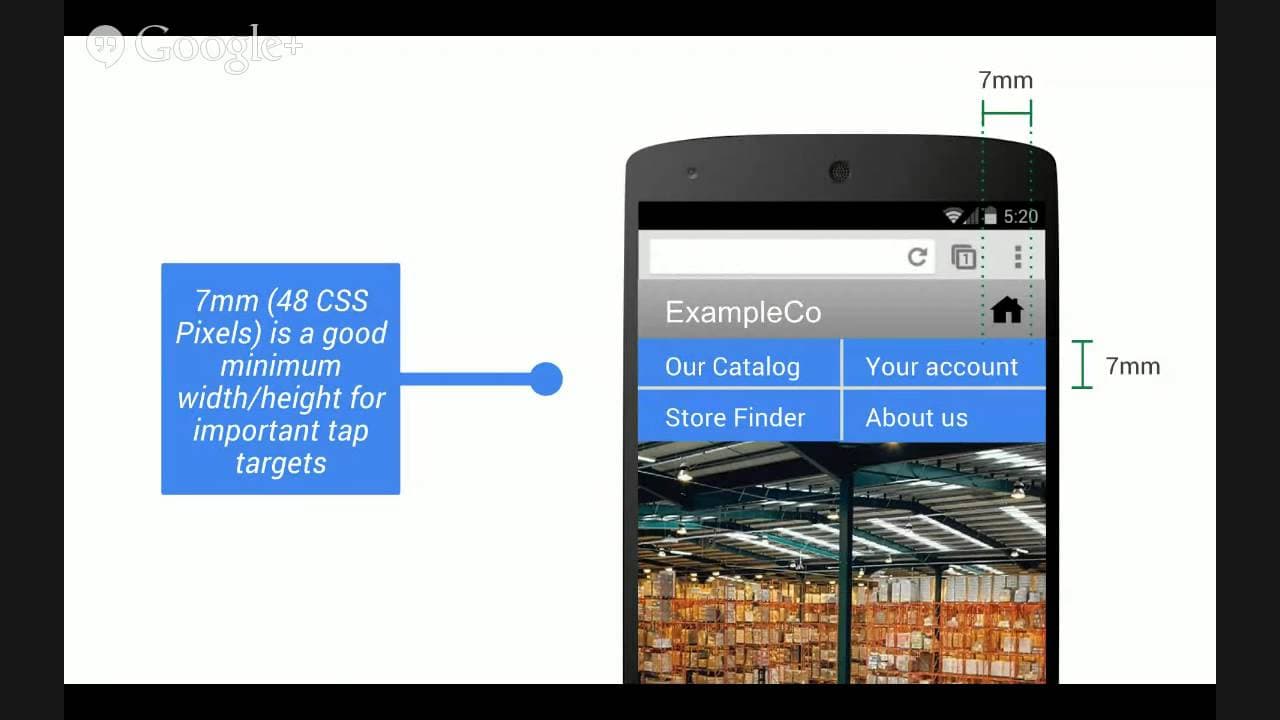
- Properly sized tap targets enhance user experience by making navigation easier on touchscreens.
- Avoid using unsupported formats like Flash, as they can lead to poor user experience on mobile devices.
- Faulty redirects, such as directing all mobile users to a homepage, can disorient users and should be avoided.
- PageSpeed Insights is a valuable tool for identifying and fixing speed and user experience issues on mobile sites.
Install to Summarize YouTube Videos and Get Transcripts
Explore YouTube Video Summarizer or Get YouTube Transcript Extractor
Questions & Answers
Q: How to implement browser caching for mobile sites?
Browser caching can be implemented by including a cache-control header in your site's pages. This header specifies which files should be cached, their maximum age, and other settings. By using consistent URLs and determining optimal cache lifetimes, you can effectively cache static resources like images and logos, reducing load times for returning users.
Q: What are the best practices for optimizing images on mobile sites?
To optimize images, choose the right format based on the image's purpose. Use vector formats when possible, and for raster images, experiment with quality settings to find the balance between size and clarity. Remove unnecessary metadata, serve scaled images appropriate for the device, and automate the optimization process to ensure consistent performance improvements.
Q: Why is asynchronous JavaScript important for mobile site speed?
Asynchronous JavaScript is important because it allows the browser to continue rendering the page while the JavaScript is being fetched and executed. This means the initial page load is faster, as the browser doesn't have to wait for the JavaScript to complete before displaying content. By using async or defer attributes, you can improve the user experience significantly.
Q: How does defining a viewport enhance mobile user experience?
Defining a viewport ensures that your website's content is scaled correctly for different devices, preventing horizontal scrolling and small, unreadable text. By using meta tags to set the viewport width to the device width and initial scale to 1, you ensure that the layout adjusts dynamically, providing a more accessible and user-friendly experience on mobile devices.
Q: What are the consequences of using unsupported formats like Flash on mobile sites?
Using unsupported formats like Flash can lead to poor user experiences, as many mobile devices do not support Flash content. This results in missing or non-functional elements on your site, potentially frustrating users and causing them to leave. Instead, use HTML5 and CSS3 to create interactive content that works across all devices and platforms.
Q: How can faulty redirects affect mobile user experience?
Faulty redirects, such as redirecting all mobile users to a homepage instead of the intended page, can disorient users and disrupt their browsing experience. This practice can increase bounce rates as users struggle to find the content they were seeking. It's crucial to implement redirects that lead users to the equivalent mobile page or serve the desktop version if a mobile version is unavailable.
Q: What role does PageSpeed Insights play in mobile site optimization?
PageSpeed Insights is a tool that analyzes your website's performance and provides specific recommendations for improvement. It helps identify issues like render-blocking JavaScript, unoptimized images, and slow server response times. By following the tool's suggestions, you can enhance both the speed and user experience of your mobile site, leading to better engagement and satisfaction.
Q: Why is it important to have properly sized tap targets on mobile sites?
Properly sized tap targets are crucial on mobile sites because they ensure that users can easily interact with navigation links and buttons without accidentally clicking the wrong elements. A recommended size is at least 48 CSS pixels, which accommodates the average adult finger size. This attention to detail improves accessibility and overall user satisfaction on touch devices.
Summary & Key Takeaways
-
Optimizing mobile sites for speed and user experience involves several key practices. Implement browser caching to store files locally on the user's device, reducing load times. Optimize images by choosing the right format and removing unnecessary metadata to minimize data transfer. Use asynchronous JavaScript to prevent blocking the page rendering process.
-
Defining a viewport is essential for ensuring content is displayed correctly on various devices, preventing horizontal scrolling. Properly sized tap targets improve navigation on touchscreens, enhancing user experience. Avoid unsupported formats like Flash, which can lead to poor mobile experiences.
-
Faulty redirects, such as redirecting all mobile users to a homepage, should be avoided to prevent user disorientation. Utilize tools like PageSpeed Insights to identify and address speed and user experience issues, ensuring a smooth and efficient mobile browsing experience.
Read in Other Languages (beta)
Share This Summary 📚
Summarize YouTube Videos and Get Video Transcripts with 1-Click
Try YouTube Summary with ChatGPT & Claude or YouTube Transcript Generator
Explore More Summaries from Google Search Central 📚






Summarize YouTube Videos and Get Video Transcripts with 1-Click
Try YouTube Summary with ChatGPT & Claude or YouTube Transcript Generator