How to Code and Understand an Ulam Spiral
TL;DR
An Ulam spiral visualizes factor counts by placing positive integers on an outward-moving grid and drawing larger circles for numbers with fewer factors. The program uses a two-dimensional array to track filled cells, direction variables to control movement, and a square-root-based function to count factor pairs efficiently.
Transcript
This is our Ulam Spiral Fun program, and I'm sure I'm mispronouncing Ulam or Ulam. But what it is is a way to visualize number factors, and in particular, a way to visualize prime numbers. And so it starts at the center here. This is the number one. And it calculates how many factors does one have. Well, one only has one factor. And so the way I di... Read More
Key Insights
- The Ulam spiral is a visualization that places positive integers on a grid while spiraling outward from the center, allowing factor counts and the distribution of prime numbers to appear as a visual pattern.
- Circle size is inversely related to factor count in this program: integers with few factors receive larger circles, while integers with many factors receive smaller circles. This makes prime numbers visually distinct because each has exactly two factors.
- The number one is handled separately because it has exactly one factor and is not considered prime. It receives the largest circle in the visualization, while prime numbers such as two, three, five, seven, and eleven receive the next prominent size.
- The visualization scale is controlled by variables for cell size and circle scale. Dividing the canvas dimensions by the cell size determines how many grid cells fit in each direction, with an additional cell included to help cover the entire canvas.
- A two-dimensional array stores the factor count assigned to every filled grid position. This stored state is necessary because the spiral traversal logic must determine whether neighboring cells have already been occupied as successive numbers are placed.
- Direction variables control movement through the grid by specifying changes to the current coordinates. An x increment of one moves right, a y increment of one moves down, and negative increments can represent movement left or up.
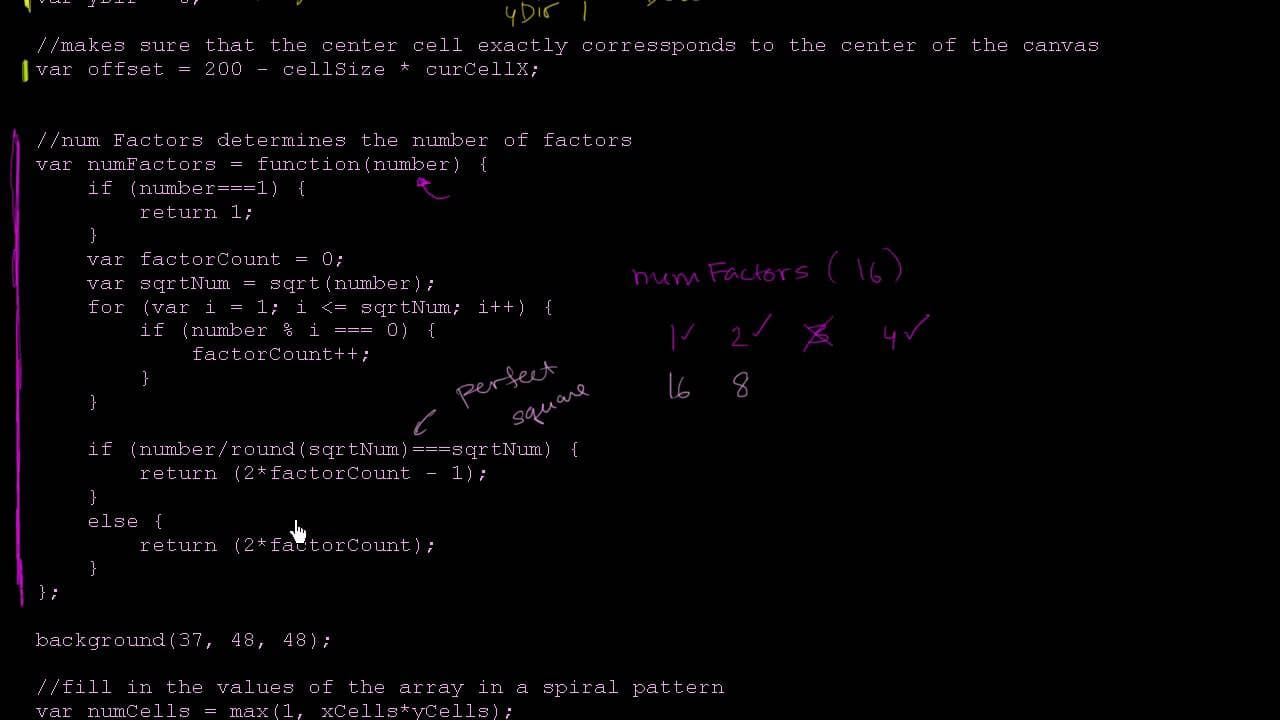
- The factor-counting function tests divisors only up to and including the square root of the input. This works because factors occur in corresponding pairs, such as one and sixteen or two and eight for the number sixteen.
- Perfect squares require special handling when factor pairs are counted. The square-root factor pairs with itself, so doubling every detected divisor would count that factor twice. The program therefore doubles the count and subtracts one for perfect squares.
Install to Summarize YouTube Videos and Get Transcripts
Explore YouTube Video Summarizer or Get YouTube Transcript Extractor
Questions & Answers
Q: How does an Ulam spiral visualize prime numbers?
An Ulam spiral places positive integers in grid cells while moving outward from a central starting point. In this program, each integer is represented by a circle whose size depends on its number of factors. Prime numbers have exactly two factors, one and themselves, so they receive relatively large circles and become visually noticeable within the broader spiral pattern.
Q: Why is one not considered a prime number?
One is not considered prime because it has only one factor, namely itself. A prime number must have exactly two factors: one and the number itself. The program handles one as a special case and draws it as the largest circle because no other positive integer in the visualization has only one factor.
Q: How does circle size represent the number of factors?
The program draws larger circles for integers that have fewer factors and smaller circles for integers that have more factors. One receives the largest circle because it has only one factor. Prime numbers receive another prominent size because they have exactly two factors, while numbers such as six appear smaller because they have several factors.
Q: Why does factor counting stop at the square root?
Factor counting stops at the square root because factors occur in pairs. For sixteen, one pairs with sixteen, two pairs with eight, and four pairs with itself. Testing divisors only from one through four identifies every pair without checking all integers through sixteen. The transcript notes that for ten thousand, this reduces testing to numbers between one and one hundred.
Q: How are perfect squares handled when counting factors?
A perfect square needs special handling because its square-root factor pairs with itself. For sixteen, the tested factors through four are one, two, and four. Doubling that count would count four twice, so the program multiplies the count by two and subtracts one. This produces the five factors shown: one, two, four, eight, and sixteen.
Q: How does the program determine the grid size?
The program divides the number of pixels in each canvas dimension by the chosen cell size. For the example of a four-hundred-by-four-hundred-pixel canvas with cells measuring one hundred pixels in both directions, four cells fit along each dimension. The code adds one more cell to help ensure that the drawing covers everything at the selected scale.
Q: Why does the program use a two-dimensional array?
The two-dimensional array represents the grid positions occupied as numbers are written into the spiral. Each current cell stores the calculated number of factors for its corresponding integer. The program needs this stored information because its traversal logic must keep track of whether adjacent cells have already been filled while deciding how to continue the spiral.
Q: How do direction variables move through the spiral grid?
The xDir and yDir variables specify how much the current grid coordinates change during each movement. Setting xDir to one and yDir to zero moves right. Setting xDir to zero and yDir to one moves down under the described coordinate system. Negative xDir or yDir values can similarly represent movement left or up as the spiral changes direction.
Summary & Key Takeaways
-
The visualization begins with one at the center and places successive positive integers along an outward spiral. Circle size represents factor count inversely: numbers with fewer factors receive larger circles, while numbers with more factors receive smaller ones. This makes prime numbers, which have exactly two factors, visually prominent throughout the pattern.
-
The setup code determines the visualization's scale by defining cell size, circle scale, and the number of cells that fit across each canvas dimension. A two-dimensional array stores factor counts for occupied positions. Rounded midpoint calculations select the center cell, while an offset keeps that cell centered during zooming.
-
The factor-counting function treats one as a special case, then tests possible divisors only through the number's square root. Each divisor normally has a corresponding partner, so the count is doubled. Perfect squares require subtracting one because their square-root factor would otherwise be counted twice. The main loop calculates, stores, and draws each value.
Read in Other Languages (beta)
Share This Summary 📚
Summarize YouTube Videos and Get Video Transcripts with 1-Click
Try YouTube Summary with ChatGPT & Claude or YouTube Transcript Generator
Explore More Summaries from Khan Academy 📚



Summarize YouTube Videos and Get Video Transcripts with 1-Click
Try YouTube Summary with ChatGPT & Claude or YouTube Transcript Generator