How to Read Research Papers with ChatGPT or Claude, and Check What It Tells You

Oct 28, 2026
4 min read
0 views
ChatGPT and Claude can summarize a paper in seconds. The trouble is knowing when the summary is wrong. In a 2023 study of ChatGPT-generated medical content, 47% of the references it produced were fabricated and another 46% were real but inaccurate (Cureus). In Wiley's 2025 survey of 2,430 researchers, concern about inaccuracies and hallucinations rose from 51% to 64% in one year (Wiley).
So the useful question is not how to make AI read papers for you. It is how to use AI where it is reliable, and keep every claim tied to a sentence you can open and check. This guide shows a four-step routine with Glasp:
Use a summary only to decide whether to read.
Highlight the sentences you would cite.
Ask Claude or ChatGPT about your own highlights, not the whole internet.
Check the passage before you cite it.
What you need: the free Glasp extension for Chrome, Safari, Firefox, Edge, Brave, or Opera (how to install it).
Step 1: Use the summary to decide, not to read
Open the paper's full-text page (PubMed Central, arXiv, a publisher's site) or its PDF, and ask Glasp for a summary:
Glasp's own summary appears in the Glasp panel next to the page, and in Glasp's PDF viewer.
The summary icon opens the page in ChatGPT or Claude with a summary prompt (how it works).
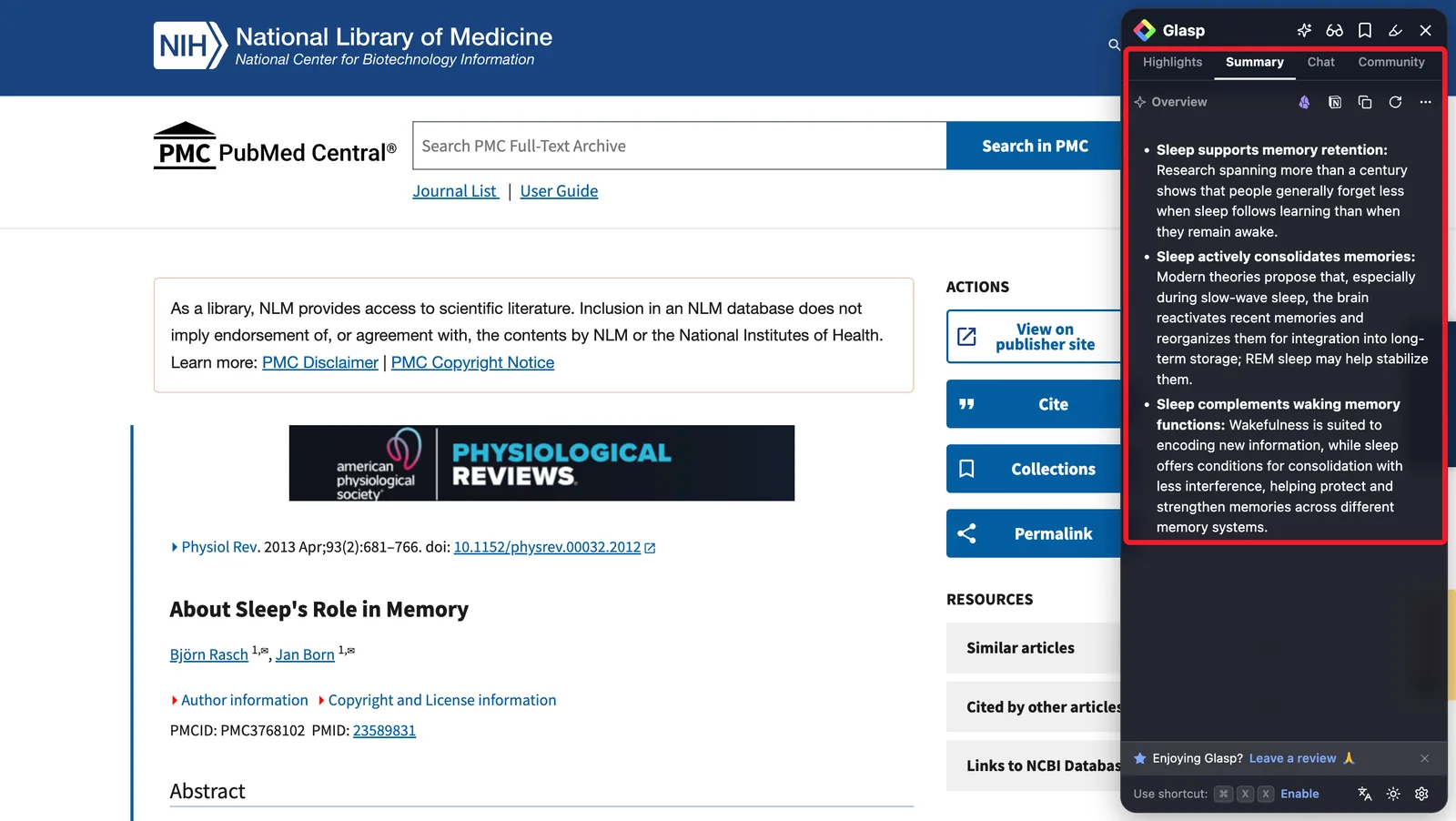
Use the summary for one decision only: read closely, skim, or skip. Do not quote it and do not cite it. A summary drops the conditions a result depends on (the population, the dose, the comparison), and those are usually what you need.
This is also where AI saves the most time. Most papers you open are not the ones you need to read closely. Deciding that quickly is faster reading in practice.
Step 2: Highlight the sentences you would cite
For the papers you keep, read them yourself and highlight only the sentences you will come back to:
The question the paper answers.
The method choice that limits the result.
The main result, with its number.
The limitation the authors state.
Use one color per kind, and add a one-line note in your own words where it matters. The full walkthrough is in How to Highlight and Take Notes on Research Papers Online.
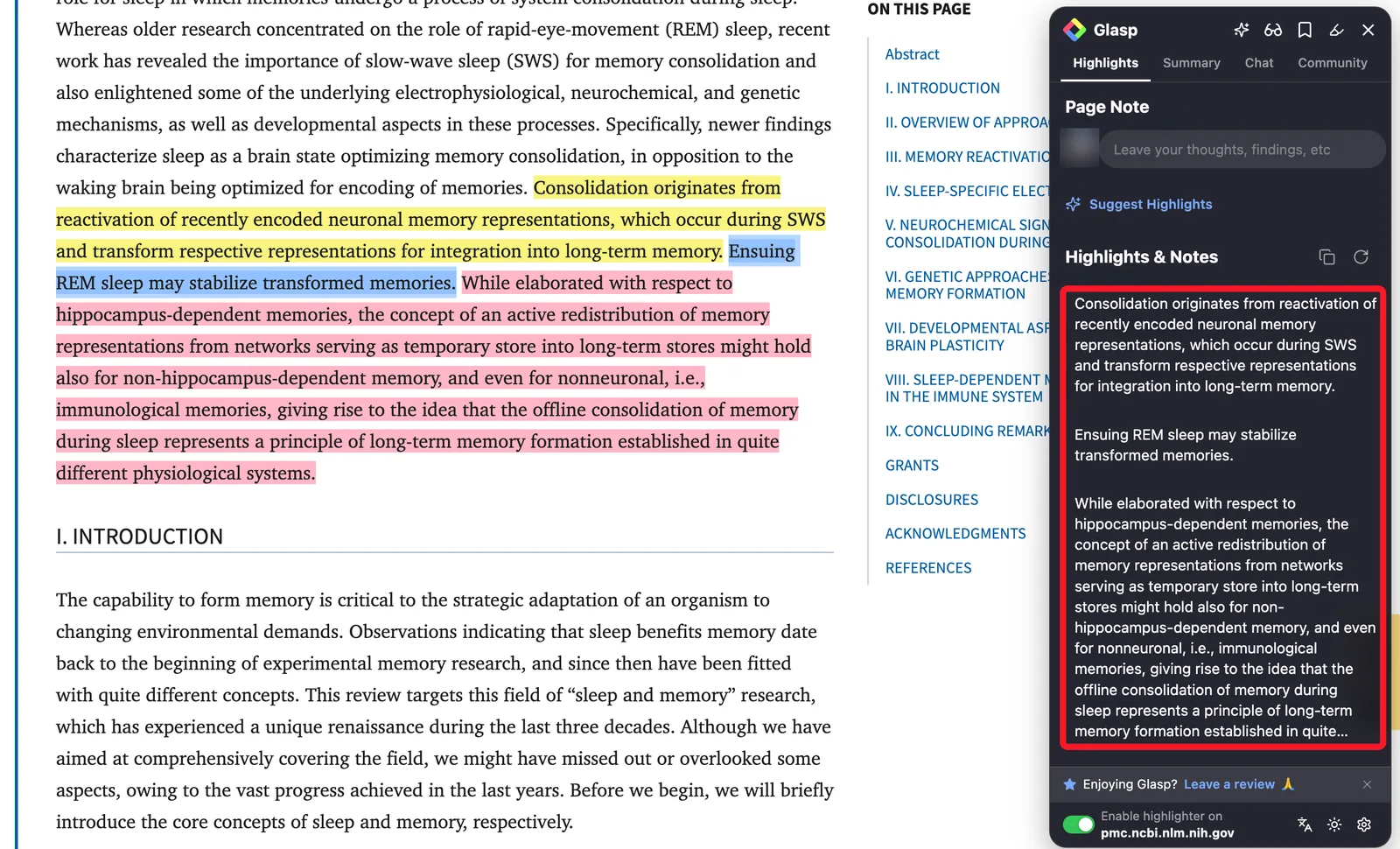
These highlights are what makes the next step trustworthy. The AI will answer from sentences you chose, not from what it remembers about the topic.
Step 3: Ask Claude or ChatGPT about your own highlights
Connect Glasp to Claude or ChatGPT with the Glasp MCP Connector. Then ask about the passages you marked, and ask for the passage and link every time:
"Search my Glasp highlights on sleep and memory consolidation. Quote each highlight and give the link to its paper."
"Which papers I highlighted report results in adults over 65? Quote the passage and give the link."
"What did I highlight about the limitations of this method? Quote my highlights only."
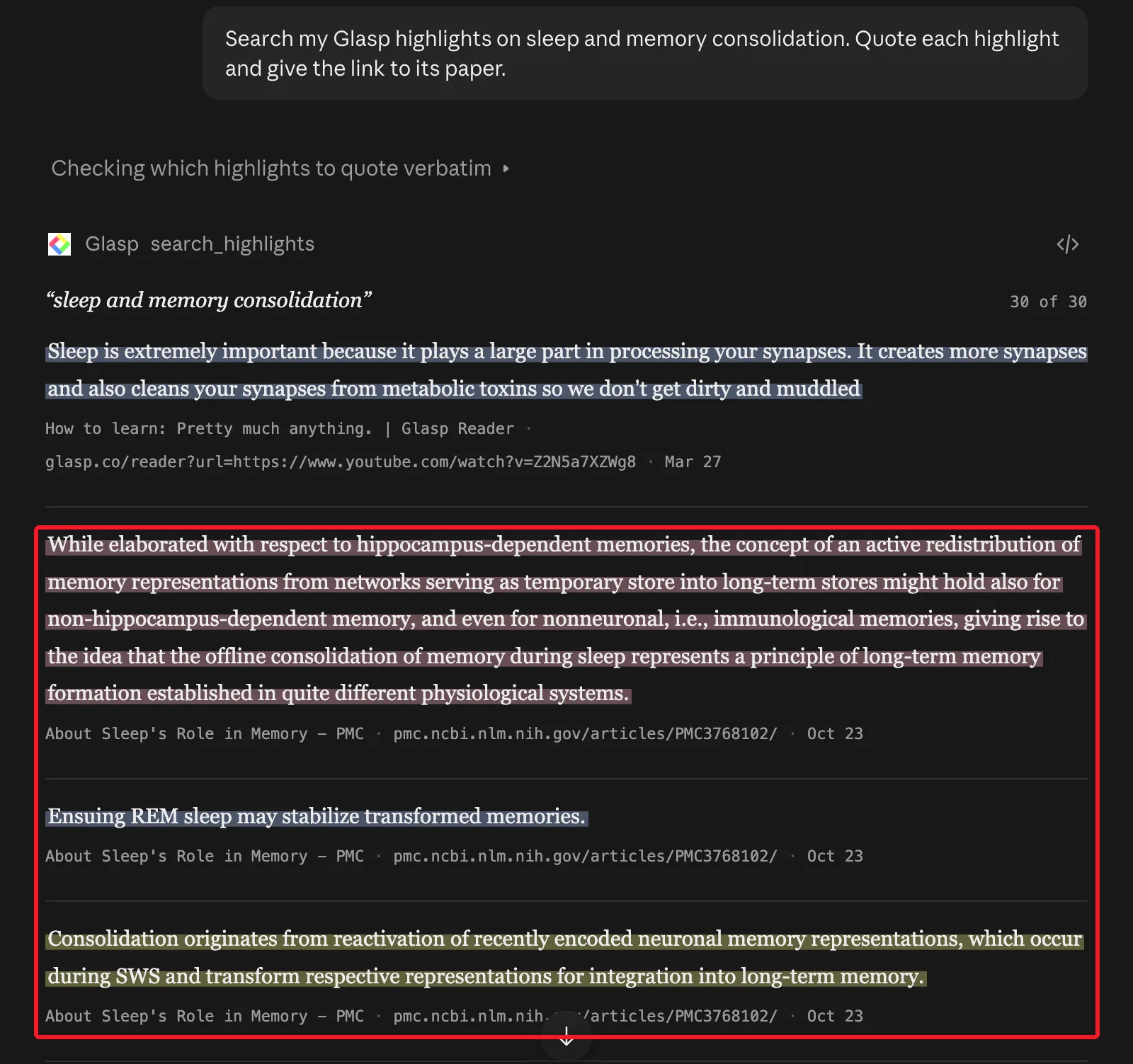
Because the assistant works from your highlights, each answer comes with a sentence you marked and the page it came from. An answer without a quoted passage is a sign to stop and check.
Step 4: Check the passage before you cite it
Before a detail goes into your notes, a slide, or a paper:
Open the link and read the sentence in its paragraph. Make sure the result holds for the group and conditions you mean.
Cite the paper, never a reference the AI wrote. If the assistant names a paper you have not highlighted, find it yourself first.
Keep numbers from the paper, not from a summary of it.
This takes a minute per claim. It is the difference between using AI to read and using AI to find what you already read.
A routine for one week
Monday: summarize ten new papers, keep three.
During the week: read the three closely and highlight them.
Before writing: ask your highlights for what you need, then open each source and check it.
FAQs
Can I just ask ChatGPT or Claude to summarize the PDF?
You can, and it is fine for deciding whether to read. It is not a substitute for reading the parts you will rely on, and it should never be your source for a citation.
Is the AI summary free?
Yes, within limits. The free plan includes 3 summaries a day that open in ChatGPT or Claude, and 3 Glasp AI summaries per 7 days. Pro and Unlimited include more.
Does it work on PDFs?
Yes. PDFs open in Glasp's PDF viewer, where you can see a summary and highlight them. You can also upload PDFs; uploaded PDFs are always private.
Are my highlights on papers public?
Highlights on web pages are public on your Glasp profile by default. Private highlighting needs a Pro or Unlimited plan.
Before you leave
If you have any questions, please refer to the FAQ or contact us.
👉 X
See you next time,
Glasp team