How to Prepare for Journal Club from Your Highlights

Oct 29, 2026
4 min read
1 views

Journal club prep usually happens the night before: read the paper, pull out the question and the methods, find the limitations, make a few slides. Done from scratch, that can take hours, and most of the work disappears after the session. Next time a related paper comes up, you start again.
This guide shows a way to prepare that leaves something behind. You appraise the paper as you read it, using one highlight color per appraisal question. Your highlights then become the outline for the discussion, and they are still there, linked to the paper, the next time the topic comes up.
What you need: the free Glasp extension for Chrome, Safari, Firefox, Edge, Brave, or Opera (how to install it).
Step 1: Open the full text, not the PDF, if you can
Open the article's full-text page on PubMed Central or the publisher's site. Highlighting a web page has two advantages for journal club: the highlights can be shared by link (Step 5), and they stay attached to the article page.
PDFs work too. They open in Glasp's PDF viewer, where you can highlight and add notes. Uploaded PDFs are always private, though, so they cannot be shared with your group.
Step 2: Give each color one appraisal question
Glasp has four highlight colors and leaves their meaning to you. For journal club, give each one a question from your appraisal checklist:
Yellow: the question. The population, the intervention, the comparison, the outcome.
Blue: the methods. How patients were allocated, who was blinded, how the outcome was measured.
Green: the results. The main result with its number and confidence interval.
Pink: your doubts. Losses to follow-up, a surrogate outcome, a subgroup that carries the conclusion.
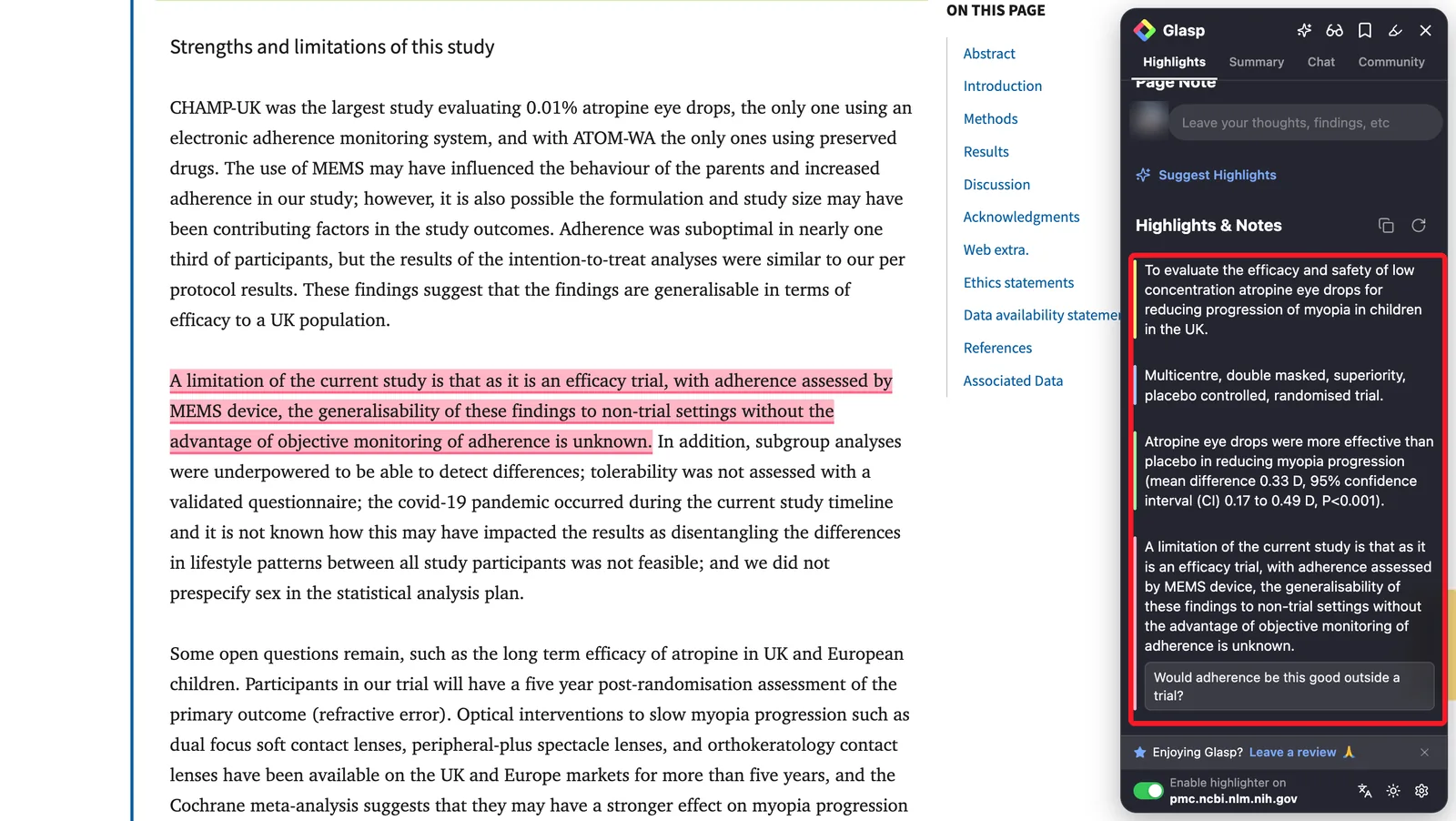
If your program uses a checklist, keep it open while you read. The CASP checklists include a free one for randomized controlled trials, and CONSORT 2025 lists what a trial report should contain. Pink highlights are often where the paper falls short of them.
Step 3: Write the question you want to ask the group
On your two or three most important highlights, add a note with the question you want to bring to the discussion:
"Would this change what we do for patients over 75?"
"Is the primary outcome one patients care about?"
"Why did the authors stop early?"
These notes turn your highlights into discussion prompts, which is what makes a journal club useful.
Step 4: Turn your highlights into a one-page outline
Click the copy button next to Highlights & Notes in the Glasp sidebar, and paste your highlights into your slides or notes. Because each color is one appraisal question, the outline is already in order: question, methods, results, doubts.
If you use Claude or ChatGPT, connect the Glasp MCP Connector and ask it to build the outline from your highlights only:
"Using only my Glasp highlights on this paper, make a one-page journal club outline: question, methods, results, and my doubts. Quote each highlight and keep my notes as discussion questions."
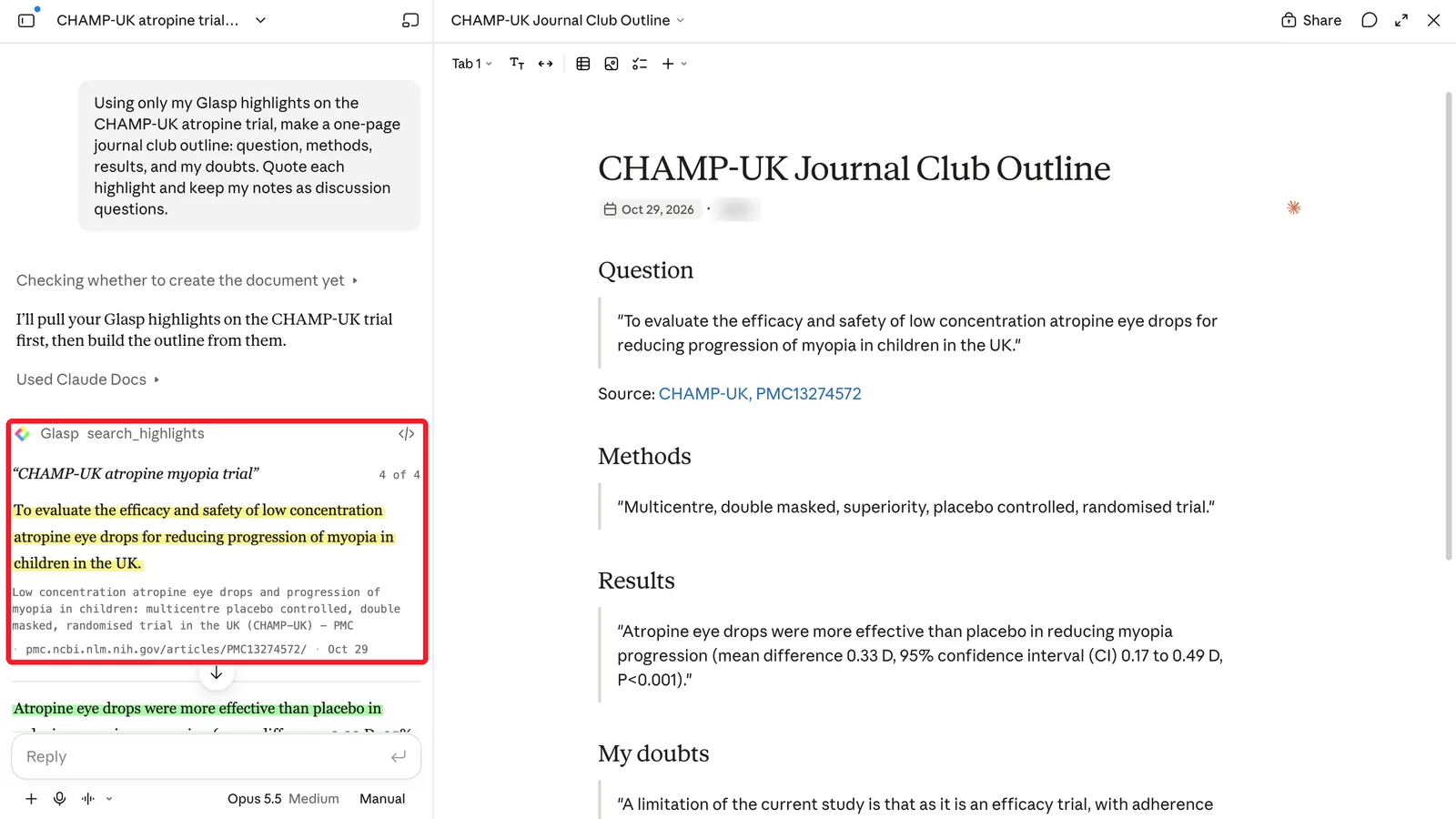
Check every number against the paper before it goes on a slide.
Step 5: Share the page with your group
Highlights on web pages are public on your Glasp profile by default, and each page has its own link. Send that link to your group before the session, so everyone sees the same passages and your questions next to them.
If you need to keep highlights private, that needs a Pro or Unlimited plan, and private highlights are not visible to others.
After journal club
Tag the paper with the topic (journal-club, sepsis, anticoagulation). The next time a related paper comes up, open the tag and you have the earlier appraisal, with your doubts and the group's questions, a click away.
If you keep notes in Obsidian or Notion, export your highlights to Obsidian or to Notion, so the appraisal sits next to your other notes.
FAQs
Can my whole group highlight the same paper?
Each person highlights in their own Glasp account. Highlights on public web pages can be seen on each person's profile, so everyone can share their page link with the group.
Does this work for PDFs from my library?
You can highlight PDFs in Glasp's PDF viewer, or upload them. Uploaded PDFs are private on every plan and cannot be shared, so for a shared session, use the article's web page when it is available.
Is it free?
Highlighting, notes, and tags are free. Private highlighting needs a Pro or Unlimited plan.
Before you leave
If you have any questions, please refer to the FAQ or contact us.
👉 X
See you next time,
Glasp team