Best Readwise Alternatives in 2026 (Free Options Included)

Aug 03, 2026
9 min read
74 views

Glasp is the best free Readwise alternative for most people: it imports your Kindle highlights for free with scheduled auto-sync, sends a free daily review email, exports to the same major note apps, and adds something Readwise doesn't have, a free MCP connector that puts your highlights inside Claude and ChatGPT. That said, the right pick depends on what you use Readwise for. Recall is the best choice for AI summaries and spaced-repetition quizzes, Snipd is built for podcast highlights, and Matter is the nicest pure reading app on iPhone. This guide compares them honestly, including what Readwise still does best.
Why Look for a Readwise Alternative?
Credit first: Readwise is the pioneer of the highlight-syncing category, and it is still excellent. It pulls highlights from Kindle, Instapaper, Apple Books, and dozens of sources (including photos of paper-book pages), resurfaces them in a daily review, and exports them to Notion, Obsidian, Roam, and Evernote. The Full plan also includes Reader, a genuinely great read-it-later app.
The complaint is almost always the same: there is no free plan. After the 30-day trial, Readwise costs $5.59/month (Lite, billed annually) without note-app export, or $9.99/month billed annually ($12.99 billed monthly) for the Full plan. If you highlight casually, that is a real subscription for a habit you might use a few times a week.
So the question for each alternative below is: how much of Readwise's job (capture highlights, resurface them, export them) can it do, and at what price?
The 6 Best Readwise Alternatives
1. Glasp: Best Free Alternative for Kindle Import, Review, and Export
Platform: Browser extension (Chrome, Safari, Edge, Brave, Firefox, Opera), web app, iOS and Android
Price: Free plan with unlimited public highlights. Pro is $15/month, or $150/year ($12.50/month billed annually)
Covers from Readwise: Kindle highlight import (free, with scheduled auto-sync), daily review email, exports to Notion, Obsidian, Roam, and more
Standout: A free MCP connector that lets Claude and ChatGPT search your highlights
Best link: glasp.co
Glasp covers Readwise's three core jobs without a subscription. Capture: highlight web articles, PDFs, and YouTube transcripts directly, and import your Kindle highlights for free, with an auto-sync that can run daily, every 3 days, or weekly. Resurface: the free Daily Kindle Review email brings back a selection of your highlights on a schedule you choose. Export: Notion, Obsidian, Readwise, Roam, Tana, Workflowy, Zotero, plus Markdown, CSV, HTML, and JSON files.
Then there is the part Readwise doesn't do: Glasp is also where highlights get created, not just synced. The extension highlights as you read, and the free MCP connector makes your whole library searchable from inside Claude, ChatGPT, and Claude Code.
Where Readwise is still better: it syncs from more sources automatically (including photo OCR for paper books), and its spaced-repetition review is deeper than Glasp's daily email. Also note that free-tier highlights on Glasp are public by default; private highlights are a Pro feature.
Best for: Readwise users who want the Kindle import, daily review, and exports without the subscription, plus an AI layer on top.
2. Recall: Best for AI Summaries and Spaced Repetition
Platform: Web app, Chrome and Firefox extensions, iOS and Android (beta)
Price: Free (10 AI summaries/month, unlimited saving). Plus $10/month billed yearly, Max $38/month billed yearly
Covers from Readwise: Resurfacing, via spaced-repetition quizzes that go deeper than Readwise's daily review
Standout: Saves become an auto-connected knowledge graph with built-in quizzes
Recall approaches the problem from the retention end. Save an article, YouTube video (up to 10 hours), or PDF (up to 300 pages), and it generates a summary, links it into a knowledge graph, and, on paid plans, quizzes you on it with spaced repetition before you forget.
What it doesn't do: import Kindle highlights (a long-standing feature request), which for many people is Readwise's whole point. If your highlights live in books, Recall can't reach them; if they live on the web and YouTube, it is arguably the smartest resurfacing tool here.
Best for: Learners who care more about remembering content than syncing highlights between apps.
3. Matter: Best Reading Experience with Highlight Sync
Platform: iPhone, iPad, web (plus a Mac app). No Android app
Price: Free to start; Premium is $79.99/year via the App Store (web pricing may differ)
Covers from Readwise: Capture (highlight while reading) and export (Notion, Obsidian, Roam, and Readwise itself)
Standout: Near-human text-to-speech that turns your reading list into a podcast
Matter is what you get if you optimize for the reading moment: a beautiful iOS reader with fluid highlighting, newsletters piped in from Gmail, and text-to-speech good enough to replace a podcast. Highlights sync out to Notion, Obsidian, Roam, and Readwise.
The limits: Apple-only (no Android), no Kindle highlight import, and unlimited highlighting plus integrations require Premium.
Best for: iPhone and iPad readers who highlight what they read and want it to sound as good as it looks.
4. Raindrop.io: Best Bookmark-First Option with Free Highlights
Platform: Web, Mac, iOS, Android; extensions for Chrome, Safari, Firefox, Edge
Price: Free (unlimited bookmarks, collections, and highlights). Pro is about $3/month billed annually (price varies by region)
Covers from Readwise: Capture, highlights on any saved page, all free
Standout: The most generous free tier in the category
If your Readwise use was mostly "keep web highlights somewhere organized," Raindrop does that for free, attached to a genuinely excellent bookmark manager. Unlimited highlights on the free plan, visual collections, tags, and apps on every platform.
What's missing is the Readwise-style loop: no Kindle import, no daily review or spaced repetition, and highlight export is less central than in the dedicated tools. It stores knowledge; it doesn't resurface it.
Best for: Organizers who want free web highlights inside a first-class bookmark manager.
5. Snipd: Best for Podcast Highlights
Platform: iOS (with Apple Watch and CarPlay) and Android
Price: Free (unlimited listening, AI on 2 episodes/week). Premium $6.99/month (App Store pricing varies by region)
Covers from Readwise: Podcast capture, which Readwise itself can't do natively
Standout: Tap your headphones to save a "snip" with audio, transcript, and AI summary
Snipd is the only tool here that captures a medium the others can't touch. While you listen to a podcast, one tap on your headphones saves the moment, with transcript, speaker labels, and an AI summary. Snips export to Notion, Obsidian, Readwise, Glasp, Bear, Logseq, and Markdown.
It is deliberately narrow: podcasts (plus YouTube and uploaded audio), not web articles, PDFs, or Kindle. Think of it as the podcast leg of your highlight stack rather than a full Readwise replacement.
Best for: Podcast listeners who lose great ideas to the "I'll remember that" fallacy.
6. Anki: Best Zero-Budget Spaced Repetition (DIY)
Platform: Windows, Mac, Linux, Android (all free); iOS app is a one-time $24.99
Price: Free (the iOS app purchase funds development)
Covers from Readwise: The review loop, and nothing else
Standout: The most powerful spaced-repetition engine ever built, for free
If the only Readwise feature you'd miss is the review, Anki does reviewing better than anything, and it is free. The catch is that nothing flows in automatically: you build cards by hand or with add-ons, and there is no highlight capture at all.
One practical bridge: Glasp can export your highlights as an Anki deck, fronts and backs pre-built, which turns the DIY route into a two-click pipeline.
Best for: Students on a zero budget who want maximum retention and don't mind assembly.
Quick Comparison
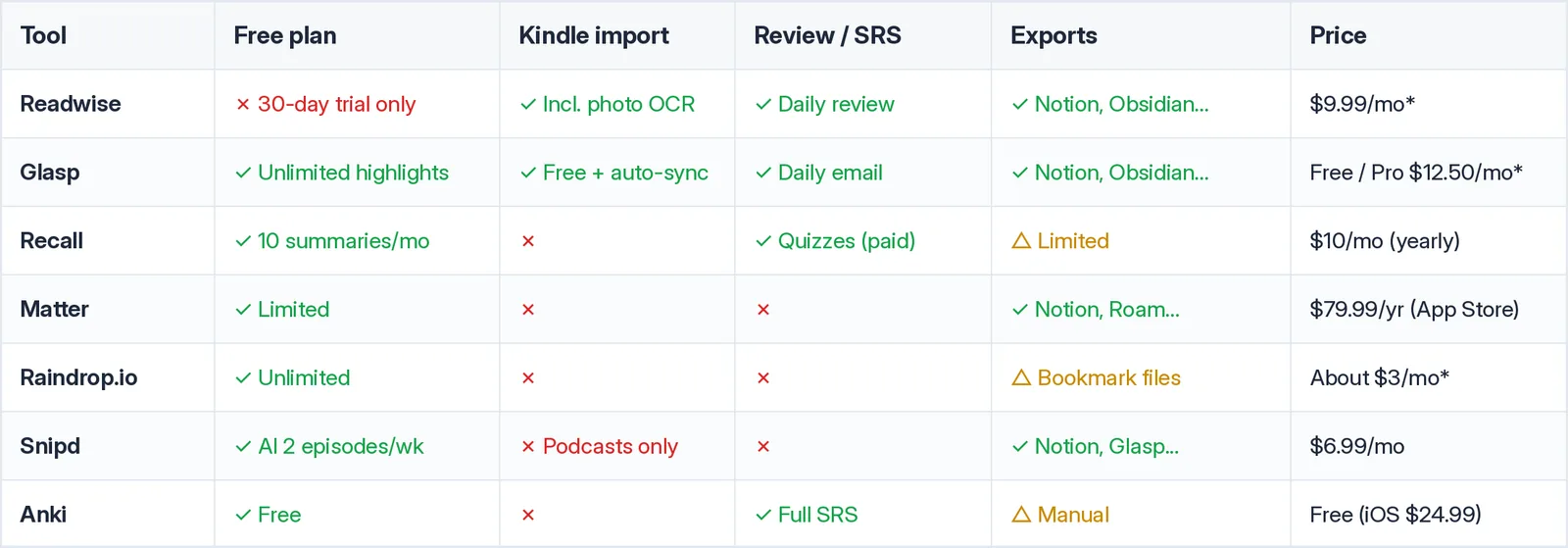
Prices marked with an asterisk are per month, billed annually. Raindrop pricing varies by region.
Worth stating plainly: of all the tools above, only Readwise and Glasp cover Kindle highlight import plus a daily review, and only Glasp does it on a free plan.
How to Switch from Readwise to Glasp
Moving takes a few minutes, and nothing is lost:
Import your Readwise library. Go to Settings, then Integrations on Glasp, open the
Importtab, and use Readwise import to bring in your existing highlights.Connect your Kindle. Glasp imports your Kindle highlights for free and can auto-sync on a schedule, so new book highlights keep flowing in.
Turn on the Daily Kindle Review email in Settings to keep the resurfacing habit.
Point your exports where they went before. Notion, Obsidian, Roam, and the rest are in the
Exporttab.
And if you ever want to go back, Glasp exports to Readwise too. Your highlights stay portable in both directions.
Frequently Asked Questions
Q: What is the best free Readwise alternative?
Glasp. It covers Readwise's core loop, Kindle highlight import (with scheduled auto-sync), a daily review email, and exports to Notion, Obsidian, Roam, and more, on a free plan with unlimited public highlights. Private highlights and higher AI limits come with Pro at $12.50/month billed annually.
Q: How much does Readwise cost in 2026?
After a 30-day trial, Readwise Lite is $5.59/month billed annually (no note-app export, no Reader), and the Full plan is $9.99/month billed annually or $12.99/month billed monthly. There is no permanent free tier.
Q: Which Readwise alternatives import Kindle highlights?
Of the tools in this guide, only Glasp imports Kindle highlights, and it does so for free with optional auto-sync. Recall, Matter, Raindrop, and Snipd do not import Kindle highlights.
Q: What's the best alternative for spaced repetition?
Recall has the best built-in spaced repetition on a modern stack (quizzes generated from what you save, on Plus and above). Anki is the free, manual powerhouse, and Glasp can export your highlights straight into an Anki deck.
Q: Can I highlight podcasts like Readwise does?
Readwise syncs podcast highlights via Snipd rather than capturing them itself. Snipd is the direct tool for this: tap your headphones to save a moment with transcript and summary, then export it to Glasp, Notion, Obsidian, or Readwise.
Q: Can my AI assistant search my highlights?
With Glasp, yes. Its free MCP connector works with Claude, ChatGPT, Claude Code, and any MCP-compatible client, so you can ask your AI "what did I highlight about X?" and get your own sources back.
Q: Is it easy to leave Readwise?
Yes. Readwise lets you export your data, and Glasp has a dedicated Readwise import. The reverse also works (Glasp exports to Readwise), so switching is not a one-way door.
Related Articles
👉 Try it free: glasp.co
Before You Leave
Readwise earned its reputation, and if its price never bothered you, it remains a great tool. But the core habit it sells, capture highlights, see them again, send them to your notes, no longer requires a subscription. Glasp gives you that loop for free, keeps your data exportable, and adds an AI connection Readwise doesn't have.