Best NotebookLM Alternatives in 2026: Glasp, Recall, Claude Projects, and More

Aug 02, 2026
9 min read
39 views
The best NotebookLM alternative depends on why you're looking for one. If NotebookLM's biggest gap for you is capturing ideas while you read and watch across the web, Glasp is the strongest alternative: it saves highlights from any webpage, PDF, YouTube video, or Kindle book into one permanent library, and pipes that library into Claude or ChatGPT. If you want spaced-repetition review, pick Recall. For deeper reasoning over your documents, pick Claude Projects. For a private, local setup, pick AnythingLLM. This guide compares them honestly, including the things NotebookLM still does best.
First Things First: NotebookLM Is Now Gemini Notebook
As of July 16, 2026, Google renamed NotebookLM to Gemini Notebook. The app now lives at notebook.google.com, and old notebooklm.google.com links redirect there. Same product, new name, so we'll use both in this article.
Credit where it's due: Gemini Notebook is genuinely good at what it's built for. You upload sources, and it answers questions using only those sources, with inline citations back to the exact passage. The free tier is generous (100 notebooks, up to 50 sources each, 500,000 words per source), and its Studio outputs, podcast-style Audio Overviews, Video Overviews, mind maps, flashcards, and quizzes, have no real equal. Paid tiers come through Google's AI subscriptions (AI Plus, AI Pro, and AI Ultra), which raise the caps on notebooks, sources, and daily chats.
So why look for an alternative? The complaints tend to cluster around four things:
It starts with a pile of documents, not with your reading. There's no official browser extension to capture ideas as you browse. (The popular "NotebookLM Web Importer" extension is third-party, not made by Google.)
Inside Gemini Notebook, each notebook only sees its own sources. Notebooks now sync with the Gemini app, where you can attach several to one conversation, but the notebook app itself still works one silo at a time, and nothing accumulates automatically as you read.
Daily caps apply even when you pay, on chats and Audio Overviews.
It's tied to the Google ecosystem, which matters if you need local, private, or non-Google infrastructure.
Match your complaint to the alternative below.
The 6 Best NotebookLM Alternatives
1. Glasp: Best for Capturing While You Read (and Using It with Any AI)
Platform: Browser extension (Chrome, Safari, Edge, Brave, Firefox, Opera), web app, iOS and Android
Price: Free to start. Pro is $15/month, or $150/year ($12.50/month billed annually), with an Unlimited tier above it
Core flow: Highlight anything as you read, and it lands in one searchable library
Standout: A free MCP connector that gives Claude and ChatGPT access to your library
Best link: glasp.co
Glasp attacks NotebookLM's biggest gap: the step before the notebook. Instead of collecting files and uploading them, you highlight the good parts of whatever you're already reading, web articles, PDFs, YouTube transcripts (with timestamps), and Kindle books, and everything accumulates in one permanent, tagged library. There are no silos to manage and nothing to re-upload.
Then comes the part NotebookLM can't do: your library travels. Glasp's MCP Connector (see: How to Connect Glasp to Claude, ChatGPT, and Claude Code) is free, and it lets Claude, ChatGPT, Claude Code, and any MCP client search your highlights directly, so you can ask "what did I save about pricing strategy?" inside the AI you already use. You can also export highlights to Notion, Obsidian, Roam, Tana, Workflowy, Zotero, and more, or turn them into Anki flashcards.
Where Gemini Notebook is still better: analyzing a fixed set of long documents with per-sentence citations, and generating Audio or Video Overviews. Glasp doesn't do podcast-style artifacts. Also note that free-tier highlights on Glasp are public by default; private highlights are a Pro feature.
Best for: Readers and learners who want to capture ideas continuously and carry them into any AI tool, not just one notebook.
2. Recall: Best for Remembering What You Save
Platform: Web app, iOS and Android, browser extension
Price: Free (10 AI summaries/month), Plus $10/month billed yearly, Max $38/month billed yearly
Core flow: Save content, get an auto-summary, review it with spaced repetition
Standout: A knowledge graph that links everything you save, plus API and MCP access even on the free tier
Recall is built around a different question than NotebookLM: not "what does this document say?" but "will I remember any of this next month?" Everything you save, articles, videos, PDFs, gets summarized and connected into a knowledge graph, and on Plus and above, Recall auto-organizes your library and quizzes you with spaced repetition before you forget what you saved.
Unlike Gemini Notebook, where each notebook sees only its own sources, Recall's graph spans your whole library, and you can chat across all of it. Where Gemini Notebook is still better: source fidelity and citations, source capacity, and Studio artifacts.
Best for: People whose real problem is retention, not analysis.
3. Claude Projects: Best for Deep Reasoning over Your Documents
Platform: Web, desktop, and mobile via Claude
Price: Claude Pro $17/month billed annually ($20 monthly); Max plans from $100/month; Team from $20/seat billed annually
Core flow: Create a Project, upload knowledge, set custom instructions, and chat with full context
Standout: The strongest writing and reasoning over the documents you give it
A Claude Project is the closest thing here to "NotebookLM with a stronger brain." You load documents into a Project's knowledge, add instructions, and every chat in that Project reasons over them. For synthesis, drafting, and genuinely difficult questions about your material, Claude's output quality is the draw, and Projects are unlimited on paid plans.
The tradeoffs: Projects aren't available on the free plan at all, there's no per-sentence citation system like Gemini Notebook's, and no audio or video artifacts.
Best for: People who want to think and write with their documents, not just query them.
4. AnythingLLM: Best Private and Local Alternative
Platform: Free desktop app (Mac, Windows, Linux), free self-hosted Docker, paid cloud
Price: Desktop and self-hosted are free (bring your own LLM API key). Cloud from $50/month
Core flow: Run a RAG workspace on your own machine, point it at your documents, chat privately
Standout: Your documents never have to leave your computer
If the reason you're leaving NotebookLM is "I can't upload these documents to Google," AnythingLLM is the escape hatch. It runs entirely on your machine (or your own server), works with the model of your choice, and gives you NotebookLM-style document chat with full control over where the data lives.
The cost is setup and polish: you bring your own model or API key, and there's no Studio-style output suite. This is a tool for people comfortable with a bit of configuration.
Best for: Privacy-constrained users, regulated industries, and local-first tinkerers.
5. Humata: Best for Team Document Q&A
Platform: Web app
Price: Free (60 pages/month), Expert $9.99/month (500 pages), Team $49/user/month (5,000 pages, OCR, permissions)
Core flow: Upload documents, ask questions, share with your team with folder-level permissions
Standout: Per-page pricing and team permission controls
Humata is document Q&A aimed at teams. Where NotebookLM's sharing is limited, Humata's Team plan adds folder and department permissions, OCR for scanned files, and per-page cost control, which makes it easier to roll out across a group that lives in PDFs. Note that the free tier also caps answers (10), not just pages.
For an individual learner it's less compelling than the others here, and there are no audio artifacts or capture features.
Best for: Teams that need permissioned Q&A over shared document sets.
6. Elicit: Best for Academic Research
Platform: Web app
Price: Free Basic tier (unlimited paper search and summaries), Pro $49/user/month billed annually, Scale $169/user/month billed annually
Core flow: Search 138M+ papers, extract structured data across many papers into tables
Standout: It finds the literature you don't have yet
NotebookLM analyzes the papers you already collected. Elicit works the other way: it searches a corpus of 138 million+ academic papers, screens them, and extracts structured data (methods, sample sizes, findings) into comparison tables across dozens of papers at once. For systematic reviews, that's a different league.
It's specialized and, at the Pro tier, priced like a professional research tool. For general reading and notes, it's overkill.
Best for: Researchers and students doing literature reviews.
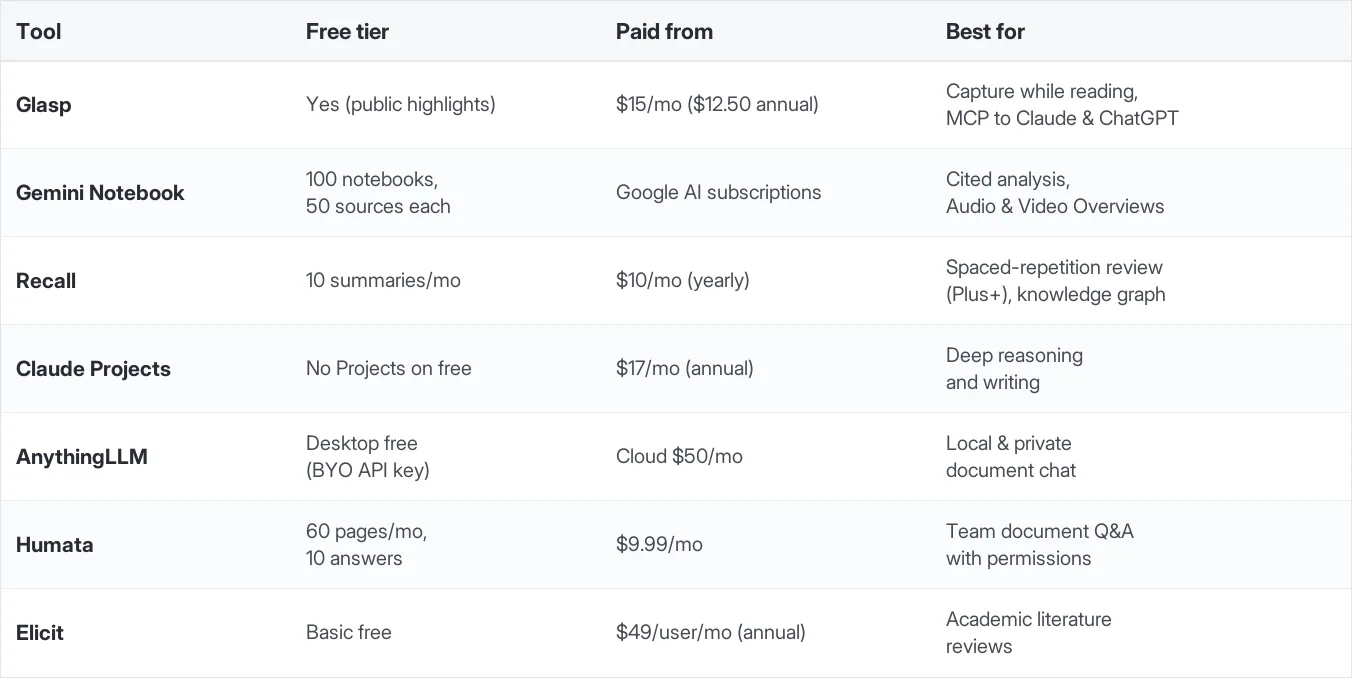
Quick Comparison
You Don't Actually Have to Choose: Glasp + NotebookLM
Here's the twist most comparison articles skip: the strongest setup for many learners is Glasp and Gemini Notebook together. Glasp captures and accumulates your highlights while you read; NotebookLM analyzes deeply when you need artifacts or citations. Glasp's exports make the handoff easy:
Capture with Glasp all week, then feed the best material into a notebook when you want an Audio Overview or a cited study guide.
Frequently Asked Questions
Q: What is the best NotebookLM alternative?
It depends on what NotebookLM isn't doing for you. Glasp is the best alternative for capturing ideas while you read across the web, YouTube, and Kindle, and for using your library inside Claude or ChatGPT via MCP. Recall is best for spaced-repetition review, Claude Projects for deep reasoning, and AnythingLLM for local privacy.
Q: Did NotebookLM change its name?
Yes. Google renamed NotebookLM to Gemini Notebook on July 16, 2026. The app now lives at notebook.google.com (old links redirect), and it's the same product.
Q: Is NotebookLM (Gemini Notebook) free?
Yes, and its free tier is generous: 100 notebooks with up to 50 sources each and 500,000 words per source, plus limited daily Audio Overviews. Higher limits come with Google's AI subscription tiers (AI Plus, AI Pro, AI Ultra).
Q: What's the main weakness of NotebookLM?
It starts after you've collected your documents. There's no Google-made browser extension to capture ideas as you read, each notebook only sees its own sources, and daily usage caps apply even on paid tiers. Tools like Glasp cover the capture step and keep one persistent library.
Q: Is there a NotebookLM alternative that works locally?
Yes, AnythingLLM. Its desktop app and self-hosted version are free, run on your own machine with the model of your choice, and your documents never leave your control.
Q: Which alternative is best for academic papers?
Elicit. It searches a corpus of 138 million+ papers and extracts structured data across many papers at once, which suits literature reviews far better than a notebook-based tool.
Q: Can I use Glasp together with NotebookLM?
Yes, and it's a strong combo. Capture highlights with Glasp as you read, then export them into NotebookLM when you want deep analysis, citations, or an Audio Overview. Glasp has step-by-step guides for sending Kindle highlights and YouTube transcripts into NotebookLM.
Related Articles
How to Use the Glasp MCP Connector (Claude, ChatGPT, Claude Code)
How to Import YouTube Transcripts into NotebookLM with Glasp
👉 Try it free: glasp.co
Before You Leave
Gemini Notebook is a great analysis tool, and nothing here pretends otherwise. But if your real bottleneck is capturing and keeping what you learn, and having it available in every AI you use, start with Glasp and let the two work together.