How to Turn Podcasts Into Short Clips With AI
TL;DR
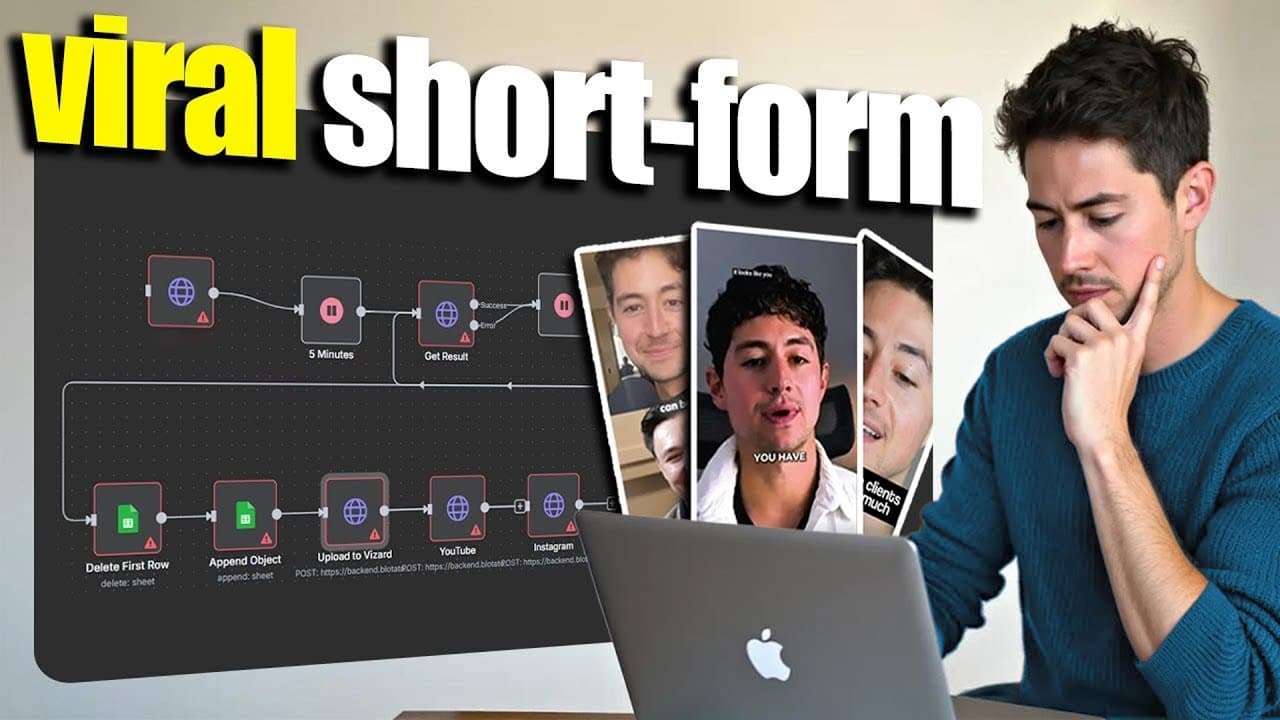
Automate podcast repurposing by sending episode links from an RSS feed into Vizard through n8n, collecting completed clips through a webhook, and storing the results in Google Sheets. The workflow identifies highlights, creates edited vertical videos with captions, generates social post copy, and notifies the team by Gmail, while leaving room for human review before publishing.
Transcript
Hey, I'm about to build an AI system live in front of you that automatically transforms any podcast into engaging Tik Tok and Instagram clips. It extracts the best highlights, adds attention grabbing background videos, and also generates captions, even posts everything automatically. A systems like this you can easily sell for a,000 to $2,000 to po... Read More
Key Insights
- The workflow is an n8n automation that converts long-form podcast content into short videos for TikTok, Instagram, and YouTube Shorts. It connects content discovery, external video processing, caption generation, asset storage, and team notification within a single operational system.
- The source discovery process uses an RSS feed to find recent channel content and obtain YouTube video links. Passing links to the clipping service is preferred because it avoids handling uploaded video files directly and simplifies the automation's inputs.
- Vizard performs the specialized video processing through its API. The service receives a video link, analyzes the source, extracts engaging segments, edits those segments into short videos, and adds captions without requiring the workflow creator to rebuild the underlying processing pipeline.
- The automation separates submission from result handling because video processing is not immediate. One section sends source videos and places projects into a queue, while another section catches completed results through a webhook or retrieves project data after processing finishes.
- Google Sheets serves as the workflow's database and content calendar. Stored fields include video identifiers, project identifiers, completed video URLs, transcripts, and generated social captions, giving the team a central place to review and access finished assets.
- API quick-start documentation provides the shortest path from an unfamiliar service to a working n8n integration. A documented curl request can be imported into an HTTP Request node, which automatically maps much of the request structure before credentials and parameters are configured.
- The system generates social post copy after retrieving the finished project. This adds an Instagram or TikTok caption to the completed clip record, so the output includes both a downloadable video asset and supporting text for publication.
- Gmail provides the final team notification when clips are ready. The message contains a brief status description and a link to the relevant spreadsheet, allowing collaborators to find the generated assets without repeatedly checking the workflow or processing service.
Install to Summarize YouTube Videos and Get Transcripts
Explore YouTube Video Summarizer or Get YouTube Transcript Extractor
Questions & Answers
Q: How can n8n turn a podcast into short social clips?
n8n can coordinate the process by discovering podcast episodes through an RSS feed, extracting their YouTube links, and sending those links to Vizard with an HTTP Request node. After Vizard processes the source video, a webhook or retrieval step collects the project results. The workflow then generates social captions, stores video links and metadata in Google Sheets, and sends a Gmail notification to the team.
Q: Why use Vizard instead of building a custom clipping pipeline?
Vizard already provides a specialized processing pipeline for analyzing long-form video, selecting highlights, slicing clips, formatting the output, and adding captions. The build avoids recreating those capabilities with a complicated collection of custom components because that approach would be more fragile. The workflow instead uses Vizard through its API and lets n8n handle orchestration, storage, caption generation, and notifications.
Q: How does the workflow find new podcast episodes automatically?
The workflow uses an RSS feed as its content source. It scrapes the creator's channel feed, identifies recent content, and obtains the associated YouTube video links. Those links become the inputs sent to the clipping API. This approach lets the system detect source material without requiring someone to upload each episode manually or enter every video into the workflow by hand.
Q: How are completed clips returned to the n8n workflow?
Completed clips are handled separately from the initial submission because the external service needs time to process each video. The workflow creates a project and places it in a queue, then catches the result through a webhook or retrieves the finished project later. The returned project data includes items such as the transcript, completed video URL, video identifier, and project identifier.
Q: What information is stored in the Google Sheets database?
Google Sheets acts as the workflow's database and content calendar. It stores information such as the source or completed video identifier, Vizard project identifier, downloadable clip URL, transcript, and generated Instagram or TikTok caption. Keeping these fields together gives the team a practical review surface where finished assets can be located, checked, downloaded, and prepared for publication.
Q: How do you connect the Vizard API to n8n?
Start with Vizard's API quick-start documentation and obtain an API key from a paid account. Copy the provided curl request, create an HTTP Request node in n8n, and use the node's curl import feature to map the request structure automatically. Add the API key and inspect the available request parameters, including the video URL, language, and preferred clip length, before testing the submission.
Q: Does the automation publish every generated clip automatically?
The described system prepares clips for posting by generating the edited videos, captions, metadata, and team notifications. The opening description says posting can also be automated, but the demonstrated flow focuses on sending content for processing, retrieving results, generating social copy, saving everything in Google Sheets, and notifying collaborators. The spreadsheet therefore provides a natural place for review before any publication step.
Q: How does the team know when the podcast clips are ready?
The final workflow step sends a Gmail message to the person or team responsible for the content. The email includes a brief notice that the clips are ready and a link to the relevant Google Sheets database. This removes the need to monitor the processing queue continuously and directs collaborators to the location containing the finished video links, transcripts, captions, and project details.
Summary & Key Takeaways
-
The workflow turns long-form podcast episodes into short social videos without requiring manual editing at every stage. It discovers source content through an RSS feed, sends YouTube links to Vizard for clipping, waits for processing, retrieves completed videos, generates accompanying captions, and records the resulting assets in a Google Sheets content database.
-
The build uses a specialized clipping service because its existing processing pipeline can handle highlight selection, video slicing, formatting, and captions more simply than a custom collection of machine learning components. Vizard is selected after comparing it with another platform, checking pricing, confirming API access, and reviewing its quick-start documentation and authentication requirements.
-
The completed n8n system is divided into submission and retrieval stages. The first stage scrapes recent content and creates Vizard projects, while the second receives or retrieves processed results, generates Instagram or TikTok copy, and saves project identifiers, video links, transcripts, and other metadata. Gmail then alerts the relevant team member.
Read in Other Languages (beta)
Share This Summary 📚
Summarize YouTube Videos and Get Video Transcripts with 1-Click
Try YouTube Summary with ChatGPT & Claude or YouTube Transcript Generator
Explore More Summaries from Nick Saraev 📚

Summarize YouTube Videos and Get Video Transcripts with 1-Click
Try YouTube Summary with ChatGPT & Claude or YouTube Transcript Generator