How to Use the Futures Trader Tool on thinkorswim
TL;DR
The Futures Trader tool on thinkorswim allows you to efficiently trade futures by customizing your display panes for trade tracking, news updates, and chart analysis. To place a trade, select a contract, confirm the details, and submit the order. This setup enhances your trading experience with real-time features and accessibility.
Transcript
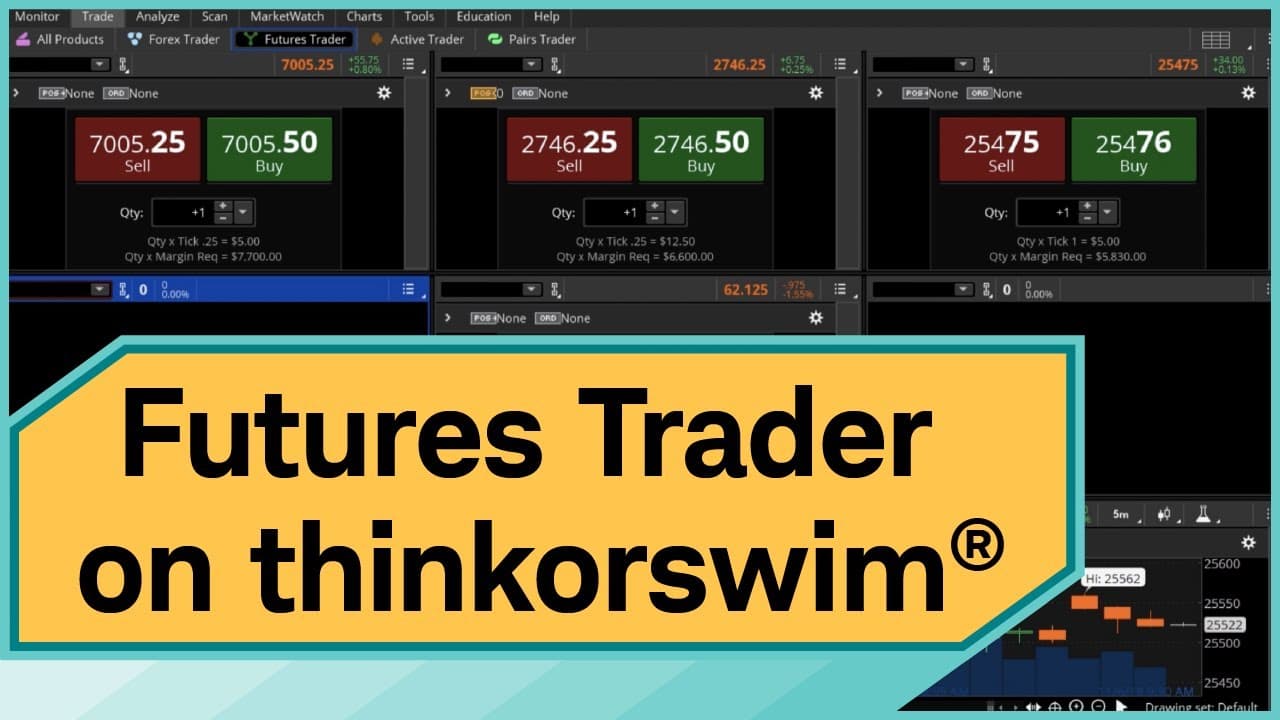
Futures Trader is a professional-level, futures-trading tool within thinkorswim®. In this video you’ll see a few features of the tool, how to set up the display for futures trading, and how to place a trade. To access the Futures Trader, I’ll select the Trade tab, then the Futures Trader tab. As you can see, the platform is divided into s... Read More
Key Insights
- 🔨 Futures Trader tool in thinkorswim streamlines futures trading with customizable panes, trade tracking, and quick access to essential trading tools.
- 😫 Setting up display panes in the Futures Trader tool allows users to monitor different aspects of futures products for informed decision-making.
- ™️ Placing trades through the Futures Trader tool involves confirming trade details, verifying costs, and reviewing orders before submission.
- 🤗 Users can track open contracts, monitor market news, and access price charts for futures products within the Futures Trader tool.
Install to Summarize YouTube Videos and Get Transcripts
Explore YouTube Video Summarizer or Get YouTube Transcript Extractor
Questions & Answers
Q: What are the key features of the Futures Trader tool in thinkorswim?
The Futures Trader tool allows users to set up multiple panes for tracking trades, placing orders, monitoring news, and viewing price charts for futures products. It offers quick access to essential functions for trading efficiency.
Q: How can users customize the display in the Futures Trader tool?
Users can adjust the number of panes on the platform, track specific futures products, and access trading tools like the Dashboard, Live News, and Chart for comprehensive market analysis and decision-making.
Q: What steps are involved in placing a trade using the Futures Trader tool?
Placing a trade involves selecting the contract, confirming trade details like side, symbol, expiration, and cost, reviewing the order, and submitting it for execution. Users can monitor open contracts through the Trade button.
Q: Why is it important to review trade details carefully before submitting an order?
Reviewing trade details ensures accuracy in contract selection, cost calculations, commission fees, and buying power effects. It helps users make informed decisions and avoid errors in trading execution.
Summary & Key Takeaways
-
Futures Trader tool in thinkorswim allows users to trade futures easily by setting up panes for tracking different aspects of products.
-
Users can access features like trade tracking, news updates, and price charts for futures products within the tool.
-
Placing trades through the Futures Trader tool involves selecting the contract, confirming details, and submitting the order.
Read in Other Languages (beta)
Share This Summary 📚
Summarize YouTube Videos and Get Video Transcripts with 1-Click
Try YouTube Summary with ChatGPT & Claude or YouTube Transcript Generator
Explore More Summaries from Charles Schwab 📚





Summarize YouTube Videos and Get Video Transcripts with 1-Click
Try YouTube Summary with ChatGPT & Claude or YouTube Transcript Generator