Apple Studio Display XDR Review: Pro Panel, Consumer Price
TL;DR
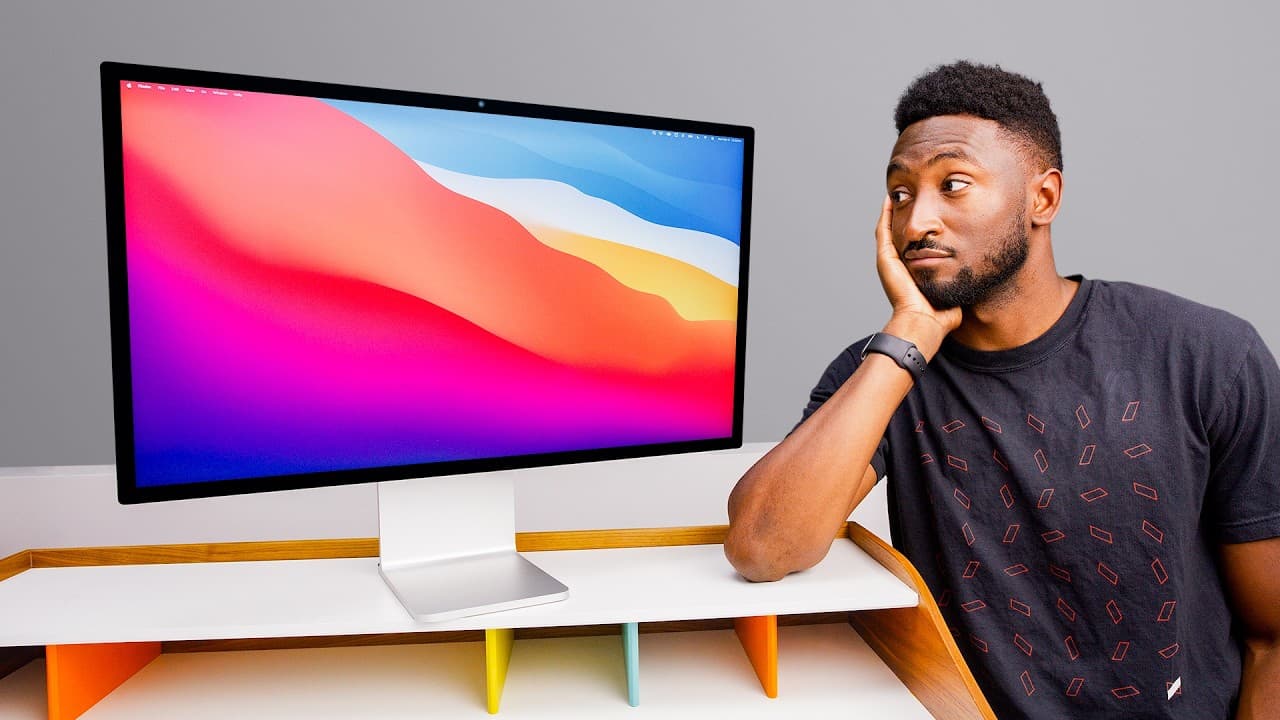
The Studio Display XDR is technically better than the Pro Display XDR in every way: a mini-LED panel with far more local dimming zones, higher peak HDR brightness, a faster max refresh rate with adaptive sync, an extra Thunderbolt 5 port, plus a webcam and speakers the Pro Display lacked, all for a lower starting price that includes the stand. It is the best match for a MacBook Pro one-cable desk setup.
Transcript
Maybe, maybe we're all pros. Maybe that's what this means. Yo, what's up? MKBHD here, and this is Apple's new Studio Display XDR. Probably can't tell just by looking at on camera, but this is the new one. I've been testing it, staring at it for a few days now. This is not the most important product that's come out in the past couple weeks, let's be... Read More
Key Insights
- The Studio Display XDR replaces the Pro Display XDR in Apple's lineup, and Apple's own announcement blog post still calls it the world's best pro display, signalling that the word Studio now sits where Pro used to at the top of the range.
- Mini-LED local dimming is the single biggest upgrade here. The XDR carries several times the number of dimming zones the Pro Display had, which visibly reduces blooming and raises contrast ratios when viewing dark content in a dark room.
- Peak brightness improved on both fronts: the display sustains a far higher full-screen brightness in ordinary SDR mode than the Pro Display managed, and its peak HDR brightness is higher too, making HDR content noticeably more impactful.
- The pairing argument is what sells Apple displays. The previous Studio Display was a mismatch next to a mini-LED high refresh rate MacBook Pro, but the XDR's mini-LED panel and higher refresh rate finally match the laptop it sits beside.
- One-cable desk setups are the practical draw. A single Thunderbolt 5 cable carries display, accessories connected to the rear ports, and laptop charging at a high wattage, with a spare full-speed Thunderbolt 5 port left over for fast storage.
- Daisy chaining is supported: several regular Studio Displays or a smaller number of Studio Display XDRs can be linked to one MacBook Pro over a single cable, with every panel matching in refresh rate and brightness.
- Pricing collapsed relative to the Pro Display XDR. The old model cost thousands with the stand and nano-texture each sold as expensive separate add-ons, while the better XDR starts far lower with the stand included and nano-texture as a modest upcharge.
- Apple appears to be stepping back from the true professional market, which is small, picky and least invested in the ecosystem. Most Pro-branded Apple products are high-end consumer devices with pro-level capability, which suggests the Mac Pro's future is doubtful.
Install to Summarize YouTube Videos and Get Transcripts
Explore YouTube Video Summarizer or Get YouTube Transcript Extractor
Questions & Answers
Q: What is the difference between the Studio Display XDR and the regular Studio Display?
The regular Studio Display keeps the same design, stand, chassis and long-serving IPS LCD panel, gaining only a new processor and Thunderbolt 5 ports at an unchanged price. The Studio Display XDR is a genuinely new product: same screen size, resolution and stand, but with a mini-LED panel offering far higher peak HDR brightness, a much higher max refresh rate with adaptive sync support, and many local dimming zones for better contrast. It sits above the base model as the upgraded rung on the price ladder.
Q: Is the Studio Display XDR better than the Pro Display XDR?
Yes, at a technical level it is better in every single way. It gets much brighter both full-screen in SDR and at peak in HDR, its mini-LED backlight provides several times the local dimming zones for far less blooming and higher contrast, and it adds an extra Thunderbolt 5 port on the back. It also includes a webcam and built-in speakers that the Pro Display never had, and it costs considerably less while including the stand that the Pro Display charged extra for.
Q: How much does the Studio Display XDR cost compared to the Pro Display XDR?
The Studio Display XDR starts at a price well below the Pro Display XDR and, importantly, includes the stand in that figure. The Pro Display XDR cost thousands on its own, then charged a large additional sum for the stand and another large sum for the nano-texture glass option. On the new display, nano-texture is a comparatively modest upcharge. The result is a better display for a fraction of the total outlay once the stand and coating are counted.
Q: Why does the Studio Display XDR pair better with a MacBook Pro?
The earlier Studio Display felt mismatched next to a MacBook Pro because the laptop had a mini-LED high refresh rate screen while the monitor was a lower refresh rate LCD, so the two panels looked different side by side. The XDR closes that gap with its own mini-LED panel, high peak brightness and higher max refresh rate. Beyond matching visuals and the silver metal aesthetic, it delivers the one-cable experience where a single Thunderbolt 5 connection carries video, accessories and laptop charging.
Q: Can you daisy chain multiple Studio Display XDRs?
Yes. The spare full-speed Thunderbolt 5 port on the back can connect to another display, so several regular Studio Displays or a smaller number of Studio Display XDRs can be chained together to the same MacBook Pro over one single cable. Every panel in the chain would match as a high refresh rate, high brightness mini-LED, and the laptop would still receive high-wattage charging through that same connection. That same port can alternatively dock very fast external storage.
Q: What are the drawbacks of the Studio Display XDR?
The included Thunderbolt 5 cable is on the short side, which may limit desk placement. The top of the chassis gets slightly warm after being on for a while, partly because it is a large bright panel and partly because there is a dedicated Apple chip with its own RAM inside just to run the webcam and speakers. The power supply is built in but the power cable is still non-removable, which makes replacement a hassle. The built-in speakers are good but no substitute for dedicated ones.
Q: Who is the Studio Display XDR actually for?
It suits mixed-use creators rather than reference-grade professionals. Hollywood editing suites do not need a built-in webcam or speakers because those monitors live in an editing den all day. This display is aimed at people who edit video and photos some of the time, take video calls and virtual meetings at other times, and occasionally watch videos, listen to music or even game. The centerstage webcam, the surprisingly capable speakers and the high refresh rate all serve that blended workflow.
Q: Why does Apple naming suggest the Mac Pro is being phased out?
Apple positioned the Studio Display XDR as the replacement for the Pro Display XDR while still describing it as the world's best pro display in its announcement, meaning Studio now occupies the top of the lineup where Pro used to. The true professional market is small, picky and least interested in Apple's ecosystem, so Apple mostly ships high-end consumer devices carrying pro-level capability under the Pro name. The Mac Studio already receives more frequent updates than the Mac Pro, which has gone years without one.
Summary & Key Takeaways
-
Apple released two displays in the same week: a lightly refreshed regular Studio Display that keeps the old design, stand, chassis and IPS LCD panel while gaining a new processor and Thunderbolt 5 ports at the same price, and the brand new Studio Display XDR, which keeps the size, resolution and stand but swaps in a mini-LED panel.
-
The XDR panel beats the Pro Display XDR on every technical measure. It hits a much higher full-screen brightness in SDR and a higher peak in HDR, and its mini-LED backlight has several times as many local dimming zones, which cuts blooming and raises contrast dramatically on dark content in a dark room.
-
Nano-texture returns as a paid option and has improved over the years, moving from the Pro Display XDR to the MacBook Pro and iPad Pro along the way. The desktop version ships with its own note and a dedicated cleaning cloth, and Apple updated the polishing cloth compatibility list to cover the new display.
Read in Other Languages (beta)
Share This Summary 📚
Summarize YouTube Videos and Get Video Transcripts with 1-Click
Try YouTube Summary with ChatGPT & Claude or YouTube Transcript Generator
Explore More Summaries from Marques Brownlee 📚





Summarize YouTube Videos and Get Video Transcripts with 1-Click
Try YouTube Summary with ChatGPT & Claude or YouTube Transcript Generator