What Are the Top 5 Features of Android 13?
TL;DR
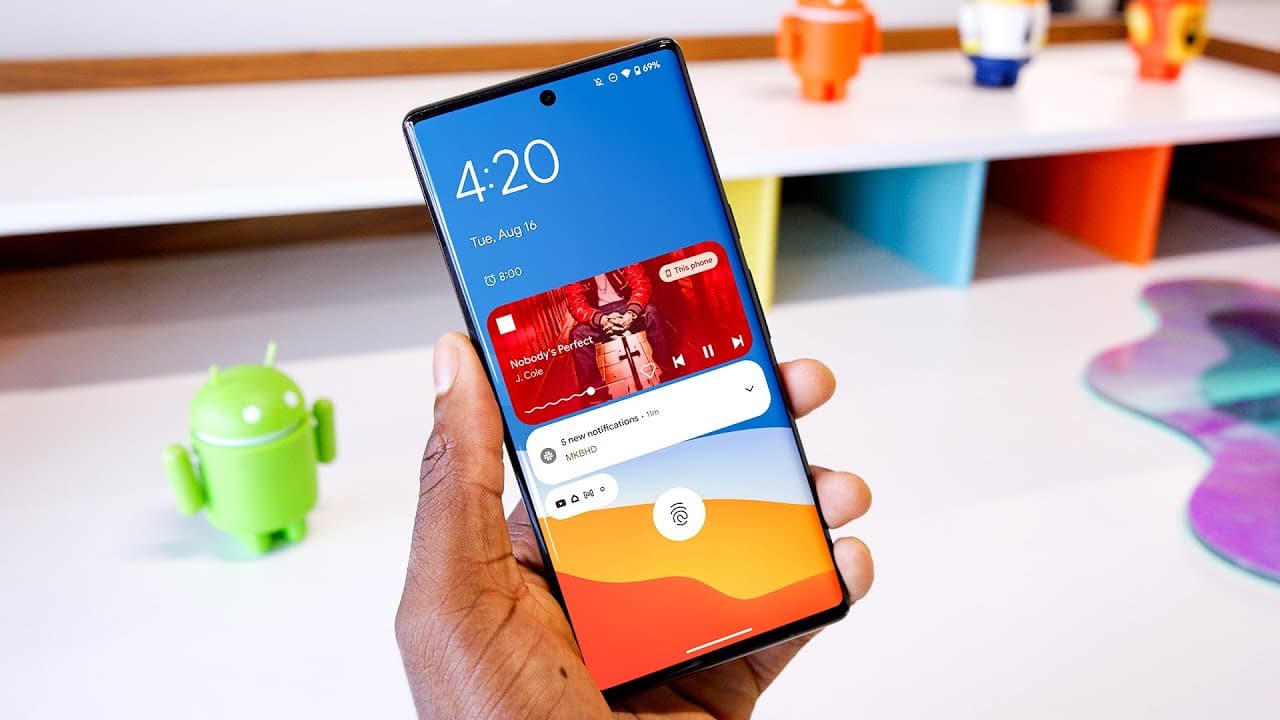
Android 13 introduces several key features that enhance user experience, including improved clipboard functionality that allows editing, enhanced security measures for app permissions, support for spatial audio, app-specific language settings, and refined aesthetics. These updates focus on quality of life enhancements without significant overhauls, aiming for smoother performance across devices.
Transcript
all right let's talk android 13. hey what's up i'm kbhd here so i just did my ios 16 hands-on a couple weeks ago did my walkthrough and demo and everything so as i was digging through android 13 for a sort of similar demo two things struck me one the ios videos always get just absolutely nuts views literally every single time and it's not just beca... Read More
Key Insights
- 🛟 Android 13 focuses on quality of life improvements rather than major overhauls like previous updates.
- 🍱 The update includes enhanced clipboard functionality with preview boxes and automatic markup for images.
- 😀 Security and privacy enhancements in Android 13 grant users more control over app permissions and notifications.
- ❓ Native support for spatial audio and improved audio quality are significant features in Android 13.
- 😀 App-specific language support and improved aesthetics, including a refined theme picker and media player, are key aspects of Android 13.
- 🏃 The update aims to provide a smoother user experience and performance on devices running Android 13.
- 🐛 Google has addressed bug fixes and performance improvements in Android 13 for increased stability.
Install to Summarize YouTube Videos and Get Transcripts
Explore YouTube Video Summarizer or Get YouTube Transcript Extractor
Questions & Answers
Q: What are the major differences between Android 12 and Android 13 updates?
Android 13 brings minor tweaks and improvements in usability, security, audio enhancements, language support, and aesthetic changes compared to the significant visual overhaul in Android 12.
Q: How does Android 13 enhance clipboard functionality?
Android 13 improves the clipboard experience by offering a preview box for copied text, automatic markup for images, and clearing sensitive information after a set time. It also supports universal copy and paste between phones and tablets.
Q: What security and privacy enhancements are included in Android 13?
Android 13 allows users to grant photo access to apps selectively, opt-in for notifications, and view active apps at the bottom of the notification slider for privacy and security. These measures ensure better control over personal data.
Q: What aesthetic changes can users expect with Android 13?
Android 13 refines the visual experience with a more precise theme picker for wallpapers, an updated media player with dynamic color changes, and small tweaks like a new lock screen clock. These changes aim to improve aesthetics and user interface consistency.
Summary & Key Takeaways
-
Android 13 introduces updates that focus on quality of life improvements rather than major overhauls.
-
Key features include enhanced clipboard functionality, improved security and privacy measures, native support for spatial audio, app-specific language support, and aesthetic tweaks.
-
The update aims to enhance user experience and performance on devices running Android 13.
Read in Other Languages (beta)
Share This Summary 📚
Summarize YouTube Videos and Get Video Transcripts with 1-Click
Try YouTube Summary with ChatGPT & Claude or YouTube Transcript Generator
Explore More Summaries from Marques Brownlee 📚





Summarize YouTube Videos and Get Video Transcripts with 1-Click
Try YouTube Summary with ChatGPT & Claude or YouTube Transcript Generator