Microsoft Surface Laptop 7 Review: Windows on ARM Verdict
TL;DR
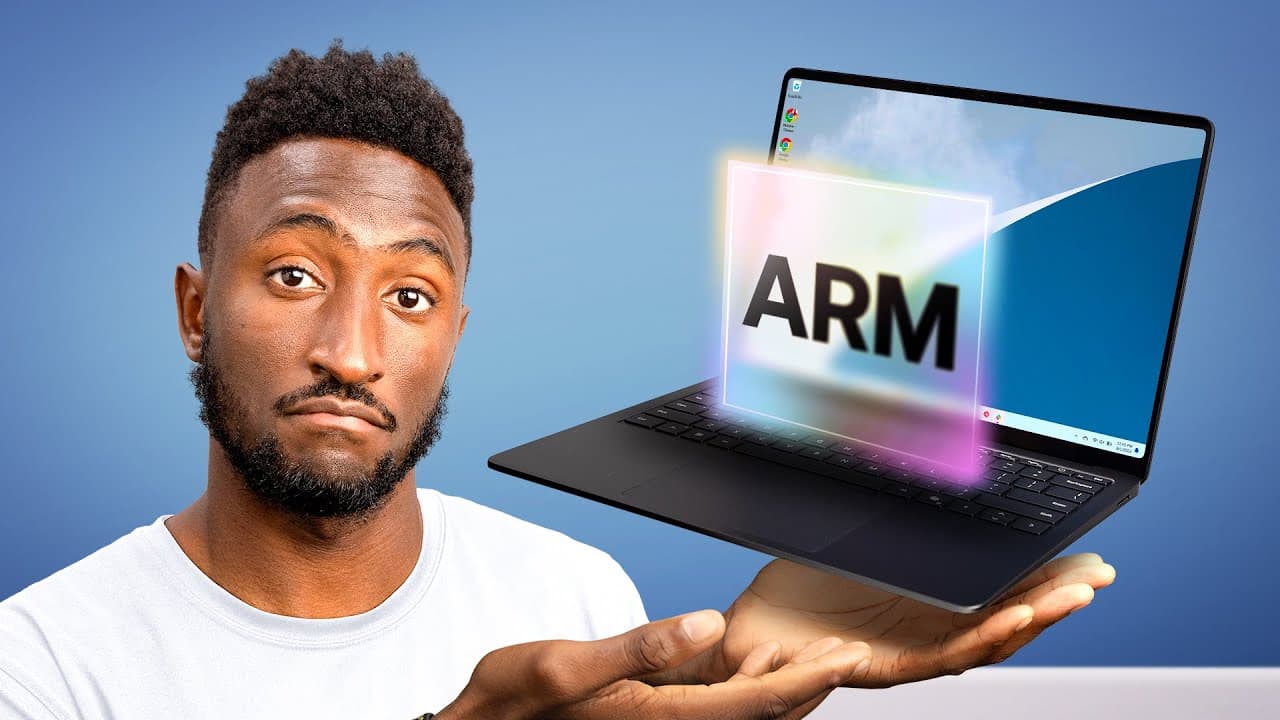
Windows ARM laptops have finally caught up on battery and everyday performance, with the Snapdragon X Elite Surface delivering all-day battery (23-hour quote) and smooth, consistent speed. The remaining catch is app compatibility: many popular apps run natively, some only work through emulation, and others like Google Drive desktop and Arc browser don't run at all.
Transcript
(Windows chiming) - Okay, I've been waiting for this for a while. As someone who's been on the sidelines of the Windows game for a little while now and seeing all this hype and this new matte black laptop that's supposed to be generational, it's got me thinking, is it legit? Like have Windows laptops actually caught up to the Apple Silicon leap fro... Read More
Key Insights
- The Microsoft Surface Laptop tested uses a Qualcomm Snapdragon X Elite chip, making it an ARM laptop rather than an Intel or AMD machine, mirroring Apple's earlier transition from Intel to ARM chips a couple of years ago.
- Battery life is the biggest leap: Microsoft quotes 23 hours versus 19 hours on the previous Intel model, translating in real mixed use to all-day battery ending around 40% for high-brightness browsing, email, and video.
- Everyday performance is smooth and consistent rather than high-end gaming grade, handling photo editing in Affinity and the full Microsoft Office Suite without breaking a sweat, plugged in or on battery.
- Windows on ARM apps fall into three types: fully optimized native apps, x86 apps that run through emulation with reduced performance, and apps that don't work at all, repeating the pattern Apple's Mac ARM transition went through.
- Native ARM app support is decent for daily-use software: Photoshop, Lightroom CC, Chrome, Spotify, Prime Video, Dropbox, and Zoom all run natively, smoothly, and without hitting battery hard.
- Emulated apps still work but run poorly: Lightroom Classic and the to-do app TickTick only ship x86 versions, and the reviewer noticed real chop and lag in TickTick's UI despite it being a lightweight app.
- Some apps don't work at all on Windows on ARM, including Google Drive desktop, Arc browser, VMware, many VPNs, and games blocked by anti-cheat software that doesn't run on the platform.
- Build quality stands out with an all-metal design, rock-solid keyboard, and large haptic trackpad, but the $2,000 14-inch laptop offers no OLED option, using a 2304x1536 120Hz LCD touchscreen instead.
Install to Summarize YouTube Videos and Get Transcripts
Explore YouTube Video Summarizer or Get YouTube Transcript Extractor
Questions & Answers
Q: What chip is inside the new Microsoft Surface laptop?
The new Microsoft Surface laptop uses a Qualcomm Snapdragon X Elite chip, which makes it an ARM laptop rather than an Intel or AMD machine. This mirrors the transition Apple made years ago from Intel chips to ARM chips. Windows attempted a similar move earlier with the Surface Pro X, which did not go well, but this new ARM laptop has performed far better, according to the reviewer who used it for a couple of weeks.
Q: How is the battery life on the Snapdragon X Elite Surface laptop?
Battery life is the biggest advantage of the switch to ARM. Microsoft quotes 23 hours, up from the 19-hour quote on the previous Intel Surface. In real mixed use, this translates to all-day battery with no worries, including high brightness, web browsing, email, watching videos, and research, ending the day around 40% easily. It even outlasts the M3 13-inch MacBook Air on some synthetic benchmarks, which is impressive for a 14-inch laptop.
Q: What is the main downside of Windows on ARM?
The main downside is app compatibility. Changing the entire architecture of the computer creates three types of apps: optimized native apps, x86 apps that work through emulation but perform worse, and apps that don't work at all. While native support is decent for everyday software, it is still not perfect. Some apps run poorly under emulation, and others like Google Drive desktop, Arc browser, VMware, and many VPNs have no compatibility at all with Windows on ARM.
Q: Which apps run natively on Windows on ARM?
A lot of popular apps run natively across the board and are smooth and great to use without hitting battery hard. These include Photoshop and Lightroom CC, Chrome, Spotify, Prime Video, Dropbox, and Zoom. Software that runs natively on the ARM chip is snappy and offers a great experience. First-party apps are optimized off the bat, and Microsoft did work to get many developers to optimize their apps for ARM, though adoption is still not universal.
Q: Which apps do not work on Windows on ARM?
Some apps straight up don't work at all yet. Arc browser and Google Drive on desktop, which the reviewer relies on heavily, have no compatibility with Windows on ARM. VMware doesn't work, a lot of VPNs don't work, and many games don't run. Some games are simply incompatible, but many that might ordinarily run have anti-cheat software that doesn't run on Windows on ARM, so the game won't work at all.
Q: Should I check anything before buying a Windows ARM laptop?
Yes. The reviewer advises that if you are at all considering a Windows ARM laptop, you should look up the apps you have to use and make sure they are at least compatible or at least emulatable. Some developers promise ARM versions coming soon, but you should check the programs you know you'll need because, depending on who you are, you could be totally covered and fine or totally out of luck. Whether the software you use works on ARM is the main question to consider.
Q: What is the display and build quality like on the Surface laptop?
The build quality is awesome, with an all-metal design, a rock-solid keyboard, a big trackpad with excellent haptics, and good fundamentals all around. The port selection includes full-size USB-A, two USB-C ports, and a headphone jack. The main downside on this pricey model is no OLED option; instead it has a 2304x1536, 120Hz LCD touchscreen with a 3x2 aspect ratio. It's a good LCD, but it can't match the deep blacks and contrast of an OLED.
Q: What are the Copilot and AI features on this laptop?
This is one of the very first Copilot PCs, so it has a dedicated Copilot button on the keyboard. The chip includes an NPU that does specific AI-related processing, such as the studio camera effects built into the camera or the forced artificial eye contact feature, handling these without pulling from the CPU or GPU. You can hit the Copilot button anytime to talk to Microsoft Copilot and ask it anything, the same way you'd use Bing, ChatGPT, or Gemini.
Summary & Key Takeaways
-
The reviewed Microsoft Surface laptop drops Intel and AMD for a Qualcomm Snapdragon X Elite ARM chip, echoing Apple's successful Intel-to-ARM shift. Unlike the earlier failed Surface Pro X attempt, this generation delivers a major efficiency gain that produces dramatically improved battery life on the same size battery.
-
Battery life jumped from a 19-hour Intel quote to 23 hours, delivering worry-free all-day mixed use ending near 40%, and it even outlasts the M3 13-inch MacBook Air on some synthetic benchmarks. Performance is smooth and consistent, handling Affinity photo editing and Office effortlessly.
-
The main trade-off is ARM app compatibility. Native apps like Photoshop, Chrome, and Zoom run great; others such as Lightroom Classic and TickTick only emulate with lag; and Google Drive desktop, Arc, VMware, and anti-cheat games don't run, so buyers should verify their required apps first.
Read in Other Languages (beta)
Share This Summary 📚
Summarize YouTube Videos and Get Video Transcripts with 1-Click
Try YouTube Summary with ChatGPT & Claude or YouTube Transcript Generator
Explore More Summaries from Marques Brownlee 📚


Summarize YouTube Videos and Get Video Transcripts with 1-Click
Try YouTube Summary with ChatGPT & Claude or YouTube Transcript Generator