How to Create an Efficient Home Studio Workspace
TL;DR
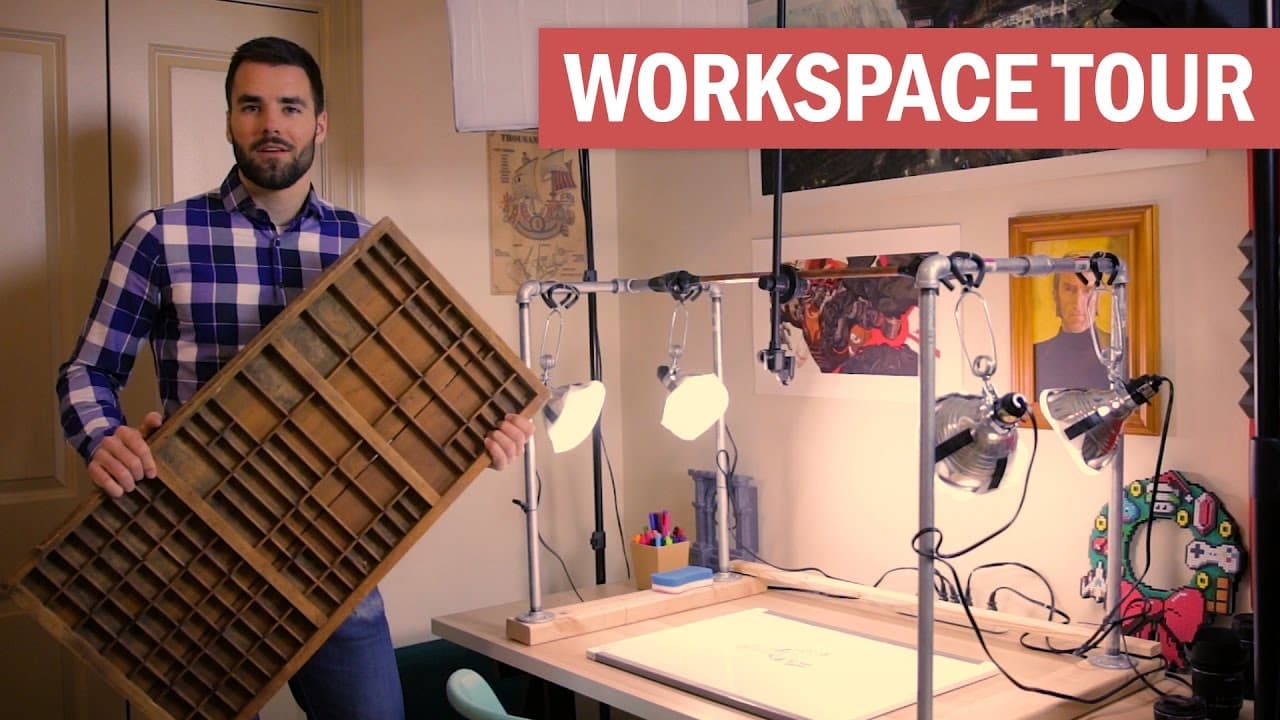
To create an efficient home studio, designate a dedicated workspace equipped with a standing desk, dual monitors, quality audio equipment, and organized storage. Incorporate automation for lighting and ensure ergonomic furniture for health. A separate reading corner can enhance creativity during breaks.
Transcript
- [Thomas] Your turn to hold the camera this time. - Fine. - What's up, guys? So I know a lot of you have been asking me to do an updated room tour, and I thought it is high time to do it because I actually just moved to Denver, which is probably one of the biggest life changes I have ever gone through, but luckily my good friend Martin, who is hol... Read More
Key Insights
- 💦 Thomas' new room is dedicated entirely to his work, serving as a studio and workspace.
- 💁 He emphasizes the importance of having a standing desk for better back health and overall well-being.
- 🎙️ Thomas recommends specific gear for monitors, mousepad, keyboard, studio monitors, and podcasting equipment.
- 🚾 He has automated lighting in his room and a convenient remote control for turning on/off different sets of lights.
- ☺️ Thomas has a separate reading corner to enjoy his morning routine and relax.
- 🤩 Organization is key in his workspace, with a cube organizer, swiveling drawer, and plug strip for easy access to outlets.
- 🧰 He keeps a toolbox in the closet for quick repairs and upgrades.
Install to Summarize YouTube Videos and Get Transcripts
Explore YouTube Video Summarizer or Get YouTube Transcript Extractor
Questions & Answers
Q: What kind of monitors does Thomas use for his workspace?
Thomas uses Dell U2412M monitors on Ergotech Freedom Arms. He recommends the newer model, U21524, for those looking for double monitors.
Q: What is Thomas' podcasting setup?
Thomas uses a Heil boom arm and a Shure SM7B microphone, which offers high-quality sound for podcasts and voiceovers. He also uses a Mackie ProFX8 mixer for fine-tuned audio control.
Q: How does Thomas keep his workspace organized?
Thomas uses a cube organizer from Target to store various items like filming equipment, pens, and pencils. He also has a swiveling drawer built-in his desk for easy access to frequently used items.
Q: What is the purpose of the overhead shooting setup?
The overhead shooting setup allows Thomas to easily film whiteboard animations and overhead demonstrations. It consists of a hanging tripod mount, different surfaces for backgrounds, and easy access to lenses.
Summary & Key Takeaways
-
Thomas recently moved to Denver and now has a dedicated room that serves as his studio and workspace.
-
The room is equipped with a standing desk, dual monitors, studio monitors, and a wide range of audio equipment for podcasting.
-
Thomas has also set up an overhead shooting setup and a reading corner in the room.
Read in Other Languages (beta)
Share This Summary 📚
Summarize YouTube Videos and Get Video Transcripts with 1-Click
Try YouTube Summary with ChatGPT & Claude or YouTube Transcript Generator
Explore More Summaries from Thomas Frank 📚

Summarize YouTube Videos and Get Video Transcripts with 1-Click
Try YouTube Summary with ChatGPT & Claude or YouTube Transcript Generator