Products
Features
YouTube Video Summarizer
Summarize YouTube videos
Web & PDF Highlighter
Highlight web pages & PDFs
Chat with PDF
Ask any PDF questions with AI
Ask AI Clone
Chat with your highlights & memories
Audio Transcriber
Transcribe audio files to text
Glasp Reader
Read and highlight articles
Kindle Highlight Export
Export your Kindle highlights
Idea Hatch
Hatch ideas from your highlights
Integrations
Obsidian Plugin
Notion Integration
Pocket Integration
Instapaper Integration
Medium Integration
Readwise Integration
Snipd Integration
Hypothesis Integration
Apps & Extensions
Chrome Extension
Safari Extension
Edge Add-ons
Firefox Add-ons
iOS App
Android App
Discover
Discover
Ideas
Discover new ideas and insights
Articles
Curated articles and insights
Books
Book recommendations by great minds
Posts
Essays and notes from readers
Quotes
Inspiring quotes collection
Videos
Curated videos and summaries
Explore Glasp
Glasp Newsletter
Weekly insights and updates
Glasp Talk
Interview series with great minds
Glasp Blog
Latest news and articles
Glasp Use Cases
Learn how others use Glasp
Build & Support
Glasp API
Access Glasp's API for developers
MCP Connector
Connect Glasp to Claude & ChatGPT
Community
Glasp Reddit Community
Students
Student discount and benefits
FAQs
Frequently Asked Questions
AboutPricing
DashboardLog inSign up

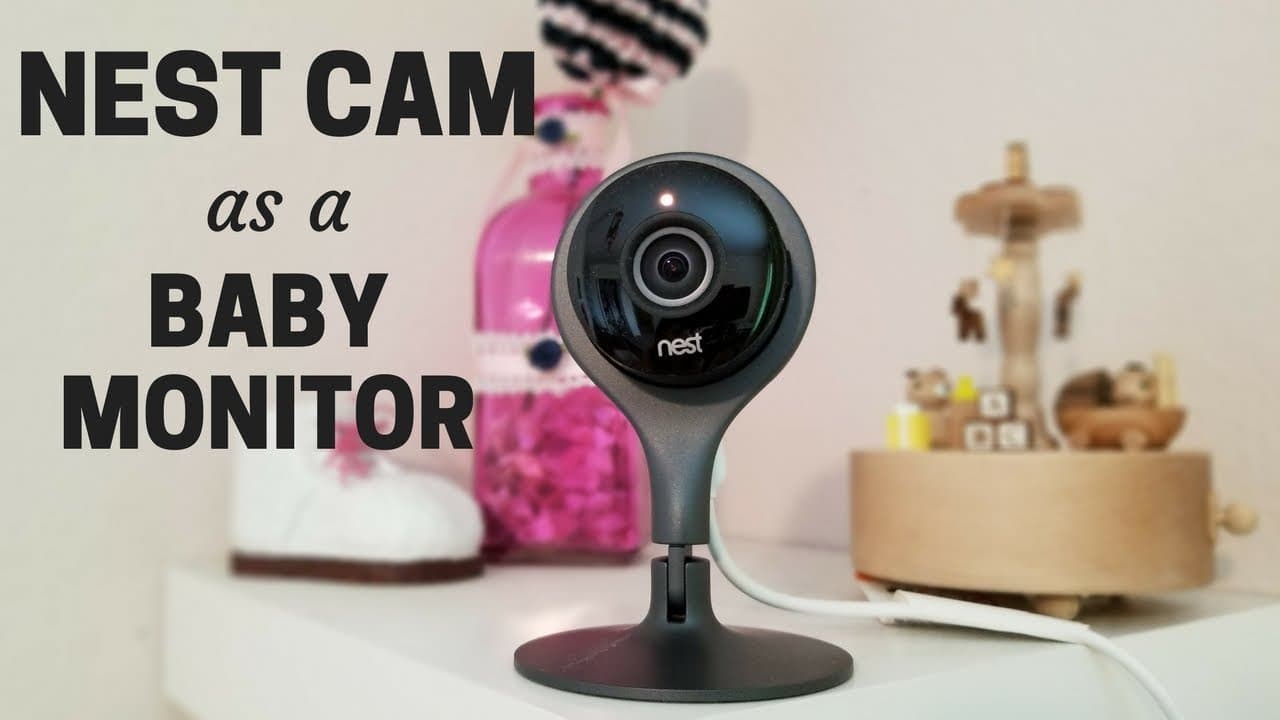
Is the Nest Cam a Good Baby Monitor Option?
72.4K views
•
August 11, 2017
by
Smart Home Solver
YouTube video player
Is the Nest Cam a Good Baby Monitor Option?

TL;DR

The Nest Cam is a reliable option for a baby monitor due to its easy setup, wide-angle view, and high-quality app. While it comes with a subscription fee for cloud storage through Nest Aware, its versatility as a multifaceted security camera makes it a worthwhile investment for parents. Features like motion zone setup and two-way talk enhance its functionality.

Transcript

hey everybody today I'm gonna be talking on the nest cam and how to use it specifically as a baby monitor well I don't have a baby right now I do have a toddler and I know I need to watch her at least as much as most babies so first I'm gonna talk about how I set up and use the camera and also what settings you'll want to look into if you're gonna ... Read More

Key Insights

  • 🖐️ Easy setup with plug-and-play design.
  • 🎥 Versatile use as a nanny cam or security camera.
  • 😶‍🌫️ Subscription fees for cloud storage beyond the free trial.
  • 🔔 Motion zone setup and notification customization available.
  • 💨 High-quality video streaming with two-way talk feature.
  • 👶 Comparison to traditional baby monitors.
  • 🙂 Wide-angle view and infrared lights for effective monitoring.

Install to Summarize YouTube Videos and Get Transcripts

Explore YouTube Video Summarizer or Get YouTube Transcript Extractor

Questions & Answers

Q: How is the Nest Cam set up as a baby monitor?

The Nest Cam is easy to set up with a plug-and-play design for Wi-Fi control. Simply mount it on a secure surface with the provided screws and plate.

Q: What are the subscription fees associated with Nest Cam?

After a free 30-day trial of Nest Aware, you can opt for $10 a month for 10-day storage or higher plans. Not subscribing limits access to only snapshot views.

Q: What unique features does the Nest Cam offer for baby monitoring?

The Nest Cam allows motion zone setup for tracking specific areas, notifications for sounds, and high-quality video streaming. It also provides two-way talk and live stream sharing.

Q: How does the Nest Cam compare to traditional baby monitors?

The Nest Cam lacks features like nightlights and lullabies but offers versatility as a nanny cam or security camera once the child outgrows it.

Summary & Key Takeaways

  • Setting up the Nest Cam as a baby monitor is easy with plug-and-play design.

  • The camera's wide-angle view and infrared lights make monitoring convenient.

  • Subscribing to Nest Aware offers cloud storage but comes with additional fees.


Read in Other Languages (beta)

English

Share This Summary 📚

Summarize YouTube Videos and Get Video Transcripts with 1-Click

Download browser extensions on:

Try YouTube Summary with ChatGPT & Claude or YouTube Transcript Generator

Explore More Summaries from Smart Home Solver 📚
Sweet Spot of Price + Features: Roborock S6 Pure thumbnail
Sweet Spot of Price + Features: Roborock S6 Pure
Smart Home Solver
Comparing Nest Cam vs Amazon Cloud Cam Side by Side thumbnail
Comparing Nest Cam vs Amazon Cloud Cam Side by Side
Smart Home Solver
SmartThings to Home Assistant: Joining the Dark Side thumbnail
SmartThings to Home Assistant: Joining the Dark Side
Smart Home Solver
Arlo Pro 2 Review: Testing Arlo Pro vs Arlo Pro 2 thumbnail
Arlo Pro 2 Review: Testing Arlo Pro vs Arlo Pro 2
Smart Home Solver
Is the Nest Temperature Sensor Worth Buying? thumbnail
Is the Nest Temperature Sensor Worth Buying?
Smart Home Solver
How to Build a DIY Smart Home That Saves Money thumbnail
How to Build a DIY Smart Home That Saves Money
Smart Home Solver

Summarize YouTube Videos and Get Video Transcripts with 1-Click

Download browser extensions on:

Try YouTube Summary with ChatGPT & Claude or YouTube Transcript Generator

Apps & Extensions

  • Chrome Extension
  • Safari Extension
  • Edge Add-ons
  • Firefox Add-ons
  • iOS App
  • Android App

Key Features

  • YouTube Video Summarizer
  • Web & PDF Summarizer
  • Web & PDF Highlighter
  • Chat with PDF
  • Ask AI Clone
  • Audio Transcriber
  • Glasp Reader
  • Kindle Highlight Export
  • Idea Hatch

Integrations

  • Obsidian Plugin
  • Notion Integration
  • Pocket Integration
  • Instapaper Integration
  • Medium Integration
  • Readwise Integration
  • Snipd Integration
  • Hypothesis Integration

More Features

  • APIs
  • MCP Connector
  • Blog & Post
  • Embed Links
  • Image Highlight
  • Personality Test
  • Quote Shots

Company

  • About us
  • Blog
  • Community
  • FAQs
  • Job Board
  • Newsletter
  • Pricing
Terms

•

Privacy

•

Guidelines

© 2026 Glasp Inc. All rights reserved.