Is the Rabbit R1 Worth It? A Barely Reviewable AI Box
TL;DR
The Rabbit R1 is difficult to recommend because its quick question answering and useful vision tools are undermined by severe battery drain, hallucinations, awkward navigation, and missing assistant basics. The Teenage Engineering-designed pocket device can identify objects and summarize text through its swiveling camera, but it cannot set alarms or timers, send emails, or access a built-in calendar. Read on to see where its unusual hardware helps, and where the gaps become frustrating.
Transcript
(upbeat music) - So, this is the Rabbit R1. And it's another AI in a box, and it's a sign of the times. So this thing here, it has a lot in common with the Humane Ai Pin, for better or for worse. But it's also supposed to have two specific things that are supposed to set it apart from that. Supposed to, anyway. And we have to talk about it. (letter... Read More
Key Insights
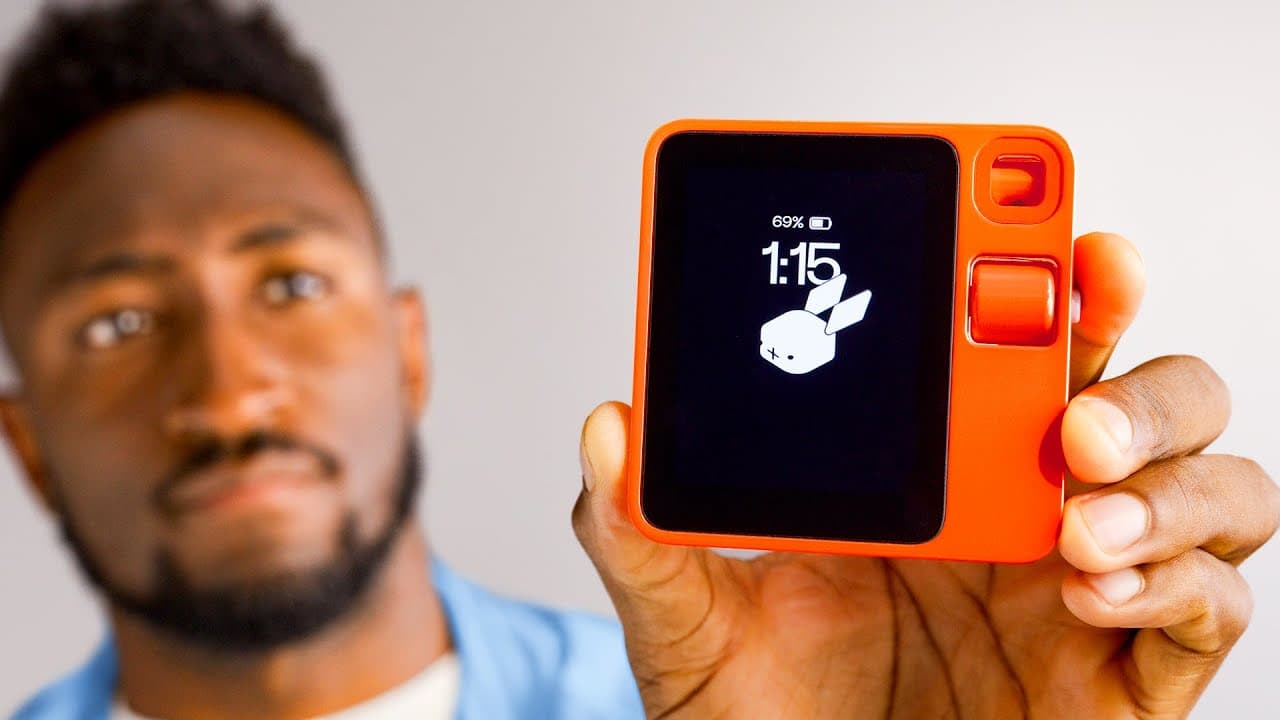
- The Rabbit R1 is a pocket-sized AI assistant in a lightweight plastic cube designed by Teenage Engineering, about the size of a stack of Post-its, with one button held down to ask questions rather than being worn like the Humane Ai Pin.
- The R1 costs $200 with no subscription fee, a sharp contrast to the Humane Pin's $700 price and $24-a-month subscription, though you still need a separate SIM card and monthly data plan to use cellular outside wifi.
- Battery life is described as brutally bad, draining while idle and dying in about four hours, requiring multiple charges per day, and it took 45 minutes to charge the tiny battery from zero to a hundred.
- The R1 is missing many basic assistant features: it can't set alarms or timers, can't record videos or photos, can't send emails, and has no built-in calendar.
- The device has a touchscreen, but Rabbit restricts it so it only works for typing on the keyboard in terminal mode, forcing users to navigate menus with the slow scroll wheel instead of tapping.
- Navigation is frustrating because there is no back button, so returning a level means scrolling all the way to the top, and adjusting brightness or volume requires two hands to hold the button and turn the scroll wheel.
- The multimodal camera swivels open with a double-tap and answers vision questions, correctly identifying a Monstera deliciosa plant and instantly summarizing a long email or article pointed at a computer screen.
- Like all AI assistants in this category, the R1 still hallucinates and confidently answers questions wrong, which the reviewer encountered regularly even when asking questions with known answers.
Install to Summarize YouTube Videos and Get Transcripts
Explore YouTube Video Summarizer or Get YouTube Transcript Extractor
Questions & Answers
Q: Is the Rabbit R1 worth it?
The review presents the Rabbit R1 as difficult to recommend in its current state. It answers questions quickly and offers useful camera-based features, but poor battery life, frequent wrong answers, frustrating controls, and missing basic assistant functions leave too many gaps.
Q: What can the Rabbit R1 do?
The Rabbit R1 is best at answering spoken questions and displaying the answers on its built-in screen. Its multimodal camera can identify objects and summarize long emails or articles shown on a computer screen.
Q: How good is the Rabbit R1 battery life?
The reviewer describes the battery life as brutally bad, with the device visibly draining while idle and dying in about four hours. It may require charging multiple times per day, and charging from empty to full took 45 minutes.
Q: What basic features are missing from the Rabbit R1?
The Rabbit R1 cannot set alarms or timers, record videos or photos, or send emails. It also lacks a built-in calendar, leaving out several functions the reviewer expects from an assistant.
Q: How do you navigate the Rabbit R1 interface?
You shake the Rabbit R1 like an Etch A Sketch to open settings, then use the scroll wheel to move and the side button to select. The wheel is slow and lacks haptic feedback, making navigation frustrating.
Q: How does the Rabbit R1 camera work?
Double-tapping swivels the camera open, after which you press and hold the button to ask about what it sees. During testing, it identified a Monstera deliciosa and quickly summarized long text displayed on a computer screen.
Q: How does the Rabbit R1 compare with the Humane Ai Pin?
Both devices are described as AI assistants in a box, but the Rabbit R1 is carried in a pocket instead of worn. It answered questions consistently faster than the Humane Ai Pin, although the reviewer says they share poor battery life and hallucination problems.
Q: Does the Rabbit R1 give incorrect answers?
Yes, the reviewer says the Rabbit R1 still hallucinates and confidently provides wrong answers. Even questions whose answers the reviewer already knew were answered incorrectly on a regular basis.
Summary & Key Takeaways
-
The Rabbit R1 is a pocket AI assistant in a bright orange plastic cube designed by Teenage Engineering, sharing much with the Humane Ai Pin. It has a built-in screen, one button to ask questions, a SIM tray, and USB-C, and answers questions consistently faster than the Humane Pin.
-
It navigates via a scroll wheel with dialed-down sensitivity and no haptics or back button, and you shake it like an Etch A Sketch to reach settings. The touchscreen exists but is limited to typing in terminal mode, making the quirky UI more frustrating than a simple touch interface would be.
-
Two things aim to set it apart: a $200 price with no subscription versus the Humane Pin's $700 plus $24 monthly, and a large action model. But cheap plastic build, a low-end MediaTek chip, roughly four-hour battery, hallucinations, and missing basic features reveal the compromises.
Read in Other Languages (beta)
Share This Summary 📚
Summarize YouTube Videos and Get Video Transcripts with 1-Click
Try YouTube Summary with ChatGPT & Claude or YouTube Transcript Generator
Explore More Summaries from Marques Brownlee 📚





Summarize YouTube Videos and Get Video Transcripts with 1-Click
Try YouTube Summary with ChatGPT & Claude or YouTube Transcript Generator