CLA VOCALS - The BEST Vocal Plugin For Beginners!
TL;DR
Learn to enhance vocal sound using the CLA Vocal plugin for beginners.
Transcript
in this video I'm going to show you how to get great sounding vocals using only the CLA vocal plugin Academy my name is Nolan Freitas and my goal for today is to help those of you who are just getting started with music production if you're new to recording and mixing this just might be one of the easiest plugins that you'll ever use Quick disclaim... Read More
Key Insights
- 💄 The CLA Vocal plugin combines essential effects for vocal processing into one accessible interface, making it a top choice for beginners.
- 🤩 Users can manipulate key vocal parameters, such as bass and treble, to customize sounds effortlessly.
- 👻 The library of presets allows users to explore different vocal styles without needing advanced mixing skills.
- 👣 This plugin is designed to quickly enhance vocal tracks, demonstrating its efficiency for those with limited time.
- 🛟 Experienced producers might prefer individual plugins for more control, but the CLA plugin serves as a valuable tool for rapid results.
- 👶 The plugin’s interface is straightforward, encouraging new users to experiment without feeling overwhelmed.
- 👂 The inclusion of various vocal effects promotes creativity, enabling users to discover unique sound combinations.
Install to Summarize YouTube Videos and Get Transcripts
Explore YouTube Video Summarizer or Get YouTube Transcript Extractor
Questions & Answers
Q: What makes the CLA Vocal plugin suitable for beginners?
The CLA Vocal plugin is ideal for beginners due to its all-in-one design, combining essential vocal processing tools into one interface. It simplifies the mixing process by allowing users to easily adjust settings like bass, treble, and reverb without needing advanced knowledge of individual plugins. This user-friendly approach helps newcomers achieve professional-sounding vocals quickly.
Q: Can you explain how to adjust the input sensitivity on the plugin?
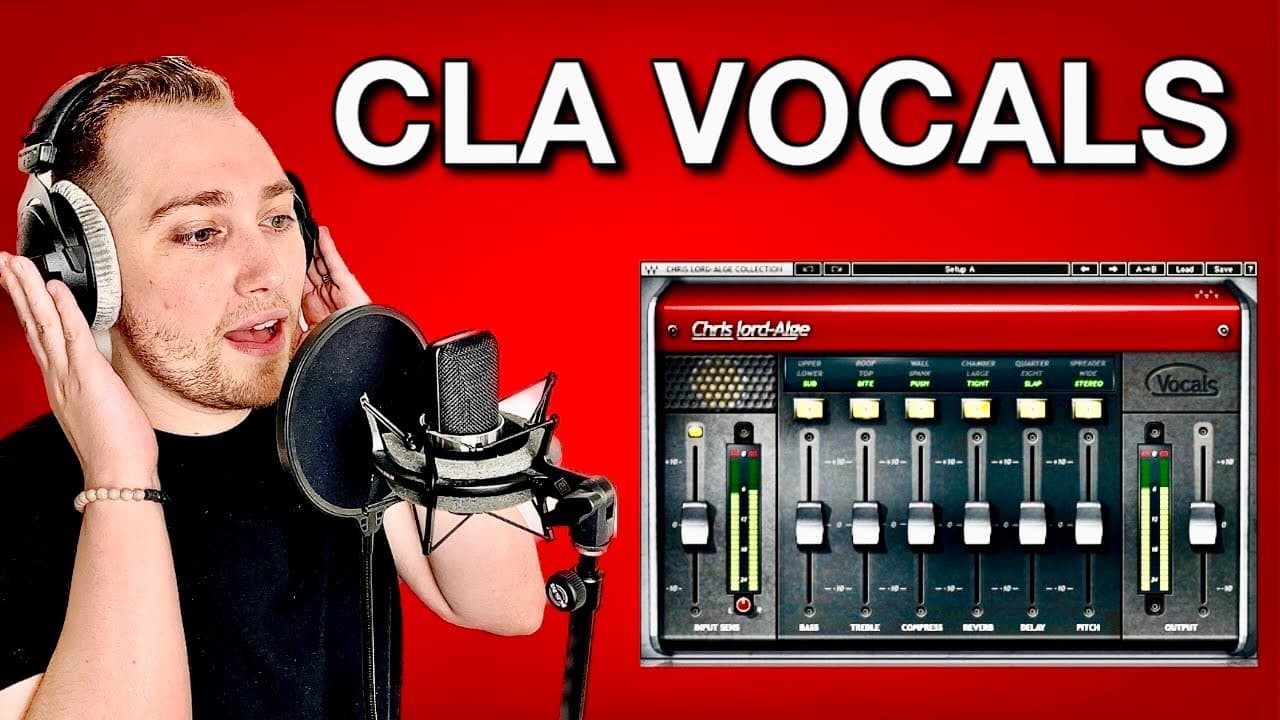
Input sensitivity on the CLA Vocal plugin controls the gain level for the incoming vocal track. Adjusting this allows you to optimize the vocal signal before applying effects. Increasing input sensitivity can make vocals sound fuller, while decreasing it can prevent distortion if the original recording is too loud. This adjustment is crucial to achieving a balanced sound.
Q: What kind of effects can be applied using the CLA Vocal plugin?
The CLA Vocal plugin allows you to apply various effects, including different styles of compression, reverb, and delay. Users can select from options such as a large room reverb or eighth-note delay, which adds depth and dimension to the vocal sound. It also features specialized effects like double vocals, which can enhance the fullness of the sound.
Q: How does the plugin's preset library benefit novice users?
The preset library within the CLA Vocal plugin offers quick access to pre-configured settings that cater to different vocal styles and sounds. For novice users, this eliminates the need to experiment extensively with settings. Instead, they can simply select and apply a preset that resonates with their vision, fostering creativity while minimizing the technical learning curve.
Summary & Key Takeaways
-
The CLA Vocal plugin is designed for beginners, offering a user-friendly interface that combines multiple effects in one tool, making it easy to get great vocal sounds quickly.
-
It includes features such as input sensitivity adjustment, bass and treble controls, compression styles, and various reverb and delay options tailored for vocal mixing.
-
The plugin also provides a preset library for users unsure of what vocal style to create, making the process accessible without extensive mixing knowledge.
Read in Other Languages (beta)
Share This Summary 📚
Summarize YouTube Videos and Get Video Transcripts with 1-Click
Try YouTube Summary with ChatGPT & Claude or YouTube Transcript Generator
Explore More Summaries from Home Studio Academy 📚
Summarize YouTube Videos and Get Video Transcripts with 1-Click
Try YouTube Summary with ChatGPT & Claude or YouTube Transcript Generator