How to Build an iPhone 17 Pro Max Camera Rig
TL;DR
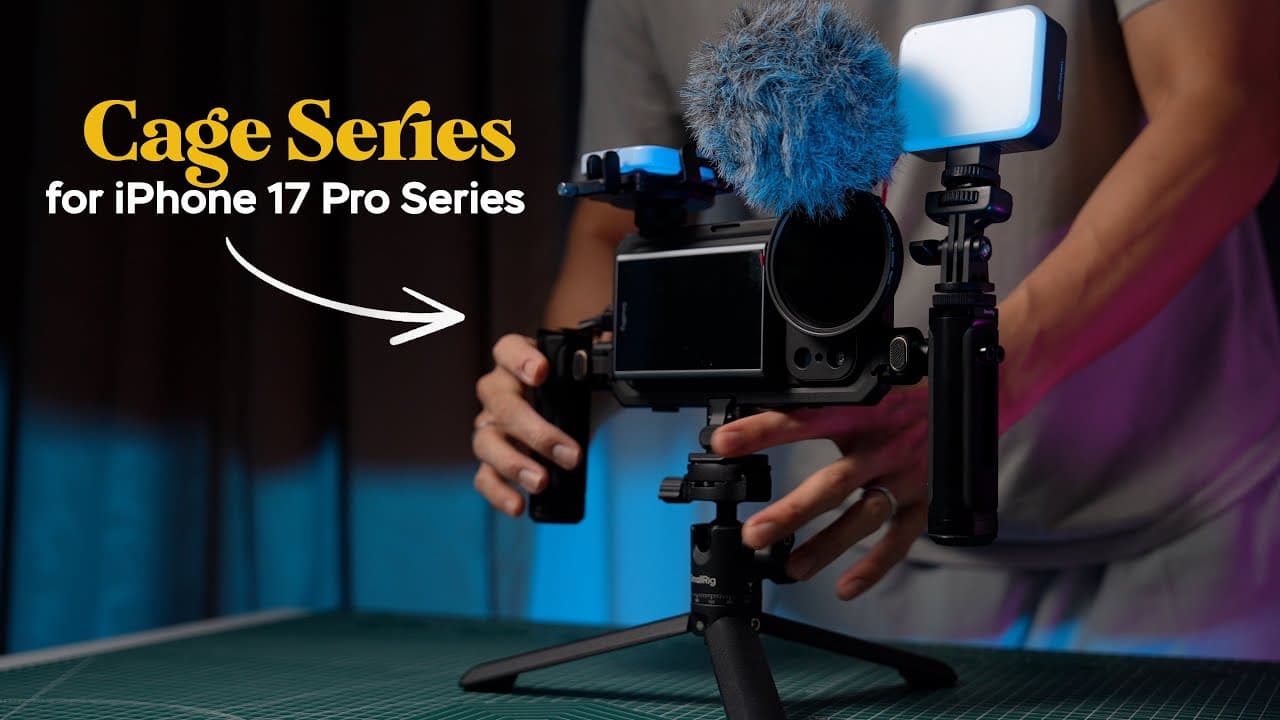
Build the rig by fitting the iPhone into SmallRig’s compatible case and metal cage, then attaching the rotating handles to the cage’s quick-release mounts. Magnetic filters, a wireless monitor, an SSD clamp, a Bluetooth recording remote, a mini LED light, and a tripod adapter can be added according to the shot, recording format, and handling needs.
Transcript
This right here is Small Rig's latest camera rig system made for the iPhone 17 series. Mainly for mobile filmmakers looking to bring their mobile film making or video shooting to the next level. It has adjustable dual handle system with their rotatable quick release system allowing for two-handed handheld operation whether if it's in horizontal or ... Read More
Key Insights
- The camera cage is a full-body metal frame designed for the iPhone 17 Pro Max while it is inside one of the included compatible cases. A side locking mechanism secures the phone, and quick-release mounting points on all four sides allow the handles and adapters to be repositioned.
- The dual-handle system is built around rotatable quick-release clamps that attach with a pinching action and form a solid connection. Mounting a handle on each side provides two-handed horizontal control, while rotating the grips forward can improve handling during shots made from a higher camera position.
- The top-handle configuration is created by mounting one handle on the cage’s upper side and rotating it about 90 degrees so it sits perpendicular to the phone. This arrangement makes low-angle handling more comfortable and can be combined with a side handle and wireless display monitor.
- The magnetic filter system uses a 67 mm FilMov adapter plate attached around the phone’s camera module. Its filters pop on and off instead of requiring repeated threading, and the CPL, ND2–32 variable ND, and quarter-strength black mist filters can be stacked together when multiple effects are needed.
- The wireless display monitor mirrors the iPhone screen over Wi-Fi at up to 4K and 30 frames per second, with some latency. It connects after the user scans a QR code, joins the SmallRig Wi-Fi network, and selects the SmallRig monitor through the phone’s screen-mirroring controls.
- The Bluetooth remote provides quick access to the phone’s shutter and recording controls from a handle. Pairing requires a long press of its power button followed by selecting SmallRig WC03 in Bluetooth settings. It takes a photo in photo mode and starts or stops recording in video mode.
- The external SSD clamp attaches to a cold shoe mount and expands to hold an SSD enclosure. A USB-C cable clamp helps prevent accidental disconnection, while the demonstrated Blackmagic Camera app setup records ProRes RAW directly to a connected external SSD with 2 TB of installed storage.
- The P96 Pro Mini LED is a 5 W accessory light with adjustable white balance from 2500 to 6500 Kelvin. Its built-in 1,500 mAh battery lasts up to about one hour, and its compact body fits a cage cold shoe when additional illumination is required.
Install to Summarize YouTube Videos and Get Transcripts
Explore YouTube Video Summarizer or Get YouTube Transcript Extractor
Questions & Answers
Q: How do you assemble the SmallRig iPhone 17 Pro Max camera cage?
First, place the iPhone 17 Pro Max into one of the compatible cases included with the mobile dual-handle kit. Insert the right side of the cased phone into the full-body metal cage, follow with the left side, and press the indicated locking mechanism. Assemble each handle’s rotatable clamp with the hidden Allen key, then pinch the clamps onto the desired quick-release points.
Q: How can the SmallRig handles be configured for different shots?
For conventional horizontal filming, attach one handle to each side of the cage to gain two-handed control during sideways or upward panning. The handles rotate, so they can be angled forward for higher-position shots. For low-angle filming, attach one handle to the top of the cage and rotate it about 90 degrees until it sits perpendicular to the phone.
Q: What filters are included in the SmallRig five-piece magnetic filter kit?
The kit contains an ND2–32 variable ND filter for controlling exposure, a circular polarizing filter for reducing reflections, and a quarter-strength black mist filter for blooming highlights and producing a dreamy cinematic appearance. It also includes a magnetic adapter that screws onto a 67 mm filter thread and a magnetic lens cap. The three effect filters can be stacked together.
Q: How does the 67 mm magnetic filter adapter attach to the phone?
The compatible SmallRig phone cases have a proprietary mounting area surrounding the rear camera module. To install the 67 mm FilMov adapter plate, align its mounting points with that camera plateau and slide it into place. Once installed, compatible magnetic filters attach by being placed directly onto the adapter, making removal and replacement quicker than repeatedly screwing conventional filters into a threaded mount.
Q: How do you connect the SmallRig wireless monitor to an iPhone?
Scan the provided QR code to connect the iPhone to the SmallRig Wi-Fi network. After the connection is established, open the phone’s screen-mirroring control, locate the SmallRig monitor, and select it. The monitor then mirrors the phone’s display wirelessly at up to 4K and 30 frames per second, although the demonstration notes a small amount of latency.
Q: How do you pair and use the SmallRig WC03 Bluetooth remote?
Long-press the remote’s power button until the small green LED on its side begins flashing. Open Bluetooth settings on the iPhone, find SmallRig WC03, and select it to complete pairing. When the camera is set to photo mode, pressing the remote takes a picture. In video mode, the same control starts and stops recording from the handle.
Q: How can an external SSD be secured to the SmallRig cage?
Attach SmallRig’s universal external SSD clamp to one of the cage’s cold shoe mounts. Pull the clamp apart, press the SSD enclosure into position, and connect it to the iPhone through USB-C. The clamp also provides a USB-C cable retainer that reduces the chance of an accidental bump disconnecting the cable while recording directly to the drive.
Q: What mounting options does the SmallRig iPhone cage provide?
The metal cage provides quick-release mounting points on all four sides, three cold shoe mounts, and a lanyard attachment loop. These points support rotating handles, the external SSD clamp, and compact accessories such as the P96 Pro Mini LED. The H11 quick-release adapter adds a rotatable connection with a quarter-inch screw thread at its base for attachment to a tripod.
Summary & Key Takeaways
-
The core kit combines two protective phone cases, a full-body metal cage, and two handles with rotatable quick-release clamps. Handles can be mounted on multiple sides for horizontal dual-grip operation, portrait shooting, or a top-handle arrangement that makes low-angle filming more comfortable and gives the operator greater control over camera movement.
-
SmallRig’s proprietary camera-module mounting area accepts interchangeable back plates. The 67 mm FilMov adapter supports magnetic filters, while separate T-mount and 17 mm threaded plates accommodate compatible mobile lenses. The five-piece filter kit includes an ND2–32 variable ND, a CPL, a quarter-strength black mist filter, an adapter, and a lens cap.
-
The cage supports a modular production setup through quick-release points, three cold shoe mounts, and a lanyard loop. Optional accessories include a wireless display monitor, an external SSD clamp with cable retention, a Bluetooth recording remote, a 5 W adjustable-color mini light, and an H11 adapter for mounting the cage to a tripod.
Read in Other Languages (beta)
Share This Summary 📚
Summarize YouTube Videos and Get Video Transcripts with 1-Click
Try YouTube Summary with ChatGPT & Claude or YouTube Transcript Generator