Tutorial 2: How to Build Multi-AI-Agent Chatbots with External Tools Using LangGraph
TL;DR
Build a multi-AI-agent chatbot by using LangGraph to manage messages, state, and a workflow that routes queries between an open-source LLM accessed through the Groq API and external tools. The tutorial configures Wikipedia and arXiv wrappers for one result and up to 300 content characters, then initializes a StateGraph with a TypedDict-based State class. Read on for the required libraries, tool setup, and state-management details.
Transcript
hello all my name is krishn and welcome to my YouTube channel so guys this is the second tutorial on building generative applications using langra if you don't know about langra it is an amazing moduel that is provided by Langan to build multi- aai agents not only you'll be able to create agents but also you'll be able to manage the entire State an... Read More
Key Insights
- LangGraph is a framework for building stateful agent and multi-agent applications with LLMs. It supports complete workflows while managing application state, giving developers control over how chatbot nodes, external tools, and response paths interact during execution.
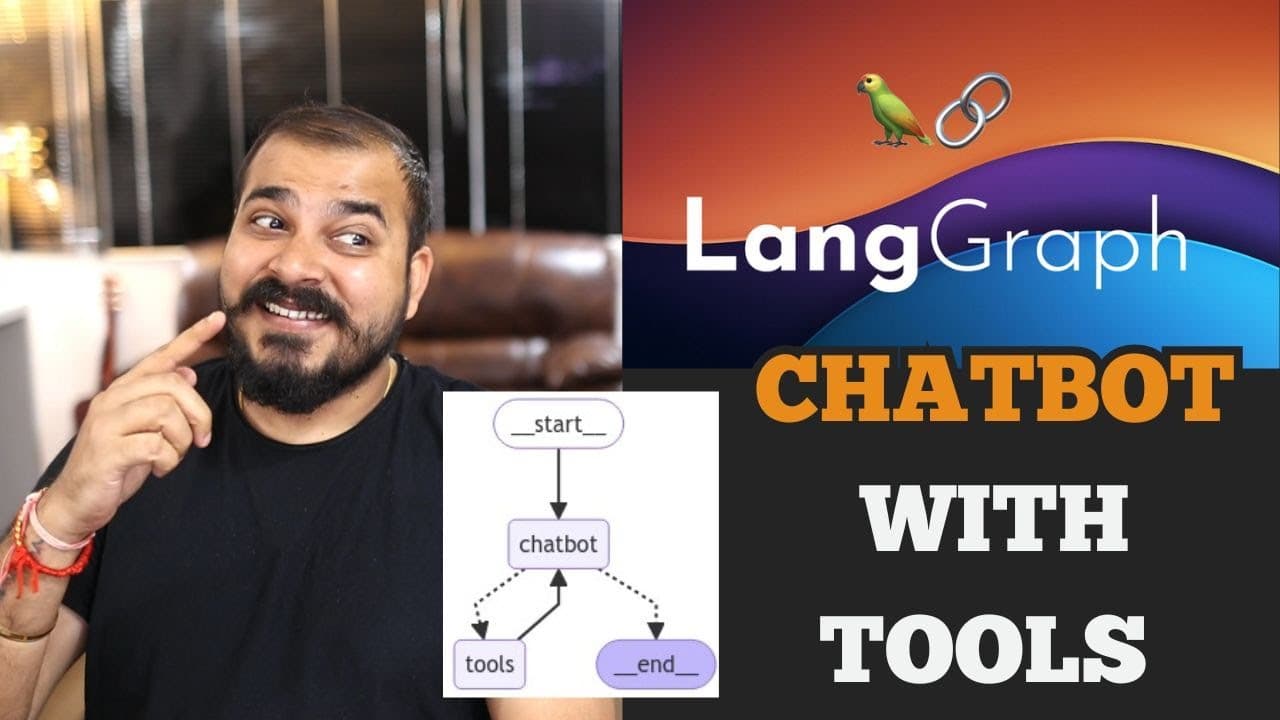
- The chatbot workflow begins when a user submits a query. The chatbot evaluates the request and decides whether to provide an answer through its connected LLM or route the query to an external tool such as Wikipedia or Google Search.
- External tools can extend the chatbot with information from specialized sources. The tutorial demonstrates Wikipedia for general searches and arXiv for research-paper queries, while noting that additional tools can be registered by adding them to the application’s tool collection.
- The Groq API provides access to the open-source LLM used by the chatbot. The required installation includes the LangChain Groq integration, alongside LangGraph, LangSmith, LangChain, and LangChain Community packages needed to assemble the application and its external-tool connections.
- WikipediaAPIWrapper and ArxivAPIWrapper can restrict returned content. The demonstrated configuration requests one top result and limits document content to 300 characters, producing compact outputs when the tools are invoked with a query.
- The Wikipedia tool is tested with a query about actor Shah Rukh Khan. The arXiv tool is separately tested with the research-paper query “Attention Is All You Need,” confirming that both wrappers can retrieve results before workflow integration.
- The State class stores workflow messages in a list defined with TypedDict and Annotated. LangGraph’s add_messages function updates that message collection after node execution, allowing the application to preserve and manage conversation information across the workflow.
- The StateGraph is initialized with the custom State class. This graph builder forms the structural foundation for defining the chatbot, connecting nodes, managing transitions, and representing the start and end of the tool-assisted response workflow.
Install to Summarize YouTube Videos and Get Transcripts
Explore YouTube Video Summarizer or Get YouTube Transcript Extractor
Questions & Answers
Q: How do you build a multi-AI-agent chatbot with external tools using LangGraph?
Install LangGraph, LangSmith, LangChain, the LangChain Groq integration, LangChain Community, and the packages required by the external tools. Configure tools such as Wikipedia or arXiv, place them in the chatbot workflow, define a message-based State class, and initialize StateGraph with that class. The workflow can then route a user query to the chatbot or an external tool and return the resulting response.
Q: How does the LangGraph chatbot decide when to use an external tool?
A user query enters the chatbot, which determines whether its connected LLM can provide the answer or whether an external tool should handle the request. The external tool can be Wikipedia, Google Search, or another registered service. After the interaction produces a response, the workflow reaches its end.
Q: Which external tools are demonstrated in Tutorial 2?
The implementation demonstrates Wikipedia and arXiv tools from LangChain Community. Wikipedia supports general searches, while arXiv is intended for research-paper queries. Google Search is also mentioned as another possible external tool.
Q: How is WikipediaAPIWrapper configured for compact results?
The Wikipedia wrapper is configured to return one top result and limit document content to 300 characters. That wrapper is passed to WikipediaQueryRun to create the runnable Wikipedia tool. The tutorial tests it with a query about actor Shah Rukh Khan.
Q: How is arXiv added as an external chatbot tool?
Import ArxivAPIWrapper and ArxivQueryRun from LangChain Community, then configure the wrapper for one top result and a maximum of 300 document-content characters. Pass the wrapper to ArxivQueryRun so it can process research-paper searches. The demonstrated test query is “Attention Is All You Need.”
Q: How is chatbot state defined in LangGraph?
The application defines a State class based on TypedDict. Its messages field is an Annotated list associated with LangGraph’s add_messages function. This State class is supplied when initializing StateGraph.
Q: Why does the LangGraph State class use add_messages?
The add_messages reducer updates the messages collection after a workflow node completes. Associating it with the Annotated messages list allows LangGraph to preserve and manage conversation information as execution moves through the workflow.
Q: What libraries are installed for this LangGraph chatbot tutorial?
The tutorial installs LangGraph, LangSmith, LangChain, the LangChain Groq integration, and LangChain Community. The Groq integration connects the chatbot to the Groq API for access to an open-source LLM. Wikipedia and arXiv dependencies support their respective external tools, while Annotated and TypedDict are imported for the State class.
Summary & Key Takeaways
-
The tutorial introduces a multi-agent generative AI application built with LangGraph. Its chatbot processes each user query, interacts with an open-source LLM through the Groq API, and decides whether to answer directly or call an external information tool. The workflow ends after the selected path produces a response for the user.
-
The implementation begins by installing LangGraph, LangSmith, LangChain, the Groq integration, LangChain Community, Wikipedia, and arXiv packages. WikipediaAPIWrapper and ArxivAPIWrapper are configured to return one result with no more than 300 document-content characters, allowing both external services to be tested independently before they are connected to the workflow.
-
LangGraph manages the application through a State class based on TypedDict. Its messages field uses Annotated, a list, and the add_messages reducer so completed nodes can update the conversation. A StateGraph is then initialized with this state definition, creating the foundation for chatbot nodes, tool interactions, workflow transitions, and eventual completion.
Read in Other Languages (beta)
Share This Summary 📚
Summarize YouTube Videos and Get Video Transcripts with 1-Click
Try YouTube Summary with ChatGPT & Claude or YouTube Transcript Generator
Explore More Summaries from Krish Naik 📚

Summarize YouTube Videos and Get Video Transcripts with 1-Click
Try YouTube Summary with ChatGPT & Claude or YouTube Transcript Generator