How to Make AI Videos With Any Audio Using Tencent HunyuanVideo Avatar for Free
TL;DR
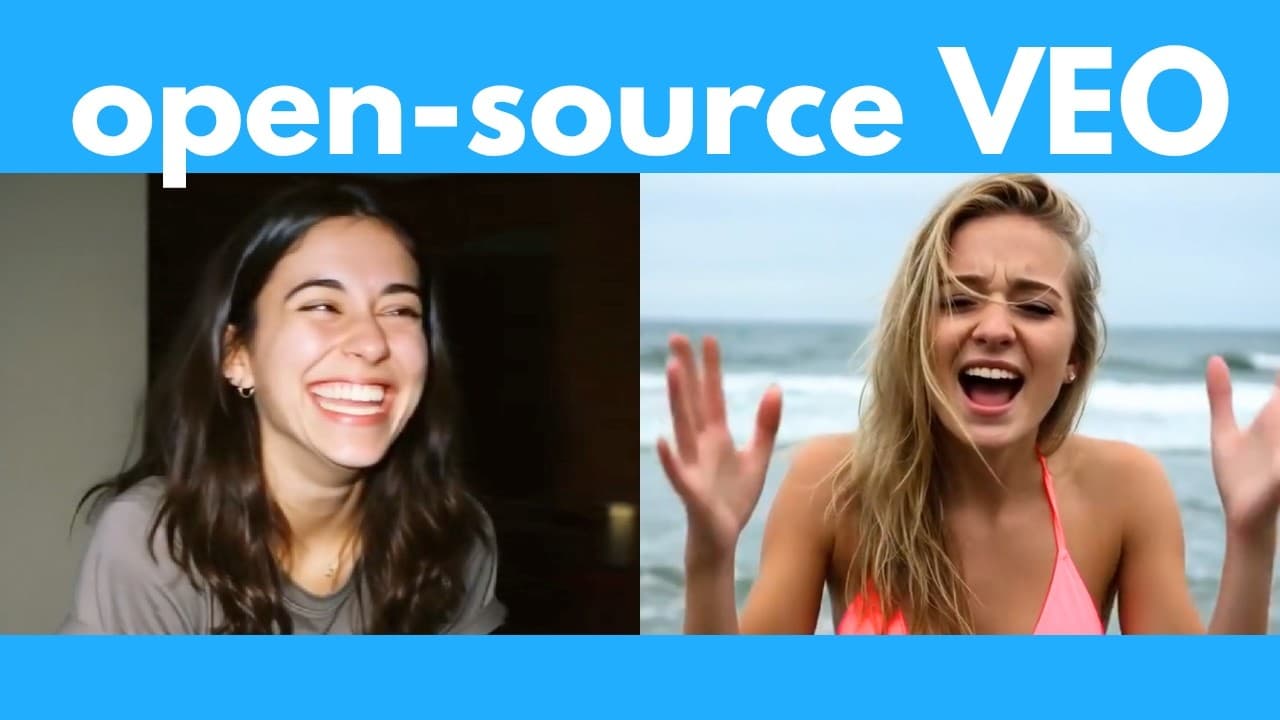
Tencent HunyuanVideo Avatar turns an image and any audio clip into a realistic video while animating the speaker’s mouth, body, camera, and surrounding scene. The free, open-source tool can run offline for unlimited use, including on computers with low VRAM, while its online platform offers text-to-speech and audio uploads. Read on to compare both workflows, understand its limitations, and see what it can animate.
Transcript
This AI can generate super realistic videos with any input dialogue. It's called Hunyen Video Avatar by Tencent. And this is completely free and open- source, so you can run it offline for unlimited times on your computer. It can even handle various emotions and singing and different animation styles. So, in this video, I'm going to go over how to ... Read More
Key Insights
- HunyuanVideo Avatar is a free, open-source AI tool from Tencent that generates realistic videos from an input image and an audio clip, and can be run offline on your own computer for unlimited use, including on machines with low VRAM.
- The tool animates the entire scene, not just the mouth or face. In the singing demo it moved the woman's whole body, made her hold and play a guitar, and animated the campfire in the foreground, going well beyond a simple lip-sync or face animator.
- Its main advantage over Google's Veo 3 is that you input your own audio, giving full control over how the voice sounds. Veo 3 only generates audio from a prompt and cannot make an uploaded image person talk, likely due to deepfake and copyright concerns.
- The model detects emphasis in the audio. In the Jensen Huang GPU demo it made him speak with stronger emphasis on words like 'This is a GPU' and 'gamer GPU,' matching where the emphasis fell in the original clip.
- Handling emotions requires a matching starting image. To show anger, laughter, or sadness, you must first generate an image of the person already displaying that emotion, then the tool syncs the performance to the audio, including breaths and sniffs.
- It works across multiple characters, languages, animals, and art styles. Demos covered Spanish audio, a lip-syncing animal, Disney Pixar 3D, and anime, though background humans in the Spanish scene showed flaws like a person walking backwards and another disappearing.
- There are two ways to use it: an online platform (in Chinese, translatable via Chrome) that supports text-to-speech or uploaded audio, and an offline local install that additionally lets you input a prompt to guide the generation.
- You can pair it with any voice cloning or text-to-speech tool to control the voice. The creator mentions F5-TTS, Zonos, and RVC (retrieval-based voice conversion) for voice-to-voice, letting you generate a consistent character with a consistent voice.
Install to Summarize YouTube Videos and Get Transcripts
Explore YouTube Video Summarizer or Get YouTube Transcript Extractor
Questions & Answers
Q: How do you make AI videos with any audio using HunyuanVideo Avatar?
Provide an image and an audio clip, then generate the video through HunyuanVideo Avatar’s online platform or install the tool locally. The online platform accepts uploaded audio or text-to-speech, while the offline version also lets you enter a prompt to guide the generation.
Q: What is Tencent HunyuanVideo Avatar?
HunyuanVideo Avatar is a free, open-source AI tool from Tencent that generates realistic videos from an image and input audio. It can run offline for unlimited use and works even on computers with low VRAM.
Q: Does HunyuanVideo Avatar animate more than the speaker’s mouth?
Yes, it can animate the entire scene rather than only the mouth or face. Demonstrations included full-body movement, camera motion, a woman playing guitar, and a campfire moving in the foreground.
Q: What are the two ways to use HunyuanVideo Avatar?
You can use its online platform or install it locally for offline generation. The online platform supports text-to-speech and uploaded audio, while the offline version additionally accepts a prompt to guide the result.
Q: How do you use the HunyuanVideo Avatar online platform in English?
The platform is currently in Chinese, but Google Chrome can translate it after you right-click and select “Translate to English.” You can then enter a transcript and choose a voice for text-to-speech, or upload your own audio clip and image.
Q: How does HunyuanVideo Avatar compare with Google’s Veo 3?
Both can produce videos with speech, but HunyuanVideo Avatar lets you supply the audio and therefore control how it sounds. The creator also highlights that HunyuanVideo Avatar is free and open-source, whereas Veo 3 generates its audio from a prompt.
Q: Can HunyuanVideo Avatar handle multiple characters, singing, and different art styles?
Yes, the demonstrations include multiple characters, a full-body singing scene, and different animation styles. In the singing example, it animated the performer, guitar, and campfire, although the played guitar notes did not align with the song.
Q: How well does HunyuanVideo Avatar follow emphasis and movement in audio?
In a 14-second Jensen Huang test, the model emphasized phrases such as “This is a GPU” in line with the source audio. It also kept the scene largely consistent while animating Jensen Huang holding a GPU and a laptop, though another test reproduced a hard cut present in its original audio.
Summary & Key Takeaways
-
HunyuanVideo Avatar by Tencent is a free, open-source AI that generates highly realistic videos from a single image and any audio clip. It runs offline for unlimited use, works even on low-VRAM computers, and animates the full scene, body, and camera rather than only lip-syncing the mouth.
-
Tested demos included Jensen Huang holding a GPU, a TED-style speaker, Spanish audio, angry, laughing, and sad emotional clips, an animal, a singing guitarist, and Disney Pixar and anime art styles. Results were mostly realistic, detecting emphasis and breaths, with minor flaws in backgrounds and non-synced guitar notes.
-
Compared to Google's Veo 3, the creator prefers HunyuanVideo Avatar because you upload your own audio for full voice control, whereas Veo 3 only generates audio from prompts and cannot make an uploaded person talk. You can combine it with voice cloners like F5-TTS, Zonos, or RVC.
Read in Other Languages (beta)
Share This Summary 📚
Summarize YouTube Videos and Get Video Transcripts with 1-Click
Try YouTube Summary with ChatGPT & Claude or YouTube Transcript Generator
Explore More Summaries from AI Search 📚



Summarize YouTube Videos and Get Video Transcripts with 1-Click
Try YouTube Summary with ChatGPT & Claude or YouTube Transcript Generator