How to Build $15K Animated Sites with Claude Code, Nano Banana 2, and Kling
TL;DR
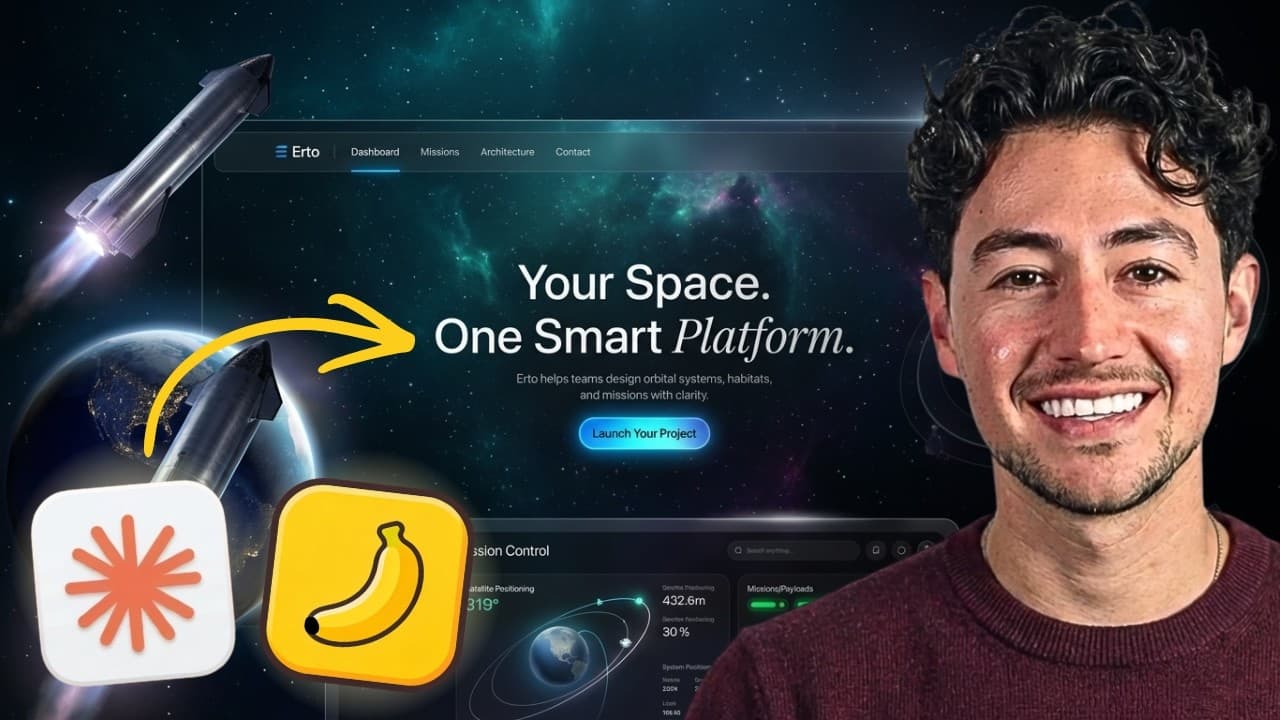
Build animated AI websites by prompting Claude Code with a high-end design skill, generating visual assets with Nano Banana or Kling 3.0, and integrating the resulting animations into the site. The creator built four examples in about 15 minutes and describes a three-step workflow that can produce a site in less than 10 minutes. Read on for specific prompts, settings, integration steps, and visual checks.
Transcript
Hey, I just built these four websites in about 15 minutes or so, and I wanted to share them with you because they all have really cool 3D sexy scroll effects. So, this is one for headphones. This over here is one for uh restoring our forest with a cool 3D globe in the background. This one here has sort of like an interior design vibe with uh a blow... Read More
Key Insights
- The core workflow is a three-part process: generate the website with Claude Code and a design skill, create animated assets with Nano Banana or Kling 3.0, and integrate those assets before publishing the finished site.
- A reusable design skill is the foundation for consistent results because it gives Claude Code established principles for spacing, luxury presentation, and design structure. This allows a brief prompt about a business category to produce a polished initial site.
- Kling 3.0 generates the animated visual layer from natural-language prompts. The demonstrated settings use a 5-second duration, a 16:9 aspect ratio, and 1080p quality for footage intended to fill a wide landing-page section.
- Nano Banana is useful for creating source images that need controlled animation. For the globe example, the generated image was passed into the animation workflow with instructions to rotate in one place while keeping its center of mass stationary.
- Multiple generations improve the chance of obtaining a usable animation because visual outputs can vary. The creator recommends producing two or three versions when credits permit, comparing the results, and downloading the strongest option for integration.
- Hero animations work best when their composition supports the page content. The integration prompt centers the video, uses it behind the hero header, and applies an inward masking gradient so the animation does not visually conflict with the surrounding website.
- Scroll-controlled video can turn an exploded-view animation into an interactive page section. Claude Code adds scroll reveal logic so movement through two or three text sections also advances the video frame by frame and exposes different design details.
- Visual review remains necessary after automated generation because the first integration can produce small text, weak contrast, choppy playback, visible lines, or mismatched background colors. Screenshots and precise follow-up prompts help Claude Code correct these issues.
Install to Summarize YouTube Videos and Get Transcripts
Explore YouTube Video Summarizer or Get YouTube Transcript Extractor
Questions & Answers
Q: How can I build an animated AI website with Claude Code, Nano Banana 2, and Kling?
First, give Claude Code a few bullet points about the desired business and direct it to use the shared design skill. Next, generate an exploded-view or animated asset with Nano Banana or Kling 3.0, then ask Claude Code to integrate it into the site and push the finished page live.
Q: How quickly can this workflow create an animated website?
The creator says four example websites took about 15 minutes in total. With the tools already configured, a website can be generated in less than 10 minutes, while Kling can create a batch of animations in roughly 3 minutes.
Q: What does the Claude Code design skill contribute?
The open repository gives Claude Code high-end website principles and design schematics. It standardizes details such as spacing and luxury styling, allowing a short prompt to produce a polished one-shot website.
Q: How should I prompt Kling 3.0 for a landing-page animation?
Describe the subject, motion, rendering style, background, quality, and intended placement. The interior-design example requests a high-quality 3D-render-style video that pans through an interior scene, has a white background, and looks appropriate for a website or landing page.
Q: What Kling 3.0 settings are used for a wide website animation?
The demonstrated animation uses Kling 3.0 with a 5-second duration, a 16:9 aspect ratio, and 1080p quality. The wide format is selected because the video will appear on a landing page.
Q: Why should I generate two or three versions of an AI animation?
Generated animations can vary, so creating two or three versions lets you compare the results and choose the strongest output. The creator recommends doing this when the available credits permit it.
Q: How can I keep an animated globe centered while it rotates?
Generate a globe source image with Nano Banana, then instruct the animation model to rotate it in the exact same place. Specify that its center of mass must not move and that it should rotate perfectly on its axis.
Q: What should I check after integrating animations into the website?
Review the page for small or low-contrast text, mismatched background colors, visible dividing lines, and choppy playback. Screenshots and precise follow-up instructions can help Claude Code improve typography, composition, masking, background consistency, and scroll-controlled frame playback.
Summary & Key Takeaways
-
The workflow begins with a short Claude Code prompt describing the desired business and visual direction. A shared design skill supplies principles for spacing, luxury styling, and page structure, helping Claude Code produce a polished initial website without requiring the creator to define every design decision manually.
-
Visual assets are generated separately and then added to the website. Kling 3.0 creates short 3D animations, while Nano Banana can provide a starting image for controlled motion such as a globe rotating in place without shifting its center of mass.
-
Claude Code integrates downloaded MP4 files into the hero and scroll sections. The creator requests centered composition, inward masking gradients, stronger typography, and frame-by-frame scroll playback, then reviews the result for problems such as low contrast, mismatched backgrounds, visible dividing lines, and choppy animation.
Read in Other Languages (beta)
Share This Summary 📚
Summarize YouTube Videos and Get Video Transcripts with 1-Click
Try YouTube Summary with ChatGPT & Claude or YouTube Transcript Generator
Explore More Summaries from Nick Saraev 📚

Summarize YouTube Videos and Get Video Transcripts with 1-Click
Try YouTube Summary with ChatGPT & Claude or YouTube Transcript Generator