How to Build an AI Voice Translator with Gradio
TL;DR
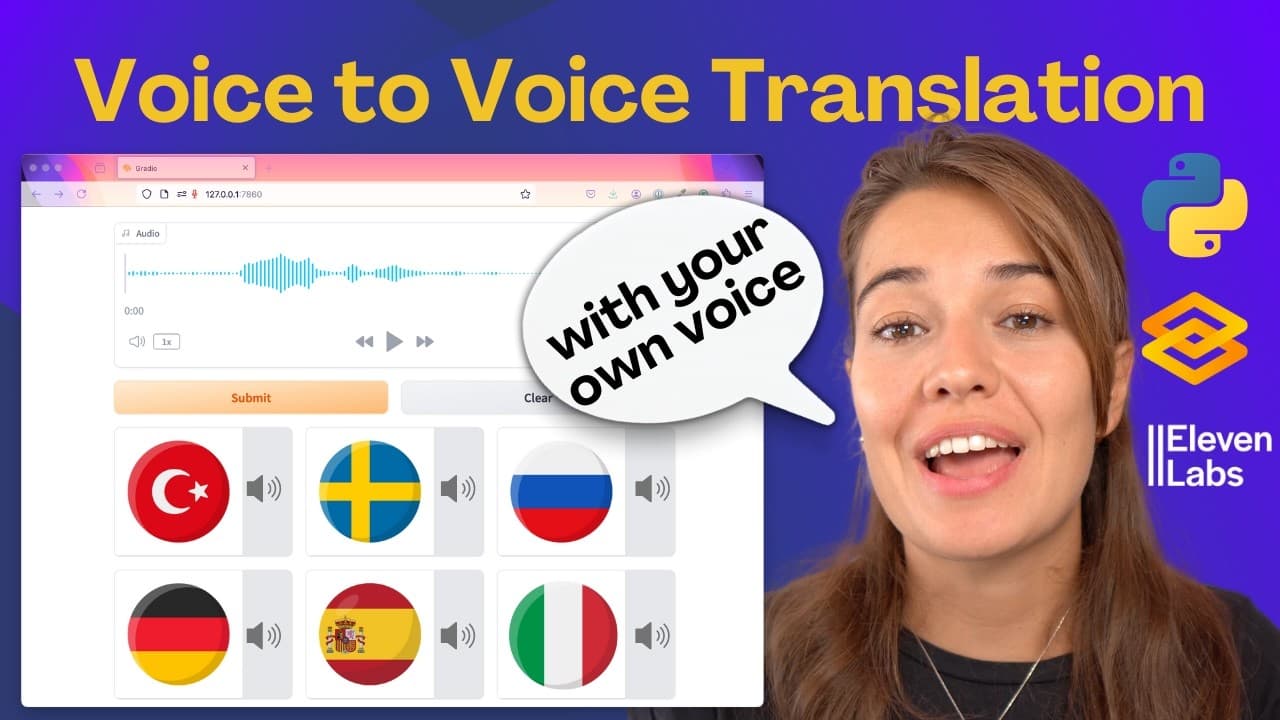
The video demonstrates building a voice translator using Gradio as the interface, AssemblyAI for transcription, Python translate for translation, and ElevenLabs for voice cloning. It explains wiring three components into a voice-to-voice pipeline and shows how to run a simple interface and expand to a more complex layout, with code organization tips and GitHub resources.
Transcript
hey and welcome today I'm going to share with you my voice translator this was an app that was surprisingly easy to build but it's kind of mindblowing so what it does is I can record myself speaking in English and then it will translate it to different languages and the mind-blowing thing is it will use my own voice to generate my speech in these o... Read More
Key Insights
- The app uses three core components: transcription, translation, and voice synthesis, to create a multi language voice translator.
- Gradio provides two main options for building apps, interface for a simple setup and blocks for advanced layouts.
- Transcription is handled by AssemblyAI which returns a transcription that can be checked for errors before translation.
- Translation is performed using Python's translate module with language codes for English to target languages like Spanish, Turkish, and Japanese.
- Text to speech is achieved with ElevenLabs to generate audio in the translated languages using the user’s voice clone.
- The workflow starts by recording a voice input, then transcribes it to text, translates the text into target languages, and finally synthesizes audio in those languages.
- Error handling is highlighted by checking transcription status and surfacing errors through the interface when needed.
- GitHub repositories are suggested for both a simple and a more complex app, offering ready made code and structure for customization.
Install to Summarize YouTube Videos and Get Transcripts
Explore YouTube Video Summarizer or Get YouTube Transcript Extractor
Questions & Answers
Q: A real search query question about the video (e.g. 'How to...', 'What is...', 'Why does...', 'When should...'). Question 1
How can I build a voice to voice translator using Gradio and three APIs? The video shows a workflow where English speech is transcribed by AssemblyAI, translated to multiple languages with a Python translate module, and rendered as speech in those languages using ElevenLabs. It also discusses implementing a simple interface or a more complex blocks layout and testing the app locally.
Q: What is the role of AssemblyAI in the project?
AssemblyAI acts as the transcription engine in the pipeline. It converts recorded English speech into text, with a mechanism to check for transcription errors. The output text is then used for translation, forming the basis for generating translated speech in multiple target languages.
Q: Which languages are demonstrated for translation in the video?
The video demonstrates translating into several languages including Spanish, Turkish, and Japanese. The translator uses language codes to route the English input into these target languages so that the subsequent text to speech step can generate language appropriate audio.
Q: How does the video suggest handling errors in transcription?
The video suggests inspecting the transcription response status and raising an error if the status indicates a problem. If transcription succeeds, the text portion is extracted and passed to the next step, ensuring the pipeline only proceeds when transcription is valid.
Q: What tool is used for translating text in the tutorial?
The tutorial uses Python's translate module to translate the transcribed English text into the target languages. The approach relies on language codes and simple translation calls to generate translated text for each language, which is then fed into the text to speech stage.
Q: How is the voice for translated speech created in the example?
The translated text is converted to speech using ElevenLabs, leveraging the user’s own voice clone. This allows the app to generate audio in the translated languages that mirrors the speaker’s voice, providing a more natural and familiar output for the listener.
Q: What are the two Gradio layouts mentioned for building the app?
The video covers two Gradio approaches: a simple interface option and a more flexible blocks layout. The interface approach is quicker and easier, while blocks enables grouping components and customizing the layout to create a richer user experience.
Q: Where can viewers find the code for the projects discussed?
Viewers are directed to a GitHub repository that contains both a simple version and a more complex version of the app. The repository link is provided in the video description, offering ready to use code and structure for learning and customization.
Summary & Key Takeaways
-
The video presents a workflow that records English speech, transcribes it, translates the text to multiple languages, and generates speech in those languages with a cloned voice. It emphasizes using three APIs and a Gradio interface to assemble the app quickly.
-
It covers two Gradio approaches, an interface option and a blocks layout, and explains how to scaffold functions for transcription, translation, and text to speech, including basic error handling and API usage.
-
Code examples and repository references are provided to compare a simplified version and a more complex version, encouraging experimentation and customization.
Read in Other Languages (beta)
Share This Summary 📚
Summarize YouTube Videos and Get Video Transcripts with 1-Click
Try YouTube Summary with ChatGPT & Claude or YouTube Transcript Generator
Explore More Summaries from AssemblyAI 📚

Summarize YouTube Videos and Get Video Transcripts with 1-Click
Try YouTube Summary with ChatGPT & Claude or YouTube Transcript Generator