How to Edit Any Video with Ditto AI in ComfyUI
TL;DR
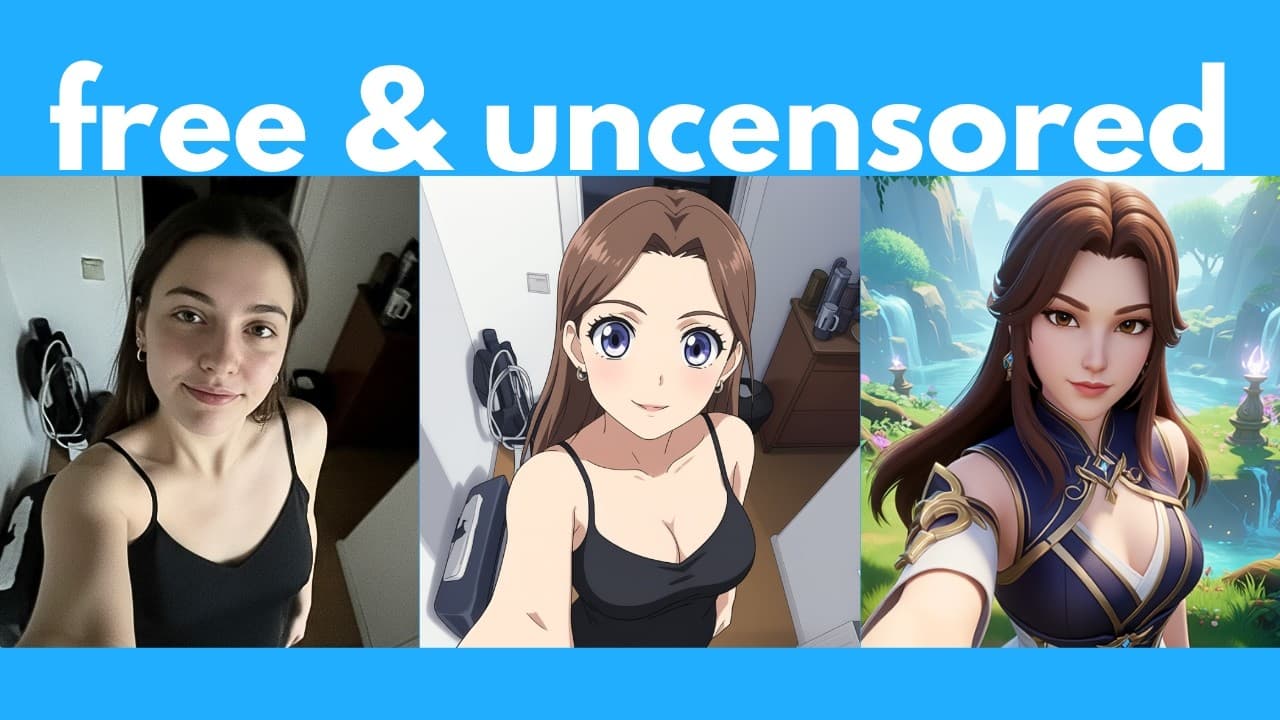
Ditto is a free, open-source AI that edits any video from a text prompt, letting you swap clothing, insert objects, change backgrounds, restyle footage, or turn anime into realistic video. Built by Ant Group on top of Alibaba's Wan model, it runs locally and unlimited offline through ComfyUI, needing at least 11 GB of VRAM.
Transcript
We have a new free and open-source AI that can edit any videos just with a text prompt. And this is pretty good. For example, let's say we have this video. Well, we can replace her top with a green one with a ruffled neckline. And here's what we get. Or here's another example where we can add a faint aurora in the sky. And here's what we get. You c... Read More
Key Insights
- Ditto is a free and open-source AI that edits any video using only a text prompt, allowing edits like replacing a top with a green ruffled-neckline version, adding a faint aurora, or inserting a vintage street lamp.
- Ditto was created by Ant Group, a branch of Alibaba, and is based on Wan, described in the video as the best open-source video model, which Ditto expands to enable prompt-based video editing.
- Ditto is weak at transferring facial expressions, so eye movements and talking motions from the original video are not carried into the output; the tool Wan Animate is recommended for transferring facial expressions instead.
- Micro editing works by changing only specific details while keeping the rest of the video intact, such as turning a bird's brown plumage iridescent blue and green or turning a cat black while retaining all other details.
- Style transfer lets you convert a video into styles like origami, Pixar, or Rick and Morty, and a separate model can turn anime scenes, including Spirited Away, into realistic live-action versions.
- Ditto is installed and run through ComfyUI, the most popular platform for running open-source AI image, video, and audio generators locally, rather than the less intuitive raw-code diff synth method.
- The official Ditto ComfyUI workflow requires a minimum of 11 GB of VRAM, and more quantized versions or GGUFs are expected in the future that could allow it to run on even lower VRAM.
- Ditto offers three models: a general global model, a style transfer model, and a sim2real model, all selectable from dropdowns in the downloadable workflow.json inside ComfyUI.
Install to Summarize YouTube Videos and Get Transcripts
Explore YouTube Video Summarizer or Get YouTube Transcript Extractor
Questions & Answers
Q: What is Ditto AI and who created it?
Ditto is a free and open-source AI that can edit any video using only a text prompt. It was created by Ant Group, which is described as another branch of Alibaba. Ditto is based on Wan, which the video calls the best open-source video model, but it expands Wan further by allowing you to edit videos with a text prompt. It can run locally on your computer for free and unlimited times offline.
Q: How do you install Ditto in ComfyUI?
First install Comfy UI Manager if you haven't already. Then download the required models: a nearly 15 GB diffusion model, an optional 205 MB cosvid Lora for faster inference, a 254 MB VAE file placed inside a newly created folder, an over 11 GB text encoder, and three Ditto models each 6.1 GB in size. Place each file in the correct ComfyUI models subfolder, then download and drag the workflow.json onto the interface.
Q: What kinds of edits can Ditto make to a video?
Ditto can replace clothing such as swapping a top for a green ruffled-neckline one, add elements like a faint aurora, insert objects like a vintage street lamp or a deer silhouette, change a full character into something like a dark sorceress, recolor details like a bird's plumage or a cat, add light to a face, replace backgrounds with a meadow, and transfer styles like origami, Pixar, or Rick and Morty.
Q: What are the VRAM requirements to run Ditto?
The official Ditto ComfyUI workflow lists a minimum requirement of 11 GB of VRAM. The video notes that more quantized versions or GGUFs of the model are likely to appear in the future, which could potentially let you run Ditto with even lower VRAM. For now, however, at least for the official workflow shown, 11 GB of VRAM is the stated minimum requirement to run it.
Q: Why does Ditto struggle with facial expressions?
In the demos, the original video shows a person talking and moving her eyes a bit, but in Ditto's output video these expressions are not translated into the result. Because of this limitation, the video recommends that if you want to transfer facial expressions, it is best to use another tool called Wan Animate instead. A full installation tutorial for Wan Animate is referenced for anyone who wants to learn more about it.
Q: How does Ditto convert anime into realistic video?
Ditto's creators released a separate sim2real model that can turn any anime scene into a realistic version. The video calls this super useful because anyone can plug in an anime through the model to potentially create a live-action version of it. An example uses a clip from Spirited Away: the original anime video is run through the animate-to-real render, producing a realistic output. Ditto offers three models total, including this simtoreal one.
Q: What are the three Ditto models available?
There are three different Ditto models you select from a dropdown in the ComfyUI workflow. The first is the general global model, used for broad edits. The second is a style transfer model, used to convert a video into styles like origami, Pixar, or Rick and Morty. The third is a sim2real model, which turns anime scenes into realistic live-action versions. Each of the three downloadable Ditto model files is 6.1 GB in size.
Q: How do you set the output video length and dimensions in the workflow?
In the workflow you upload your video and can force the frames per second, with a default of 24 fps. You set output length by frames, so 73 frames divided by 24 fps is roughly 3 seconds; if your uploaded video is longer than the set length, it truncates at that point. You also specify the width and height of the final video, remembering to adjust them for vertical or different aspect ratios, and choose whether to crop or stretch when dimensions differ.
Summary & Key Takeaways
-
Ditto is a free, open-source AI from Ant Group, a branch of Alibaba, built on the Wan video model. It edits any video from a text prompt, enabling clothing swaps, object insertion, background changes, lighting fixes, style transfer, and anime-to-realistic conversion, all running locally and unlimited offline.
-
The video shows demos including turning a person into a sorceress, adding a deer silhouette, recoloring a bird or cat, and restyling clips into origami, Pixar, or Rick and Morty. A limitation is weak facial expression transfer, for which Wan Animate is recommended instead.
-
Installation uses ComfyUI with Comfy UI Manager. You download the diffusion model, an optional cosvid Lora for faster inference, a VAE file placed in a new folder, an 11 GB text encoder, and three 6.1 GB Ditto models, then load the workflow.json and select all models.
Read in Other Languages (beta)
Share This Summary 📚
Summarize YouTube Videos and Get Video Transcripts with 1-Click
Try YouTube Summary with ChatGPT & Claude or YouTube Transcript Generator
Explore More Summaries from AI Search 📚





Summarize YouTube Videos and Get Video Transcripts with 1-Click
Try YouTube Summary with ChatGPT & Claude or YouTube Transcript Generator