How to Use ChatGPT's New Web Browsing and Plugins Feature
TL;DR
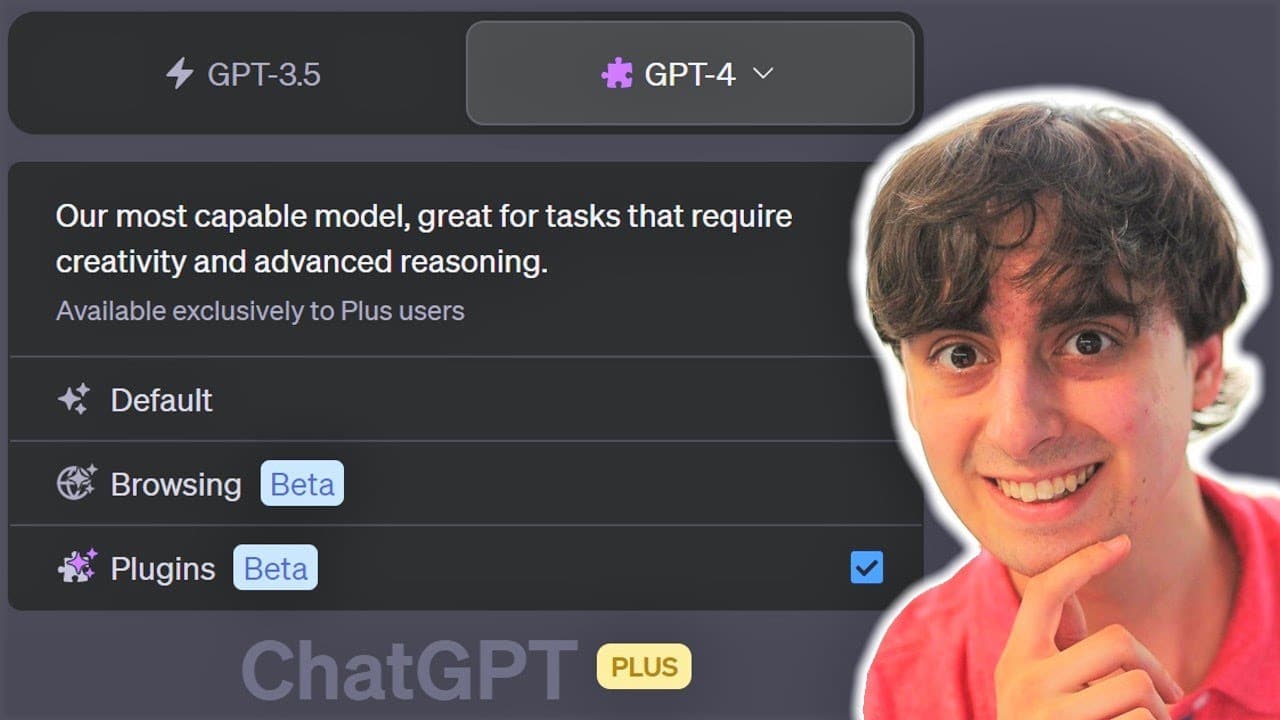
To use the new web browsing and plugins feature in ChatGPT Plus, enable them in the settings under Beta features. The web browsing allows limited link access, while plugins like Wolfram Alpha provide useful calculations. Note that some functions may still be in beta testing, potentially leading to errors or restricted access.
Transcript
well viewers it finally happened if you guys remember from my previous video yesterday which was a huge AI news video one of the main talking points was the fact that openai was releasing the long-awaited chat GPT plugins and web browsing to every single chanchi BT plus user to become a change EBT plus User it's really quite simple you just have to... Read More
Key Insights
- 👊 OpenAI has introduced web browsing and plugin features to Chat GPT Plus, expanding its capabilities beyond text generation.
- 👤 Users need to enable web browsing and plugins in the settings tab of Chat GPT Plus to access these features.
- 🍻 The web browsing feature allows users to click on links, but some links may fail to load, limiting its functionality.
- ⌛ Prominent plugins available include real-time stock and crypto data, Spotify playlist creation, and video insights for online platforms.
- 😷 The PDF plugin allows users to ask questions and analyze PDF documents.
- 💁 The Wolfram Alpha plugin provides accurate information for various calculations.
- 👊 Chat GPT Plus is still in its early stages, and some plugins may have issues in their development.
Install to Summarize YouTube Videos and Get Transcripts
Explore YouTube Video Summarizer or Get YouTube Transcript Extractor
Questions & Answers
Q: How can users access the new web browsing and plugin features in Chat GPT Plus?
To access the web browsing and plugin features, users need to go to the settings tab in Chat GPT Plus and enable web browsing and plugins in the Beta features section.
Q: Why are some users reporting that they only have access to either web browsing or plugins?
It is unclear why some users only have access to one feature. It could be due to accessibility in different countries or a gradual rollout by OpenAI. The company needs to clarify this issue.
Q: How does the web browsing feature in Chat GPT Plus compare to other search engines like Bing?
The web browsing feature in Chat GPT Plus allows users to click on specific links, making it more directable than Bing chat. However, some links may fail to load, limiting its functionality.
Q: What are some of the plugins available in Chat GPT Plus?
Chat GPT Plus offers a wide range of plugins, including Savvy trade for real-time investment data, Spotify playlist creation, video insights for online platforms, and more. Users can install up to three plugins at a time.
Summary & Key Takeaways
-
OpenAI has introduced web browsing and plugin features to Chat GPT Plus, allowing users to browse the web and access third-party applications.
-
The new interface includes a selector for GPT 3.5 and GPT4 models, with GPT4 exclusively available for Plus users.
-
Users need to enable web browsing and plugins in the settings tab of Chat GPT Plus to access these features.
Read in Other Languages (beta)
Share This Summary 📚
Summarize YouTube Videos and Get Video Transcripts with 1-Click
Try YouTube Summary with ChatGPT & Claude or YouTube Transcript Generator
Explore More Summaries from MattVidPro AI 📚





Summarize YouTube Videos and Get Video Transcripts with 1-Click
Try YouTube Summary with ChatGPT & Claude or YouTube Transcript Generator