Can Genspark Replace 11 AI Subscriptions?
TL;DR
Genspark can replace much of a creator’s fragmented AI stack by routing prompts to different models and producing finished assets in one workspace. Its demonstrated workflows cover branding, websites, pitch decks, storyboards, footage analysis, and podcasts, although specialized tools may still provide better controls for the final 5% of narrowly focused professional work.
Transcript
A team out of Palo Alto built by ex-Microsoft and ex-Google engineers went from launch to billion-dollar unicorn in about 20 months. That's faster than almost any software company in history. And here's what nobody is connecting. This is the first real signal that the AI race just moved off chat and onto [music] finished work. Not ask a question, g... Read More
Key Insights
- Genspark is an all-in-one AI workspace that combines access to thinking, image, video, and voice models. Users describe the desired outcome, and the workspace routes the job to the model it considers best suited to produce that result.
- The tab tax is the time lost while coordinating separate creative tools. Switching applications forces creators to reload context, repeat instructions, upload brand assets again, manage files, and maintain multiple accounts, turning work that should take 40 minutes into a half-day process in the example described.
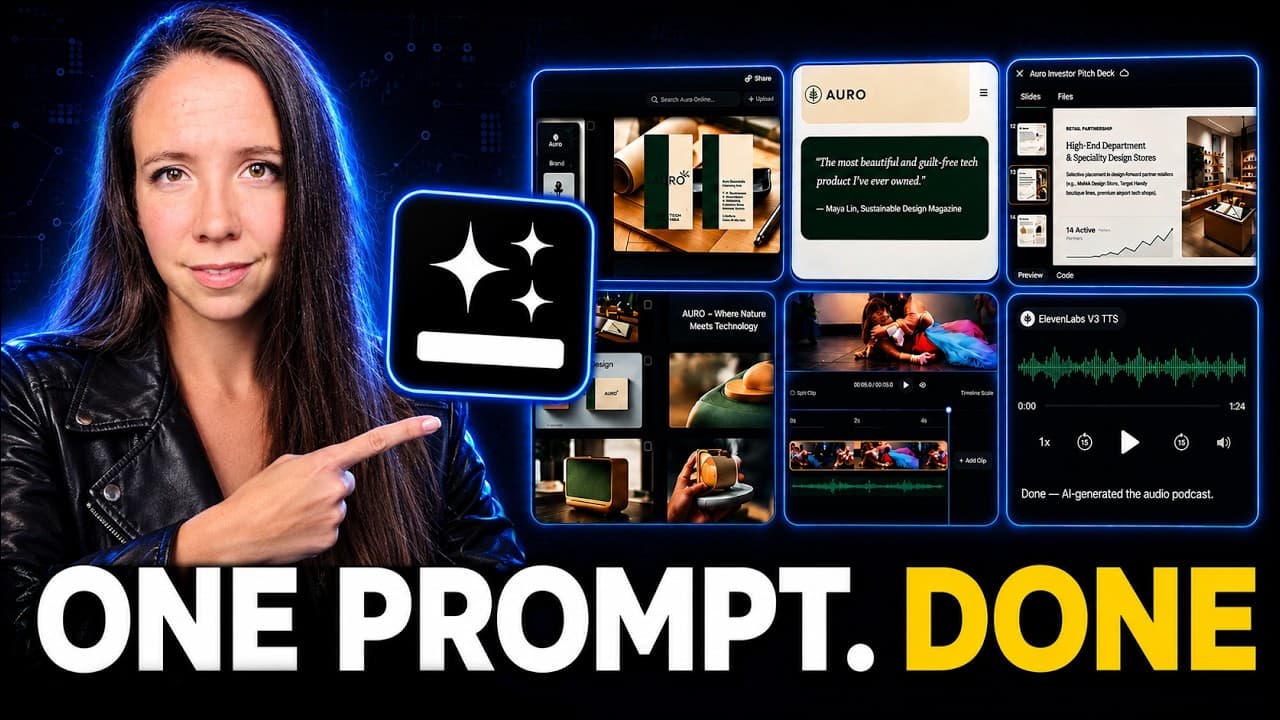
- The design agent produces assembled brand assets rather than only raw images. From a plain-language description of a name, mood, audience, and desired feeling, it generated a logo, a composed poster, and social assets sized for different platforms, with the demonstrated first pass completed and refined in 20 minutes.
- Targeted editing allows a user to mark one element and describe the required change in a sentence. The system redraws that specific portion instead of rerolling the complete design, which preserves acceptable parts of the existing composition and reduces the need to restart the creative process.
- Genspark can build and publish a working landing page from a conversational brief. The demonstrated page included layout, copy, navigation, and a hero image drawn from the previously created identity, while custom-domain publishing removed the separate handoff and deployment steps described in the former workflow.
- A single prompt can generate a structured pitch deck with designed slides and a coherent story arc. Requested slide revisions can also be expressed in plain language, allowing an idea to become an editable presentation without first selecting a template or moving into a separate slide editor.
- Storyboard generation can convert one inspiration image into a planned trailer sequence. The demonstrated output included shot order, timing, pacing notes, taglines, and cinematic direction, giving creators a way to inspect the proposed structure before shooting any footage.
- Clip Genius turns raw footage into a practical edit map by identifying a summary, character cards, reference stills, and key moments. The demonstration presents this as a minutes-long alternative to spending half a day manually scrubbing through a timeline, while document-to-podcast generation similarly compresses audio production into one prompt.
Install to Summarize YouTube Videos and Get Transcripts
Explore YouTube Video Summarizer or Get YouTube Transcript Extractor
Questions & Answers
Q: What is Genspark and how does it work?
Genspark is presented as an all-in-one AI workspace that provides access to multiple models for reasoning, images, video, and voice. A user describes the required deliverable instead of manually selecting and coordinating several applications. The workspace then routes parts of the request to the models it considers best suited for the job and keeps the resulting workflow within one project.
Q: Can Genspark replace 11 separate AI subscriptions?
Genspark can make 11 separate subscriptions optional for the creator workflow described because it combines capabilities previously spread across tools for brainstorming, writing, imagery, video, voice, music, research, and web production. The claim is primarily about consolidating everyday production. The transcript also acknowledges that a specialized application may remain preferable when a narrow task requires deeper controls or highly refined finishing.
Q: What kinds of finished work can Genspark create?
The six demonstrated jobs were a visual identity, a working landing page, a pitch deck, a video storyboard, an analysis of raw footage, and a podcast generated from a document. The visual identity included a logo, poster, and platform-sized social assets. Other outputs included structured slides, shot-planning notes, an edit map, generated voices, pacing, website copy, navigation, and imagery.
Q: How does Genspark reduce the tab tax for creators?
Genspark reduces the tab tax by keeping different stages of production inside one workspace. The previous process required repeated logins, file transfers, context explanations, uploads of the same brand colors, and coordination among separate tools. In the example, this overhead could stretch work expected to take 40 minutes into half a day because 80% of the effort was coordination rather than creation.
Q: How can Genspark create and revise a visual identity?
A user can describe a brand’s name, mood, intended feeling, and audience in plain language. The design agent then assembles finished assets such as a logo, composed poster, and social kit rather than returning only an unformatted image. For revisions, the user can mark a specific element and state the change in a sentence, allowing that portion to be redrawn without regenerating everything.
Q: Can Genspark build and publish a landing page?
Genspark built a working landing page after receiving a developer-style description of the desired sections, atmosphere, and visitor action. The generated page included its layout, written copy, navigation, and a hero image taken from the visual identity created earlier in the project. According to the demonstration, the page can also be published on a custom domain directly from the workspace.
Q: How does Genspark help with video planning and editing?
For planning, Genspark used one inspiration image to create a trailer storyboard containing shot order, timing, pacing notes, taglines, and cinematic direction. For editing preparation, Clip Genius examined uploaded raw footage and returned a summary, character cards, reference stills, and important moments. Together, these outputs let creators preview a structure before shooting and receive a usable edit map before manually reviewing the timeline.
Q: When should a creator still use a specialized AI tool?
A specialized tool remains appropriate when a creator needs the deepest controls or the strongest possible result for one narrow production task. The transcript describes this as the final 5% of finishing work and notes that a dedicated video application can expose controls Genspark does not. Genspark’s advantage is the other 95%, covering the broader path from idea through draft to usable deliverable with less coordination.
Summary & Key Takeaways
-
Genspark is presented as an all-in-one AI workspace that gives users access to multiple thinking, image, video, and voice models. Instead of requiring users to select and coordinate separate tools, it routes each requested job to an appropriate model and keeps the creative process inside one project and one browser tab.
-
Six demonstrated workflows show Genspark generating a visual identity, a publishable landing page, a pitch deck, a video storyboard, an edit map from raw footage, and a podcast from a document. Users can request revisions in plain language, including targeted visual changes that do not require regenerating an entire asset.
-
The main benefit is reduced coordination rather than guaranteed superiority at every individual task. Specialized software may still offer deeper controls and stronger finishing capabilities, but Genspark covers the broader journey from an initial idea to a usable deliverable. This can help creators and founders reduce repeated uploads, explanations, logins, and file transfers.
Read in Other Languages (beta)
Share This Summary 📚
Summarize YouTube Videos and Get Video Transcripts with 1-Click
Try YouTube Summary with ChatGPT & Claude or YouTube Transcript Generator
Explore More Summaries from Julia McCoy 📚


Summarize YouTube Videos and Get Video Transcripts with 1-Click
Try YouTube Summary with ChatGPT & Claude or YouTube Transcript Generator