Why Have Most Laptops Become Ultrabooks?
TL;DR
Most modern non-gaming laptops effectively qualify as ultrabooks because improvements in processors, storage, displays, battery life, and construction have made thin, light, responsive designs commonplace. As these baseline qualities become standard, manufacturers increasingly distinguish their laptops through features such as exceptionally low weight, privacy controls, connectivity, input options, finishes, and business software.
Transcript
Hey, what's up? MKBHD here. So I had a thought recently, and I think I'm gonna be doing more of these, you know, general videos on tech thoughts that I have. Let me know if you'd be into that. But remember ultrabooks? They really had a mini era. Like, that was when we started getting many of these purposely really thin and light laptops. It was rig... Read More
Key Insights
- Ultrabook was a marketing category invented by Intel for laptops meeting specific standards for portability, responsiveness, battery life, display resolution, processor choice, and storage performance. The label helped distinguish thin-and-light machines when those qualities were not yet common across the laptop market.
- The original ultrabook requirements included an Intel ultra-low-voltage processor, a maximum thickness of 20 millimeters, nine hours of battery life, a 1080p screen, waking from sleep within three seconds, and a minimum data transfer rate that encouraged SSD use.
- Thin-and-light laptops became practical around 2012 to 2013 because the underlying technology had improved enough to support smaller designs without automatically producing a poor experience. Larger desktop-replacement laptops still formed a distinct category with greater weight, thickness, and lower portability.
- Most normal non-gaming laptops in 2021 could effectively satisfy or exceed the original ultrabook baseline. Improved processors, SSDs, battery systems, displays, and construction made portability and responsive everyday performance standard qualities rather than unusual selling points.
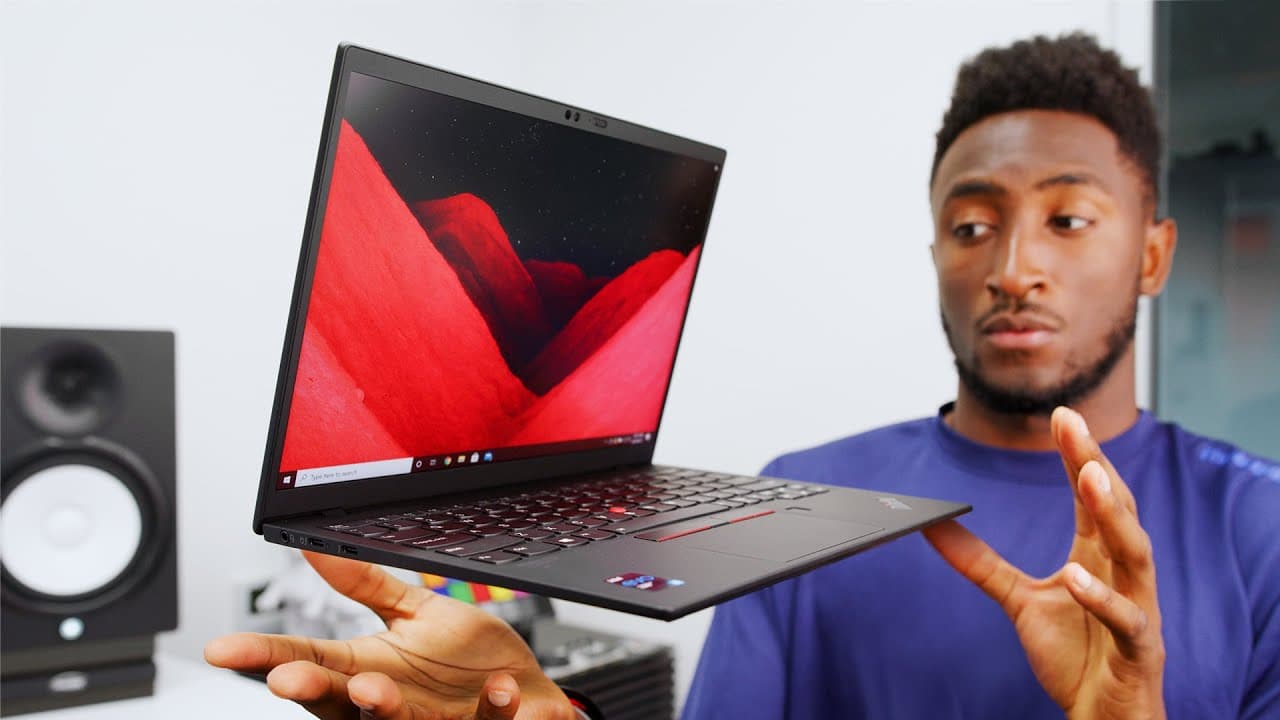
- The ThinkPad X1 Nano demonstrates modern ultrabook performance with an 11th Gen Intel Core i5 or i7 processor, Iris Graphics on the reviewed configuration, 16 gigabytes of RAM, up to one terabyte of SSD storage, and a 13-inch 2K display.
- The X1 Nano's defining advantage is its portability: it measures 17 millimeters thick and weighs 1.99 pounds. The comparison given is a 2.8-pound MacBook Air and an iPad Pro that weighs three pounds after its keyboard is added.
- Business-oriented differentiation is visible in the X1 Nano's physical webcam cover, optional infrared human-presence detection, fingerprint reader, Windows 10 Pro, BitLocker device encryption, four microphones, spill-proof keyboard deck, TrackPoint, matte finish, and optional carbon-fiber lid.
- Optional cellular connectivity could be part of a refreshed ultrabook standard because it complements a laptop designed for working anywhere. The X1 Nano offers optional 5G, while its battery supports charging to 80 percent in one hour for greater mobility.
Install to Summarize YouTube Videos and Get Transcripts
Explore YouTube Video Summarizer or Get YouTube Transcript Extractor
Questions & Answers
Q: What originally qualified a laptop as an ultrabook?
Intel attached several requirements to the ultrabook label. A qualifying laptop needed a specified Intel ultra-low-voltage processor, a body no thicker than 20 millimeters, nine hours of battery life, a 1080p display, and the ability to resume from sleep within three seconds. A minimum data transfer rate also encouraged manufacturers to install SSDs instead of older, slower hard drives.
Q: Why have most modern laptops become ultrabooks?
Laptop technology improved until thin, light, responsive designs stopped being a specialized category. By 2021, most normal laptops outside the gaming category could match or exceed the original ultrabook requirements while delivering enough performance for web browsing, notes, email, work, and school. As a result, portability, SSD speed, quick waking, and long battery life became expected baseline qualities.
Q: When did ultrabooks first become a significant laptop category?
Thin-and-light laptops had a distinct period around 2012 to 2013, when technology became capable enough to make deliberately slim and portable computers practical. Intel created the ultrabook term to categorize, market, and sell those systems. At that time, ultrabooks were meaningfully different from larger, heavier laptops that did not meet or pursue the same portability and responsiveness requirements.
Q: What are the main specifications of the ThinkPad X1 Nano?
The featured ThinkPad X1 Nano starts around $1,200 and runs Windows 10 Pro. It offers an 11th Gen Intel Core i5 or i7 processor, with the shown model using an i5 and Iris Graphics. It has 16 gigabytes of RAM, up to one terabyte of SSD storage, and a 13-inch 2K display with thin bezels and an anti-glare finish.
Q: How portable is the Lenovo ThinkPad X1 Nano?
The ThinkPad X1 Nano is 17 millimeters thick and weighs 1.99 pounds, making very low weight one of its strongest qualities. For comparison within the discussion, the MacBook Air weighs 2.8 pounds, while the iPad Pro weighs 1.5 pounds without its keyboard and three pounds after the keyboard is added. The touchscreen X1 Nano is about 2.0 pounds.
Q: What security and privacy features does the X1 Nano include?
The X1 Nano includes a physical webcam privacy cover that can block the camera when it is not needed. A fingerprint reader sits beside the trackpad for login, and optional hybrid infrared human-presence detection can wake the screen when the user returns. Windows 10 Pro also supplies BitLocker device encryption and additional enterprise features intended for business use.
Q: How does the X1 Nano support remote work and everyday tasks?
The X1 Nano provides enough performance for web browsing, email, notes, school, and typical work tasks, though it is not presented as a gaming laptop. Its taller display supports productivity, four microphones improve voice isolation during video calls, and the backlit spill-proof keyboard supports practical daily use. Two USB-C Thunderbolt 4 ports are included, with one supporting 65-watt fast charging.
Q: What features differentiate laptops when ultrabook qualities are standard?
When most non-gaming laptops are already thin, light, fast, and portable, manufacturers need other ways to stand out. The X1 Nano differentiates itself through its 1.99-pound design, matte black soft-touch finish, physical webcam cover, optional presence detection, TrackPoint, fingerprint reader, four-microphone arrangement, optional carbon-fiber lid, Windows 10 Pro features, and optional built-in 5G connectivity.
Summary & Key Takeaways
-
Intel created the ultrabook category to identify and market thin, portable, responsive laptops. Its requirements included an Intel ultra-low-voltage processor, a maximum thickness of 20 millimeters, nine hours of battery life, a 1080p display, waking from sleep within three seconds, and sufficiently fast data transfer to encourage SSD adoption.
-
By 2021, laptop technology had improved enough that most ordinary non-gaming models could meet or exceed the historical ultrabook baseline. Thin bodies, low weight, SSD storage, quick waking, useful battery life, and strong everyday performance were no longer exceptional qualities, giving buyers many more portable computers suitable for work or school.
-
The ThinkPad X1 Nano illustrates how manufacturers differentiate products after ultrabook qualities become common. It combines a 17-millimeter body and 1.99-pound weight with a 13-inch 2K matte display, Thunderbolt 4, fast charging, security features, business software, optional 5G, a TrackPoint, and recognizable ThinkPad styling.
Read in Other Languages (beta)
Share This Summary 📚
Summarize YouTube Videos and Get Video Transcripts with 1-Click
Try YouTube Summary with ChatGPT & Claude or YouTube Transcript Generator
Explore More Summaries from Marques Brownlee 📚


Summarize YouTube Videos and Get Video Transcripts with 1-Click
Try YouTube Summary with ChatGPT & Claude or YouTube Transcript Generator