How to Plan YouTube Videos Faster With Poppy AI
TL;DR
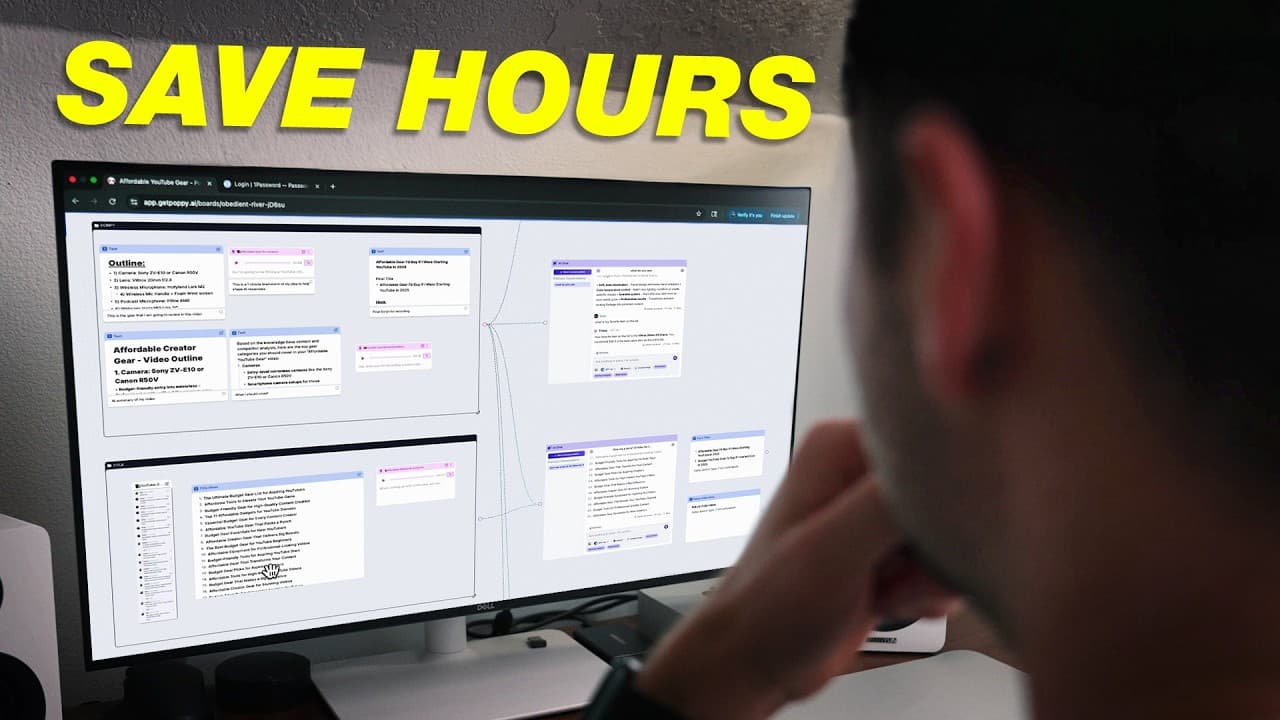
Poppy AI can reduce YouTube planning time by organizing research, competitor videos, notes, voice recordings, scripts, titles, thumbnails, and analytics on one visual board. Connect each relevant group to an AI chat so the selected model receives specific project context, then define the title and thumbnail before recording because the script and final content depend on that packaging.
Transcript
Creating a great YouTube video takes a lot of time, planning, and energy. From researching your idea to writing scripts, and creating thumbnails, and title ideas, it can honestly feel overwhelming, and it's definitely mentally draining. But check out this video right here. How I'd start a YouTube channel in 2025 is a huge outperformer on our channe... Read More
Key Insights
- Poppy AI is a visual mind-map-style workspace that places research, notes, ideas, images, outlines, scripts, titles, thumbnails, and analytics on a shared board, reducing the need to move between separate planning documents and AI chat tools.
- The demonstrated workflow reportedly cut Think Media's content-planning time in half, with featured videos requiring only a couple of hours to research, plan, and prepare for recording before later attracting thousands or hundreds of thousands of views.
- Poppy AI supports several AI models, including ChatGPT 4 and 5, Claude, Gemini, and Grok, so creators can choose a preferred model instead of being restricted to a single AI system within the planning workspace.
- Templates provide reusable structures for recurring content workflows, and the custom YouTube template shown in the demonstration separates work into groups for competition research, scripting, titles, thumbnails, and analytics.
- Competitor analysis works by adding relevant top-performing videos, attaching contextual notes, and linking the resulting group to an AI chat, which allows the model to discuss existing approaches within the specific topic being planned.
- Voice notes are a fast way to provide nuanced creative context, and Poppy AI can use their content when answering questions. Recordings can also be replayed, downloaded, or copied as transcripts for use by collaborators such as editors.
- Linked context is what makes an AI chat project-specific, because connecting a board group gives the chat access to the planning materials inside it. An unlinked chat produces the broader responses normally associated with standalone AI software.
- Video packaging is the title and thumbnail that viewers encounter before clicking, and it should be developed before recording whenever possible. The video's script and content depend on the promise and framing established by that outward-facing packaging.
- Related book: YouTube Secrets
Install to Summarize YouTube Videos and Get Transcripts
Explore YouTube Video Summarizer or Get YouTube Transcript Extractor
Questions & Answers
Q: What is Poppy AI for YouTube creators?
Poppy AI is a visual mind-map-style workspace for organizing YouTube research, notes, ideas, images, outlines, scripts, titles, thumbnails, and analytics on one board. It also provides access to AI models such as ChatGPT 4 and 5, Claude, Gemini, and Grok. Its main advantage in the demonstrated workflow is combining planning materials and contextual AI conversations in one location.
Q: How can Poppy AI make YouTube planning faster?
Poppy AI can make planning faster by keeping research, brainstorming, voice notes, outlines, scripts, and packaging ideas together instead of distributing them across tools such as Google Docs, ChatGPT, and Milanote. Think Media reported that it cut content-planning time in half, while several featured videos took only a couple of hours to research, plan, and prepare for recording.
Q: How do you start a YouTube planning board in Poppy AI?
A creator can begin by opening a new blank board and adding an AI chat with a preferred model, or by choosing an existing template from the template section. The demonstrated custom YouTube template contains separate areas for competitor research, scripting, titles, thumbnails, and analytics, giving each stage of the planning process a consistent place on the board.
Q: How do you perform competitor analysis with Poppy AI?
Start by searching YouTube for successful videos aimed at a similar audience and covering a related subject. Add those videos to a competitor-analysis group, then attach notes that explain which references are most useful. Finally, connect the group to an AI chat so the model can use the videos and notes as context when discussing what is already working in that content area.
Q: Why must a Poppy AI group be linked to an AI chat?
A group must be linked because the connection gives the AI chat access to the planning materials stored inside that group. Without the link, the chat behaves like a basic standalone chatbot and may return broad answers. With it, the model can reference project-specific videos, notes, outlines, product lists, and voice recordings when helping develop the content.
Q: How can voice notes improve a YouTube script workflow?
Voice notes let creators capture detailed opinions and creative nuance more quickly than typing every thought. Once a recording is placed in the scripting group and linked to the chat, the AI can use its content when answering questions or shaping the script. The creator can also replay the audio, copy its transcript, download the recording, or send it to an editor.
Q: How do you create a YouTube script with Poppy AI?
Build the script by adding text boxes with ideas from competitor research, a basic outline, and any required subjects or products. Voice notes can provide additional preferences and nuance. Connect the scripting group to an AI chat so the model can use all those materials as context, then refine the resulting hook, bullet points, outline, and full script before recording.
Q: Why should creators choose a title and thumbnail before recording?
The title and thumbnail form the video's packaging, which is the outward-facing preview viewers see before deciding whether to click. Establishing that packaging before recording clarifies the video's promise and framing. According to the demonstrated workflow, the script and finished content are context-dependent on the title and thumbnail, so recording too early can create a mismatch between the presentation and the actual video.
Summary & Key Takeaways
-
Poppy AI combines visual boards with AI chats, allowing creators to organize research, notes, images, voice recordings, outlines, scripts, titles, thumbnails, and analytics in one location. The demonstrated Think Media workflow reportedly reduced content-planning time by half and prepared several successful videos for recording within a couple of hours.
-
The planning process begins with competitor analysis. Relevant YouTube videos are added to a group, supplemented with notes that identify useful references or explain why examples matter. Linking that group to an AI chat gives the selected model access to the collected context, supporting more focused discussions about patterns already working in the chosen subject area.
-
After research, creators can build an outline, list products or talking points, record voice notes, and connect these materials to an AI chat for script development. Before recording, they should also establish the video packaging. A clear title and thumbnail help define the audience-facing promise upon which the script and finished video depend.
Read in Other Languages (beta)
Share This Summary 📚
Summarize YouTube Videos and Get Video Transcripts with 1-Click
Try YouTube Summary with ChatGPT & Claude or YouTube Transcript Generator
Explore More Summaries from Think Media 📚

Summarize YouTube Videos and Get Video Transcripts with 1-Click
Try YouTube Summary with ChatGPT & Claude or YouTube Transcript Generator