How Do Anchor Boxes Improve Object Detection?
TL;DR
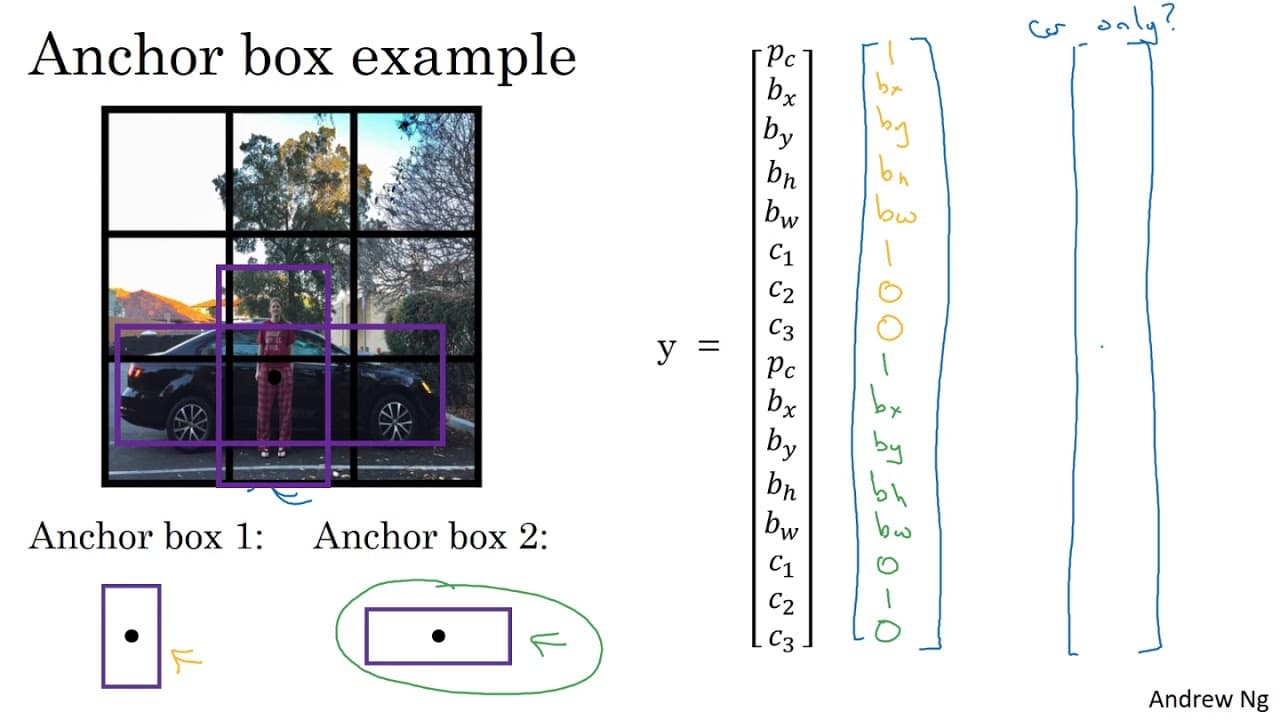
Anchor boxes enhance object detection by allowing multiple predictions in a single grid cell, thus improving accuracy. They are predefined shapes assigned based on the highest Intersection Over Union (IOU) with the object's shape. By increasing the output vector dimensions, anchor boxes enable the model to specialize in detecting different object sizes and shapes effectively.
Transcript
one of the problems with object detection as you've seen it so far is that each of the grid cells can detect only one object whatever grid cell wants to detect multiple objects here's what you can do you can use the idea of anchor boxes let's not serve an example let's say you have an image like this and for this example I'm going to continue to us... Read More
Key Insights
- 👻 Anchor boxes allow for the detection of multiple objects within a grid cell, improving object detection accuracy.
- ✋ Assigning objects to anchor cells with the highest IOU ensures precise detection and encoding of object information.
- 🍱 When using anchor boxes, the dimensions of the output vector increase, providing more detailed object detection.
- 🕵️ Anchor boxes enable the learning algorithm to specialize in detecting specific object shapes, improving overall performance.
- 🫢 Choosing anchor boxes by hand or using advanced techniques like k-means clustering can optimize object detection for different shapes.
- 🍱 Anchor boxes handle cases where multiple objects appear in the same grid cell by assigning the object to the anchor box with the highest IOU.
- 🌥️ The likelihood of multiple objects appearing in the same grid cell decreases when using larger grid sizes, such as a 19x19 grid.
Install to Summarize YouTube Videos and Get Transcripts
Explore YouTube Video Summarizer or Get YouTube Transcript Extractor
Questions & Answers
Q: What is the problem with object detection using grid cells?
Grid cells in object detection can only detect one object, which becomes a limitation when a grid cell contains multiple objects.
Q: How do anchor boxes solve the limitation of one object per grid cell?
Anchor boxes associate multiple predictions with different objects, allowing for the detection of multiple objects within a grid cell.
Q: What is the role of anchor boxes in encoding object information?
Anchor boxes encode object information by assigning objects to anchor cells that have the highest Intersection over Union (IOU) with the object's shape, ensuring accurate detection.
Q: How does the use of anchor boxes impact the dimensions of the output vector?
With anchor boxes, the dimensions of the output vector increase, resulting in a 3x3x16 vector (or 3x3x2x8), where 16 represents the anchor box dimensions and 8 represents the classes and bounding box parameters.
Summary & Key Takeaways
-
Object detection grid cells can only detect one object, but anchor boxes allow for multiple object detection within a grid cell.
-
Anchor boxes are predefined shapes that associate multiple predictions with different objects, providing better detection accuracy.
-
By using anchor boxes, the dimensions of the output vector increase, allowing for more precise object detection.
Read in Other Languages (beta)
Share This Summary 📚
Summarize YouTube Videos and Get Video Transcripts with 1-Click
Try YouTube Summary with ChatGPT & Claude or YouTube Transcript Generator
Explore More Summaries from DeepLearningAI 📚




![How Does the Logistic Regression Decision Boundary Work? — #33 Machine Learning Specialization [Course 1, Week 3, Lesson 1] thumbnail](/_next/image?url=https%3A%2F%2Fi.ytimg.com%2Fvi%2F0az8RjxLLPQ%2Fhqdefault.jpg&w=750&q=75)

Summarize YouTube Videos and Get Video Transcripts with 1-Click
Try YouTube Summary with ChatGPT & Claude or YouTube Transcript Generator