How to Use Anara AI to Read Research Papers Fast
TL;DR
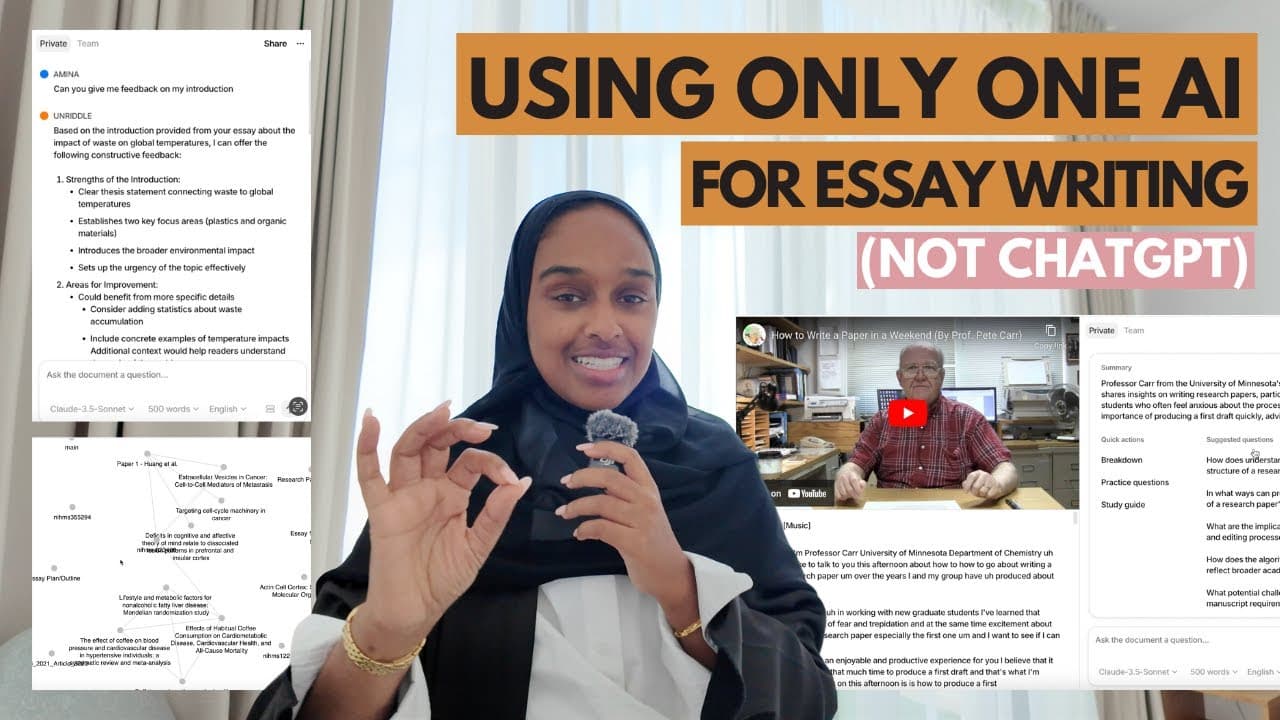
Anara (formerly Unriddle) handles reading and writing in one place: import PDFs, Word docs, YouTube URLs, audio, images, and websites, then chat with them to get breakdowns, practice questions, and answers that link to the exact page or timestamp. Group papers for literature reviews, type ++ to draft, and pull in-text plus end-of-text citations from your library or online.
Transcript
if you're still using chat gbt then throw it in the bin there is an all-in-one AI academic tool called Unriddle and in today's video I'm going to be going through a full breakdown as to how you can use it some hacks and some tricks and just some ways to help you write quicker research easier and understand research papers in minutes in just 13 minu... Read More
Key Insights
- Anara answers are grounded only in the files you upload. The tool does not pull information from other places or produce a guesstimate, so whatever you uploaded is what generates the response you receive.
- Every chat answer includes a clickable evidence marker. Clicking the number opens the source file at the exact page and highlights the section where the claim appears, and for video sources it opens the specific timestamp.
- Grouping research papers lets you chat with several documents at once. This suits literature reviews or systematic reviews across ten papers, where you want to determine something about the group rather than interrogate each paper individually.
- Subgroups create a tiered organization inside a main group. Ten papers can be split so two cover the abstract, two cover the conclusion, and three cover another section, and questions can then target a specific group.
- Typing ++ in the writing editor triggers AI drafting. It produces a starter sentence and a good starting point when you are blocked, rather than requiring you to write the first line yourself.
- Citation finding searches both your own library and an online library. It surfaces research papers with similar titles and topics, then inserts the reference in text and adds the matching entry to the end-of-text reference list.
- The document can critique your own writing on request. Asking for feedback on an introduction returns specific points such as needing a thesis statement, more detail, added stats and numbers, and stronger language, without asking a supervisor or professor.
- A graph view surfaces relationships between papers in your library. It reveals connections you may not have made before, and it doubles as a shared workspace when you are reviewing the same material with a team.
Install to Summarize YouTube Videos and Get Transcripts
Explore YouTube Video Summarizer or Get YouTube Transcript Extractor
Questions & Answers
Q: What file types can you upload to Anara?
Anara accepts documents, plain text, video, audio, websites, images, and recordings. Documents can be PDFs or Word documents. Video can be a YouTube URL pasted directly into the upload field, or a video file you downloaded yourself. Images can be JPEG or PNG. Because YouTube videos work by URL, you do not need to download them first. While you are already working inside the platform, a button in the top left hand side lets you import something quickly without leaving what you are doing.
Q: How do you verify where an AI answer came from in Anara?
Each answer displays evidence in a small circle. Clicking it takes you to the source, showing which page the claim was mentioned on and highlighting the exact section in the paper. For a YouTube video or other video source, clicking the number opens the timestamp where the point was mentioned, so you can jump straight to that moment. This makes it quick and easy to source where information comes from, and it works well for longer material such as a recorded lecture.
Q: How do you do a literature review with multiple papers in Anara?
Group research papers that belong to the same research family so you can interrogate and chat to them together rather than one at a time. This is designed for situations like a literature review or systematic review where you want to look at ten papers and determine something about the group. Asking a well-framed question, such as the main similarities and differences between the papers, returns a broken-down comparison, and each point still links back to the source file and the exact place it was mentioned.
Q: What are subgroups in Anara used for?
Subgroups let you place papers into a group nested within a main group, creating a tiered system. The example given splits ten papers so that two are for the abstract, two are for the conclusion, and another three are for a different section. This organizes your papers into much better categories, and you can then ask a question about a specific group rather than only about individual papers. It is described as one of the unique selling points of the tool.
Q: How do you summarize a long YouTube video or lecture with AI?
Paste the YouTube URL into the Anara upload rather than downloading the video. Once it is in your library, ask a targeted question such as a summary of the method used in the video, and it returns a clear breakdown without you watching the whole thing. The example used a video about how to write a paper in a weekend that ran around ten minutes or a bit longer. Answers include source location and a timestamp, which is especially useful for a longer lecture.
Q: How do you start writing when you have writer's block in Anara?
Type plus plus in the writing editor and Anara begins writing for you. It gives you a starting point and that initial starter sentence, which helps when you are blocked. After you have written something, an action tab offers choices including rewriting, finding citations, paraphrasing, shortening, and lengthening. The example document was titled the impact of waste on global temperatures, and the same enhancement options let you make text longer, shorter, paraphrased, or sound more academic.
Q: How does Anara find and insert citations?
Select the citation option from the action tab and it searches through both your own library and an online library to find the best match. In the online library it looks through research papers with similar titles and similar topics. You can then cite the result directly into your paper. It supplies not only the in-text reference but also the end-of-text reference list entry, so your citations build up as you write rather than being assembled separately afterward.
Q: Can Anara give feedback on your own draft?
Yes. Once you have written something you can ask the document a question about your own text, such as requesting feedback on your introduction. In the demonstration the response noted a strong foundation but flagged that the introduction needed a thesis statement, more details, better language, and more thought about the topic and its impact. The suggestions included adding stats and numbers, which the writer then applied directly. This delivers instant feedback without having to refer to or ask a supervisor or professor, and works best once you have a good chunk of text.
Summary & Key Takeaways
-
Anara covers four workflows: importing files, chatting to understand them, writing with AI assistance and citations, and collaborating with a team. Imports accept documents (PDF, Word), plain text, video (including YouTube URLs), audio, website links, images (JPEG, PNG), and recordings, with a quick-import button in the top left available at any point while working.
-
Chatting produces sourced answers: each response carries an evidence circle that jumps to the source, showing the exact page and highlighting the passage, or the timestamp for video. Quick actions generate comprehensive breakdowns and practice questions, predetermined question prompts help when you are unsure what to ask, and output filters adjust language, word count, and which LLM is used.
-
Writing starts by typing ++, which drafts an opening for you when you are blocked. An action tab offers rewriting, paraphrasing, shortening, lengthening, and citation finding across your library and an online library, inserting both in-text and reference-list entries. You can also ask the document for feedback on your own draft as you write.
Read in Other Languages (beta)
Share This Summary 📚
Summarize YouTube Videos and Get Video Transcripts with 1-Click
Try YouTube Summary with ChatGPT & Claude or YouTube Transcript Generator
Explore More Summaries from Dr Amina Yonis 📚
Summarize YouTube Videos and Get Video Transcripts with 1-Click
Try YouTube Summary with ChatGPT & Claude or YouTube Transcript Generator