How to Add Click Functionality to Buttons in PyGame
TL;DR
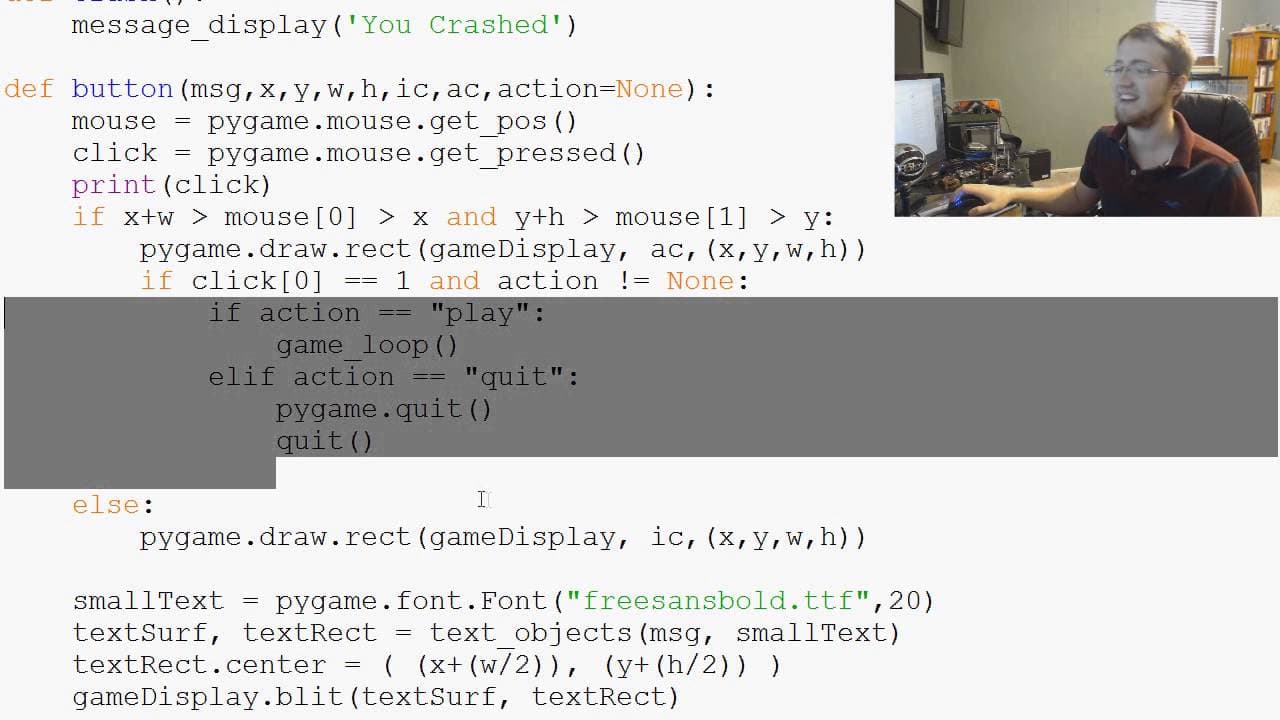
To add click functionality to buttons in PyGame, detect mouse clicks using pygame.mouse.get_pressed() and pass actions as parameters to the button function. Implement conditions within the button function to trigger different actions such as starting or quitting the game based on the button clicked.
Transcript
well hello there youtubers welcome to another PI game tutorial video in this video what we're doing is extending our button function right now obviously we've got our beautiful hover action going on it feels looks and feels like a button but doesn't quite act like a button so um we already know that there is a way to know where the mouse is because... Read More
Key Insights
- 🔄 PI Game does not have built-in button functionality, but it is possible to create functional buttons using mouse clicks and parameters.
- 🕵️ By using the "click" parameter in PI Game, buttons can successfully detect and handle mouse clicks.
- 👻 Adding parameters and actions to buttons allows for more interactive functionality in PI Game.
- 🔄 It is recommended to define separate functions for each button action for better organization and maintainability.
- 🥳 Predefined colors and rounded edges for buttons are not available in PI Game, but third-party modules may offer these features.
- 🦮 The tutorial video provides a helpful guide for understanding and implementing extended button functionality in PI Game.
- 🏛️ Although PI Game has many great features, the absence of built-in buttons is an area for improvement.
Install to Summarize YouTube Videos and Get Transcripts
Explore YouTube Video Summarizer or Get YouTube Transcript Extractor
Questions & Answers
Q: How can we detect button clicks in PI Game?
By using the "click" parameter in PI Game, specifically the click[0] attribute, we can determine if the left mouse button has been clicked.
Q: Can we add actions to buttons in PI Game?
Yes, by adding an "action" parameter to the button function, we can specify actions such as playing the game or quitting the program.
Q: What is the recommended way to handle multiple actions in buttons?
It is best to define separate functions for each action and pass the appropriate function as the "action" parameter in the button function.
Q: Does PI Game have built-in button functionality?
No, PI Game does not have built-in buttons, but this tutorial demonstrates how to create functional buttons using mouse clicks and parameters.
Summary & Key Takeaways
-
The tutorial video explains how to add click functionality to buttons in PI Game.
-
By using mouse position and the "click" parameter in PI Game, it is possible to detect and handle button clicks.
-
The video demonstrates how to add parameters and actions to buttons, such as playing the game or quitting the program.
Read in Other Languages (beta)
Share This Summary 📚
Summarize YouTube Videos and Get Video Transcripts with 1-Click
Try YouTube Summary with ChatGPT & Claude or YouTube Transcript Generator
Explore More Summaries from sentdex 📚






Summarize YouTube Videos and Get Video Transcripts with 1-Click
Try YouTube Summary with ChatGPT & Claude or YouTube Transcript Generator