How to Automate Customer Support Email in n8n
TL;DR
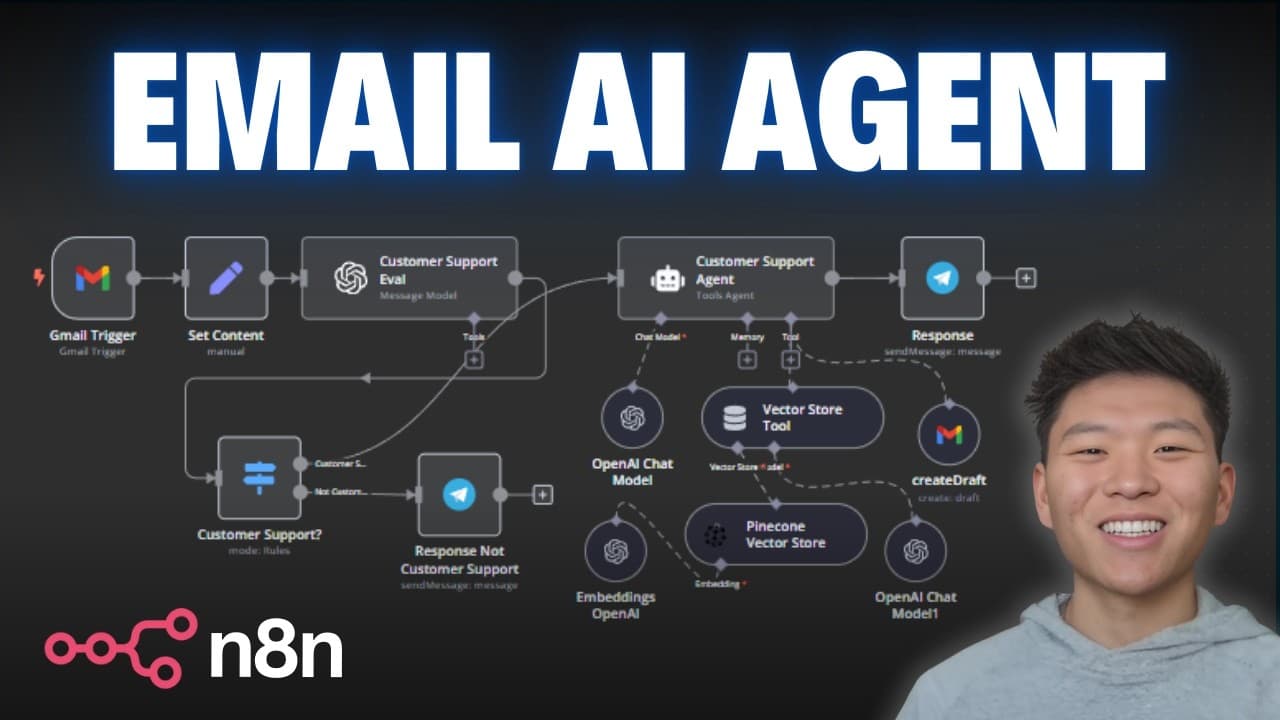
Use a Gmail trigger in n8n to capture each incoming email, classify it as customer support with an OpenAI model, and route it through a switch node. For support requests, an AI agent consults policies and FAQs in a vector database, creates a draft inside the original Gmail thread, and sends a Telegram or Slack notification so a person can review the response before sending it.
Transcript
hey guys today we're going to be going over this framework that's going to help you create different AI agents in order to automate your inbox in this workflow that we're going to be walking through step byep today it starts by watching for your emails and then it evaluates them to see if they're customer support related or not if they are it's goi... Read More
Key Insights
- The Gmail trigger is the workflow's starting point, executing the automation whenever a new message is received. It requires connected Google credentials and uses the message received event, allowing the system to process incoming emails without relying on manual execution or a scheduled trigger.
- Simplified Gmail output can remove important context from longer messages because the returned snippet may be cut short. Turning simplification off produces more detailed data, including the complete text needed by the language model to understand the customer's request accurately.
- Pinned test data is a reusable development aid in n8n. After an email trigger result is pinned, the same sample message remains available while other nodes are configured and tested, avoiding the need to fetch a new Gmail event whenever the workflow is refreshed.
- The Set Fields node makes Gmail data easier to inspect and reference by exposing selected values such as the email body and thread ID. The thread ID is especially important because the later Gmail action uses it to place the generated draft within the original conversation.
- The classification model is instructed to return a JSON field called customer support with either true or false. Structured JSON output makes the result directly addressable by later nodes, instead of leaving the classification embedded inside a general text content field.
- The switch node routes messages according to the Boolean customer support result. A true value enters the customer support path, where a response draft is created, while a false value can follow a separate path for notification or any other workflow logic.
- The customer support agent uses a vector database containing internal policies and FAQs to ground its response. This retrieval step gives the agent relevant business information for questions about matters such as order tracking and refund policies before it prepares the email draft.
- Human review remains part of the workflow because the agent creates a Gmail draft instead of immediately sending a reply. A Telegram or Slack notification supplies a summary and reports that the draft is ready, allowing the user to inspect and approve it first.
Install to Summarize YouTube Videos and Get Transcripts
Explore YouTube Video Summarizer or Get YouTube Transcript Extractor
Questions & Answers
Q: How do you trigger an email automation in n8n?
Add a Gmail trigger as the first node, connect the required Google credentials, and select the message received event. The workflow will then execute when an email arrives. During setup, fetch a test event to obtain a recent message. Pinning that event keeps its data available while you build and test the remaining workflow nodes.
Q: Why should simplified Gmail output be disabled in this workflow?
Simplified output can return only a shortened email snippet, which may omit part of a longer message. Disabling it exposes more detailed Gmail data and preserves the complete text. Although the resulting data is more complex to inspect, it gives the classification model and customer support agent the full context needed to evaluate and answer the request.
Q: Which email fields should be extracted before classification?
The demonstrated workflow extracts the email body and thread ID with a Set Fields node. The body supplies the actual request that the language model must classify. The thread ID identifies the original Gmail conversation, allowing the later Gmail tool to create its response draft in that same thread instead of treating it as an unrelated message.
Q: How does the workflow identify customer support emails?
An OpenAI message model receives the incoming email body and follows a system prompt that defines customer support topics. The examples include order status, damaged products, returns, refunds, and subscriptions. The model evaluates whether the message matches those topics and returns a customer support field containing a true or false Boolean value.
Q: Why does the classifier return its result as JSON?
JSON output creates a named customer support field that subsequent nodes can reference directly. Without structured output, the model may return general content containing text such as customer support true. Returning the classification as JSON makes the Boolean value explicit and allows the switch node to route the email cleanly according to whether that field is true or false.
Q: How does the switch node route classified emails?
The switch node reads the customer support Boolean produced by the evaluation step. When the value is true, the message follows the customer support output and reaches the agent that prepares a draft. When the value is false, it follows a separate non-customer-support output, which can be configured to send a notification or perform other workflow logic.
Q: How does the AI agent create an informed support reply?
The customer support agent searches a vector database that contains internal policies and FAQ information. It uses the retrieved material together with the customer's email to prepare a relevant response. In the demonstration, the incoming message asks about order tracking and the refund policy, and the generated draft addresses the information requested by that customer.
Q: How are AI-generated email responses reviewed before sending?
The Gmail tool creates a draft in the same thread as the original message by using its thread ID. It does not automatically send the response. Afterward, Telegram or Slack can notify the user, summarize what the email concerns, and report that a draft was created. The user can then open Gmail, review the response, and send it.
Summary & Key Takeaways
-
The workflow begins when Gmail receives a message. Disabling simplified output preserves the complete email content, which gives later nodes more context than a shortened snippet. A Set Fields node then extracts useful values, particularly the email body and thread ID, while pinned test data allows the workflow to be developed without repeatedly loading the trigger.
-
An OpenAI message model evaluates the extracted email body against defined customer support topics, including order status, damaged products, returns, refunds, and subscriptions. It returns a JSON field named customer support with a Boolean value. A switch node uses that value to route support and non-support messages through separate branches of the workflow.
-
When an email follows the customer support branch, an AI agent consults internal policies and FAQs stored in a vector database to prepare an accurate response. A Gmail tool saves the response as a draft in the original thread. Telegram or Slack then reports what happened, allowing a person to inspect and send the draft.
Read in Other Languages (beta)
Share This Summary 📚
Summarize YouTube Videos and Get Video Transcripts with 1-Click
Try YouTube Summary with ChatGPT & Claude or YouTube Transcript Generator
Explore More Summaries from Nate Herk | AI Automation 📚






Summarize YouTube Videos and Get Video Transcripts with 1-Click
Try YouTube Summary with ChatGPT & Claude or YouTube Transcript Generator