Create Stunning Backgrounds with One-Word Prompts
TL;DR
Generate vibrant desktop backgrounds effortlessly by using one-word prompts on MidJourney. Adding aspect ratios and RGB will enhance colorfulness, while emojis can bring unexpected creativity to your designs. Experiment with these techniques to unlock unique and eye-catching artwork.
Transcript
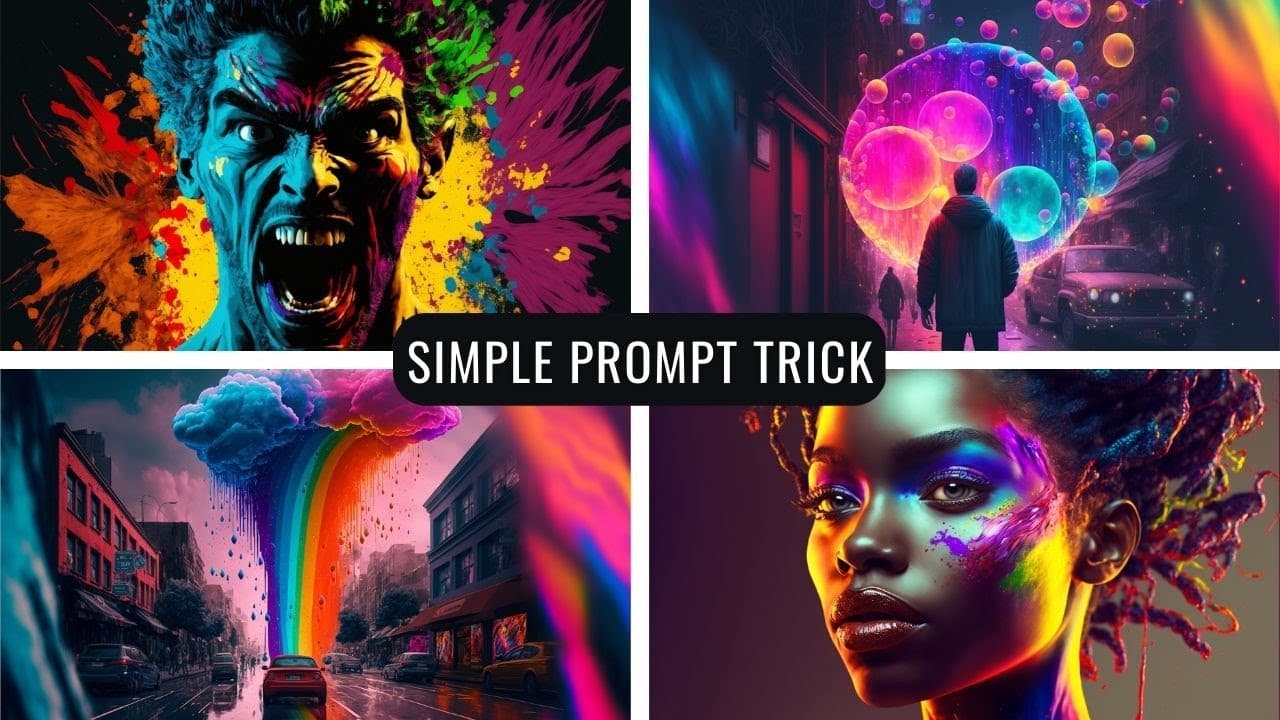
I'm constantly being asked in the comments how to get cool backgrounds like the backgrounds that I have in this video I'm going to show you how to make really really creative and colorful art like this and like these and like these ones like this and like these ones this video is going to be super quick and super to the point by the end of this vid... Read More
Key Insights
- 🎨 The trick to getting cool desktop backgrounds is to use one-word prompts in the mid-journey bot, such as "fantasy" or "beauty," and add the aspect ratio and RGB for more colorfulness.
- 🔮 You can generate amazing and colorful artwork by using mid-journey and adding prompts like "imagine fantasy" or "imagine beauty" with RGB and aspect ratio specifications.
- 🌌 Adding emojis as prompts in mid-journey can also result in interesting artwork, such as combining "fireworks" and "rainbow" for a colorful explosion in the clouds.
- 📚 Futuretools.io offers a prompt guide section with various resources for chat GPT, gpt3 playground, and other AI tools to experiment with.
- 💡 The AI art generated by mid-journey can be visually stunning, especially when using one-word prompts or emojis to spark the creative process.
- 🔑 If you're looking for colorful and attention-grabbing desktop backgrounds, go for less when it comes to prompts and let the AI generate imaginative results.
- ⚙️ The mid-journey bot is available for both premium and free versions, and you can experiment with various prompts and specifications to create unique artwork.
- 💻 The video suggests trying shorter videos that provide quick tips, and asks for feedback in the comments section on preferences and opinions.
Install to Summarize YouTube Videos and Get Transcripts
Explore YouTube Video Summarizer or Get YouTube Transcript Extractor
Questions & Answers
Q: How can you generate creative and colorful desktop backgrounds using AI?
To generate creative and colorful desktop backgrounds using AI, you can use one-word prompts and emojis as prompts. By inputting words like "fantasy" or emojis like fireworks and rainbow, you can generate stunning and unique artwork.
Q: Are there any specific settings or criteria that need to be considered when generating desktop backgrounds?
When generating desktop backgrounds, you can specify an aspect ratio, such as three-two, to ensure the image fits your screen properly. Additionally, adding RGB to your prompts can make the backgrounds more colorful and vibrant.
Q: Can you give examples of the types of desktop backgrounds that can be generated using AI?
Yes, using AI, you can generate desktop backgrounds featuring dragon heads made of trees, castles, colorful mushroom houses, rainbow explosions in the clouds, and even burger-eating burgers! The possibilities are endless and incredibly diverse.
Q: What is the role of mid-journey in creating these desktop backgrounds?
Mid-journey is a tool used in conjunction with AI to generate the desktop backgrounds. The creator mentions that it is beneficial to refer to previous videos on how to use mid-journey for setting it up.
Q: Can you use emojis as prompts for generating desktop backgrounds?
Yes, emojis can be used as prompts for generating desktop backgrounds. The video demonstrates using emojis like fireworks, rainbow, clown face, wolf, cheeseburger, and American flag to create unique and interesting designs.
Answer:
Q: How can one make their desktop backgrounds more vibrant and attention-grabbing using AI?
To make desktop backgrounds more vibrant and attention-grabbing using AI, the creator suggests adding RGB to the prompts. This adds more color to the generated artwork, making it more visually appealing.
Q: What other resources are available for generating prompts for AI desktop backgrounds?
In addition to using mid-journey, the creator recommends visiting futuretools.io, where there are 14 different prompt guide resources for various AI tools. These resources can provide additional inspiration and ideas for generating unique desktop backgrounds.
Summary & Key Takeaways
-
The video provides tips and tricks for creating unique and colorful desktop backgrounds using AI.
-
The creator recommends using one-word prompts, such as "fantasy," "beauty," and "dream," to generate stunning artwork.
-
Emojis can also be used as prompts to create interesting and unexpected designs.
Read in Other Languages (beta)
Share This Summary 📚
Summarize YouTube Videos and Get Video Transcripts with 1-Click
Try YouTube Summary with ChatGPT & Claude or YouTube Transcript Generator
Explore More Summaries from Matt Wolfe 📚




Summarize YouTube Videos and Get Video Transcripts with 1-Click
Try YouTube Summary with ChatGPT & Claude or YouTube Transcript Generator