How to Create Live Updating Matplotlib Graphs in Tkinter
TL;DR
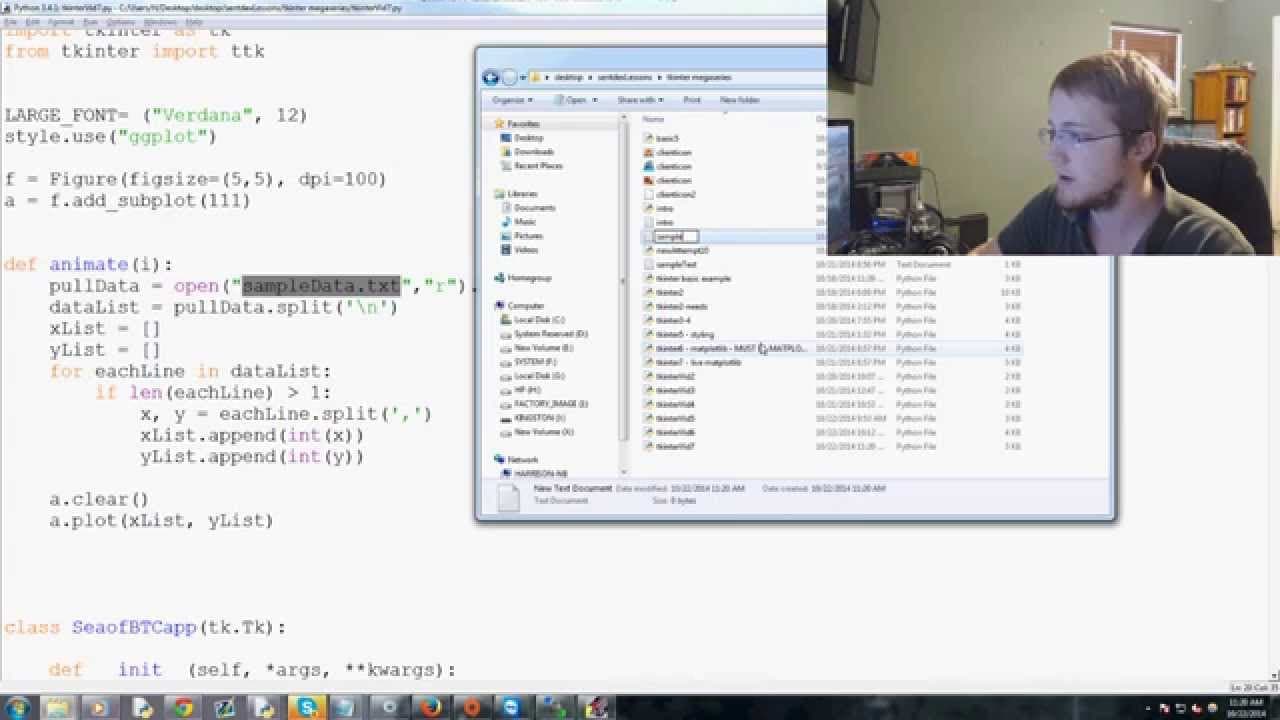
To create live updating graphs in Python using Matplotlib and Tkinter, use Matplotlib's animation function to update the graph at specified intervals. Start by importing the necessary libraries, defining the animate function, and processing data from a file. The graph will refresh automatically as new data is available, enhancing your application's data visualization capabilities.
Transcript
everybody what is going on welcome to another Python tutorial video with tkinter in this video what we're me doing is including not only we have we already included map hot lib but now we want to have matplotlib be live so I want to have like live updates happening to our matplotlib graph so how do we do that well the first thing that we're going t... Read More
Key Insights
- 👻 Matplotlib animation in Tkinter allows for creating live updating graphs in Python.
- 📈 The "style" module in Matplotlib provides different visual styles for the graphs.
- 😫 The animation function updates the graph based on the input data set at a specified interval.
- 📈 The process involves pulling and processing data, clearing the graph, and plotting the updated data.
- 🏷️ Customization options include changing the interval, adding labels and titles, and adjusting colors and markers.
- 👨💻 The code used in the tutorial can be modified to handle different data sources and customize the graph further.
- 🫒 Live updating graphs can enhance data visualization and provide real-time insights.
Install to Summarize YouTube Videos and Get Transcripts
Explore YouTube Video Summarizer or Get YouTube Transcript Extractor
Questions & Answers
Q: How can I create live updating graphs in Python?
You can use the Matplotlib library along with the Tkinter module to create live updating graphs. The animation function in Matplotlib allows for real-time updates based on a data set.
Q: What is the purpose of using Matplotlib animation in Tkinter?
Matplotlib animation in Tkinter allows for updating the graph in real-time based on changes in the data set. It provides a more dynamic and interactive visualization experience.
Q: How do I change the style of the graph in Matplotlib?
You can change the style of the graph by importing the "style" module from Matplotlib and using the "style.use" function. There are various styles available, such as "grayscale," "ggplot," and "dark_background."
Q: Can I customize the live updating graph further?
Yes, you can customize the live updating graph by modifying the code. For example, you can change the interval between updates, add labels and titles, and adjust the colors and markers used in the graph.
Summary & Key Takeaways
-
This tutorial video demonstrates how to include live updates to a Matplotlib graph using the animation function in Tkinter.
-
The video explains the process of importing the necessary libraries and setting the style for the graph.
-
The tutorial walks through the steps of pulling and processing data, clearing the graph, and plotting the updated data.
Read in Other Languages (beta)
Share This Summary 📚
Summarize YouTube Videos and Get Video Transcripts with 1-Click
Try YouTube Summary with ChatGPT & Claude or YouTube Transcript Generator
Explore More Summaries from sentdex 📚






Summarize YouTube Videos and Get Video Transcripts with 1-Click
Try YouTube Summary with ChatGPT & Claude or YouTube Transcript Generator