How to Create Viral AI Meme Videos with Pika 1.5
TL;DR
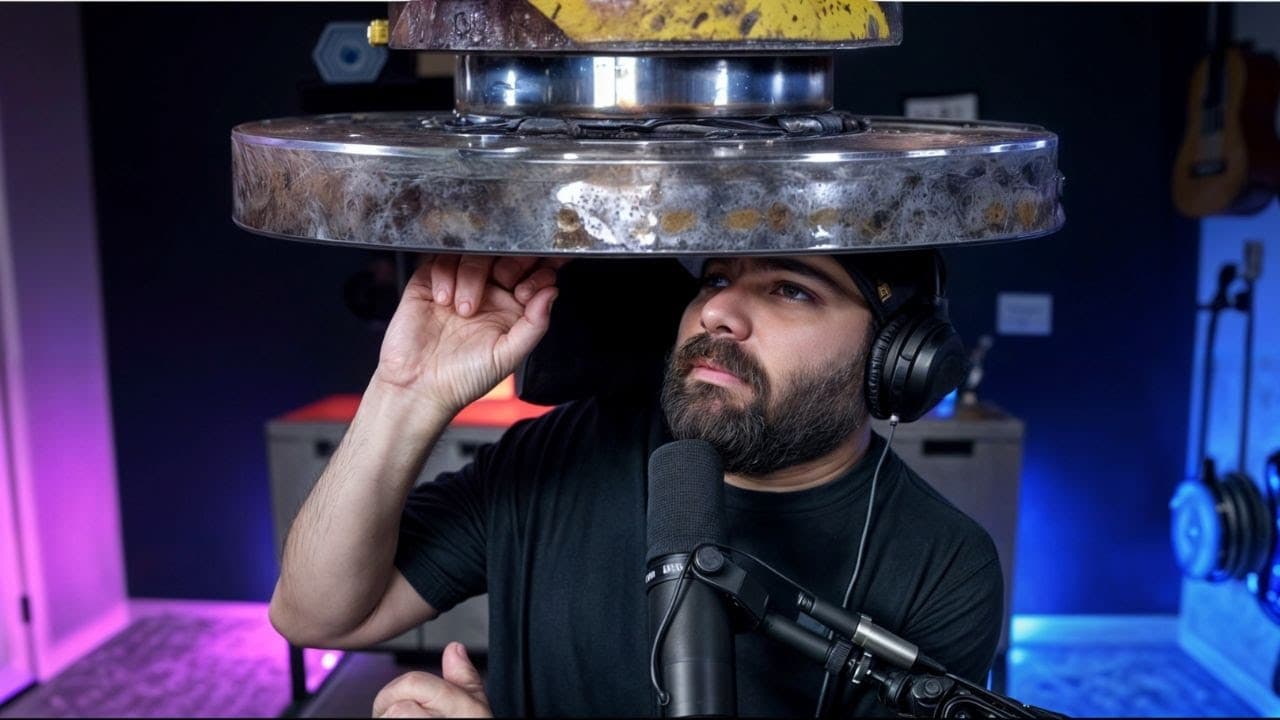
Creating viral AI meme videos is easy with Pika 1.5, which allows you to apply fun effects like melting and crushing to images. While the tool is currently free, users may experience slow video generation times. Upgrading to the Pro Plan can improve speed, but the text-to-video feature is still unreliable.
Transcript
all right I got a super quick but pretty fun thing to show off today maybe you've seen some of these going a little bit viral on various social media platforms videos like this one from Justin Hart that shows off various landmarks sort of inflating and then flying away I mean they look pretty cool and they're surprisingly easy to ma... Read More
Key Insights
- Pika 1.5 is a tool that allows users to create viral meme videos with effects like inflating, melting, and crushing objects or people.
- The tool offers various effects such as 'melt it', 'inflate it', 'explode it', 'squish it', and 'crush it', which can be applied to images.
- The Pika 1.5 model is currently available for free, though it is expected to become a paid service eventually.
- Users have reported slow generation times for videos, with some taking up to three hours to complete.
- Upgrading to the Pro Plan in Pika can speed up the generation process, particularly for Pika effect videos.
- Text-to-video generation with Pika 1.5 is currently unreliable, with many attempts resulting in errors or long wait times.
- The video creation process involves using a freeze frame from a video, applying an effect in Pika, and editing the results in video software like Da Vinci Resolve.
- Despite some technical issues, Pika 1.5 provides a fun and creative way to make engaging and shareable content.
Install to Summarize YouTube Videos and Get Transcripts
Explore YouTube Video Summarizer or Get YouTube Transcript Extractor
Questions & Answers
Q: What is Pika 1.5?
Pika 1.5 is an AI tool that allows users to create viral meme videos by applying various effects to images. These effects include inflating, melting, exploding, squishing, and crushing, which transform the images into engaging and shareable content. The tool is currently available for free, although it is expected to become a paid service in the future.
Q: How does Pika 1.5 generate videos?
Pika 1.5 generates videos by applying selected effects to images. Users can choose from effects like 'melt it', 'inflate it', 'explode it', and more. The process involves selecting an effect, applying it to an image, and then generating the video. The tool also includes sound effects to enhance the experience, although video generation can be slow, taking up to three hours in some cases.
Q: Can Pika 1.5 create text-to-video content?
Currently, Pika 1.5 struggles with generating text-to-video content. Many attempts result in errors or long wait times, suggesting that the feature is either not fully functional or experiencing high demand. Users have reported similar issues, indicating that text-to-video generation might require further development or server capacity improvements.
Q: How can video generation speed be improved in Pika 1.5?
Upgrading to the Pro Plan in Pika 1.5 can improve video generation speed. The Pro Plan offers faster generation times and access to both Pika 1.5 and 1.0 models. Users have reported that upgrading speeds up the process for Pika effect videos, although text-to-video generation remains problematic despite the upgrade.
Q: What editing software is recommended for use with Pika 1.5?
Da Vinci Resolve is recommended for editing videos created with Pika 1.5. It is a free video editing software that allows users to combine the generated clips with original videos, apply additional effects, and create seamless transitions. Other software like CapCut can also be used for similar purposes.
Q: What are some examples of effects available in Pika 1.5?
Pika 1.5 offers a range of effects that can be applied to images, including 'melt it', 'inflate it', 'explode it', 'squish it', and 'crush it'. These effects allow users to transform images into entertaining videos by simulating actions such as melting, inflating, or crushing objects or people, making them appear like animated memes.
Q: Is Pika 1.5 a paid service?
As of the recording of the tutorial, Pika 1.5 is available for free while in beta. However, it is expected to become a paid service eventually. Users can upgrade to the Pro Plan for faster video generation and additional features, indicating that some aspects of the service may require payment in the future.
Q: How can users create a 'crush' effect video with Pika 1.5?
To create a 'crush' effect video with Pika 1.5, users need to take a freeze frame from a video, apply the 'crush it' effect in Pika, and then edit the results using a video editing software like Da Vinci Resolve. This process involves combining the original video with the generated clip to create a seamless transition between normal footage and the crushing effect.
Summary & Key Takeaways
-
Pika 1.5 is an AI tool that allows users to create viral meme videos by applying various effects to images. The tool is currently free, but video generation can be slow.
-
The tutorial explains how to use Pika 1.5 to create videos with effects like inflating, melting, and crushing, and how to edit these videos using software like Da Vinci Resolve.
-
While upgrading to Pika's Pro Plan can speed up video generation, the text-to-video feature remains unreliable. Despite this, Pika 1.5 offers an innovative way to produce creative content.
Read in Other Languages (beta)
Share This Summary 📚
Summarize YouTube Videos and Get Video Transcripts with 1-Click
Try YouTube Summary with ChatGPT & Claude or YouTube Transcript Generator
Explore More Summaries from Matt Wolfe 📚


Summarize YouTube Videos and Get Video Transcripts with 1-Click
Try YouTube Summary with ChatGPT & Claude or YouTube Transcript Generator