How to Build a Free AI Voice Note App with Apple Shortcuts
TL;DR
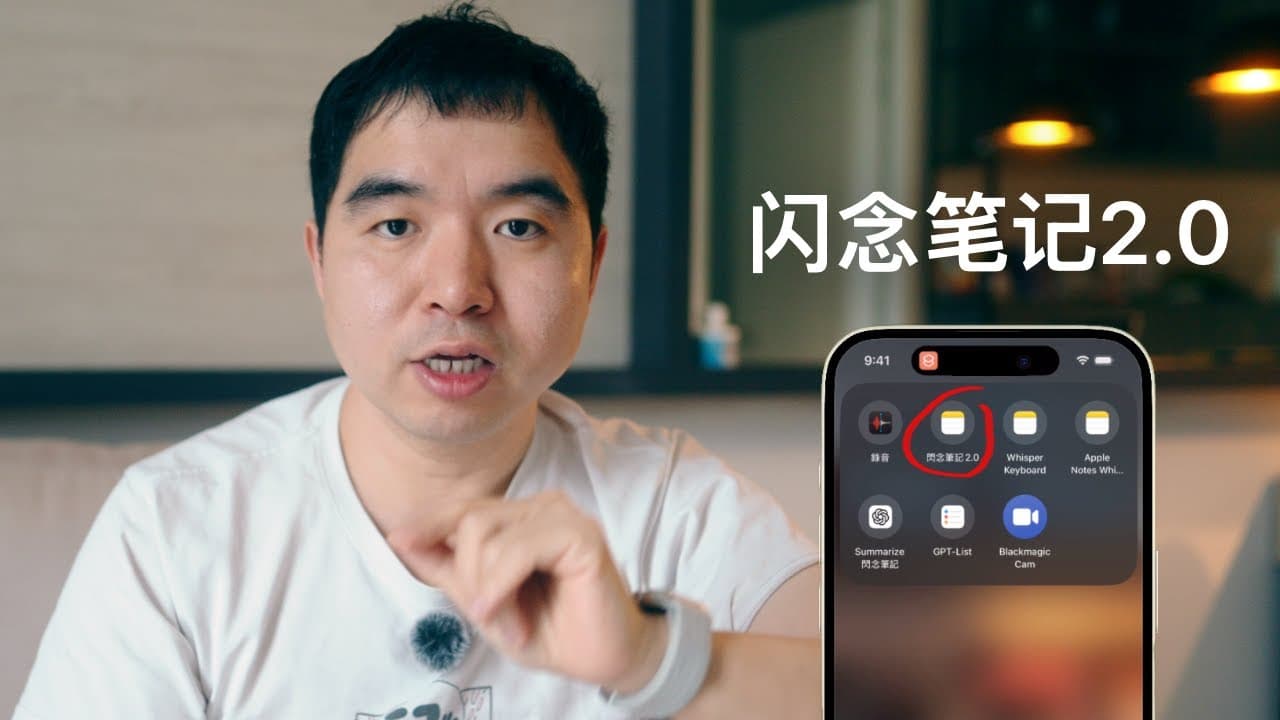
Flash Note 2.0 is a free suite of five Apple Shortcuts that captures voice ideas via iPhone, Apple Watch, or Mac, transcribes them with OpenAI's Whisper into Apple Notes, and extracts tasks into Apple Reminders. It only charges for API usage instead of a monthly fee, and even saves your recording if transcription fails so no idea is lost.
Transcript
As a creator, I have a secret efficiency software that I use every day, It’s my "Flash Note," something I whipped up a year ago with ChatGPT and Apple’s Shortcuts Up to now, more than 7,000 people have downloaded this shortcut It’s gotten rave reviews. Over the past year, I’ve kept improving it and added new features Today, I’m bringing you its 2.0... Read More
Key Insights
- Flash Note is a voice-based inspiration catcher built with ChatGPT and Apple Shortcuts that has been downloaded by more than 7,000 people, letting users capture ideas anytime by iPhone, Apple Watch, or Mac and store them in Apple Notes.
- Flash Note 2.0 is a five-shortcut efficiency suite: an upgraded main Flash Note shortcut, a new 'Add/Transcribe to Note' shortcut for Apple Watch, and a redesigned Whisper keyboard shortcut, all given away for free.
- The core workflow captures voice, sends audio to OpenAI's Whisper model for transcription, saves it in a daily note inside an Apple Notes folder, then uses ChatGPT to summarize ideas and pull out tasks into Apple Reminders via 'GPT List'.
- A new target-note feature lets users add transcribed ideas to any existing Apple Note, not just the default Flash Note, so drafts like interview questions can be updated by voice on the fly.
- Flash Note 2.0 always saves the raw voice recording even when transcription fails from network or OpenAI API issues, so no inspiration is lost and the audio can be retranscribed later.
- The 'Add/Transcribe to Note' shortcut lets Apple Watch record ideas with zero delay; the creator handles about six recordings at once, recommending each stay under two and a half minutes for best results.
- The shortcut can batch-process audio or video files under 25MB and also capture screenshots, articles, book recommendations from X, or YouTube videos directly into a target note.
- Pairing Apple Shortcuts with AI APIs is presented as the best way for non-coders to build usable AI apps, since API-based pricing means paying only for what you use, unlike competitors that lock users into monthly fees.
Install to Summarize YouTube Videos and Get Transcripts
Explore YouTube Video Summarizer or Get YouTube Transcript Extractor
Questions & Answers
Q: What is Flash Note and how does it work?
Flash Note is an inspiration-catching tool built with ChatGPT and Apple Shortcuts. Whenever an idea strikes, you capture it by voice on an iPhone, Apple Watch, or Mac. The audio is sent to OpenAI's Whisper model, which transcribes it into text saved in a Flash Note folder in Apple Notes. ChatGPT can then polish and summarize the ideas and pull out tasks that get added to a To-Do List in Apple Reminders. More than 7,000 people have downloaded the shortcut.
Q: How to capture an idea using Flash Note 2.0?
When inspiration hits, press the iPhone's Action Button, or set a double-tap on the phone's back to open the menu, then pick Flash Note 2.0. The shortcut asks for your target note, so choose Flash Note, speak your idea into the screen, and tap the screen to stop recording. The audio is sent to OpenAI's Whisper model to become text and is saved in a note named after that day inside the Flash Note folder in Apple Notes.
Q: What new features does Flash Note 2.0 add over 1.0?
Flash Note 2.0 lets you choose target notes other than the default Flash Note, so ideas can be added to any note you are drafting. It guarantees your voice recording is fully saved even if the shortcut, network, or OpenAI API fails, so no inspiration is lost and you can retranscribe later. It also introduces a new 'Add/Transcribe to Note' shortcut that works with Apple Watch, plus a redesigned Whisper keyboard. In total the suite now has five shortcuts.
Q: How does Flash Note work with Apple Watch?
The new 'Add/Transcribe to Note' shortcut lets Apple Watch team up with Flash Note. When an idea hits, lift your wrist and record on the Watch, recording one after another with no interruptions. When ready to sort them, open Voice Memo on your iPhone, find Watch Recordings, pick the ones you want, hit Share, choose 'Add/Transcribe to Note,' and select your target note. The creator handles about six recordings at once and recommends keeping each under two and a half minutes.
Q: What happens if the transcription fails due to network or API issues?
Flash Note 2.0 ensures that even if it messes up because OpenAI's API gets shaky, the network cuts out, or the shortcut glitches, your voice recording is still fully saved in the note. No inspiration is lost. You can later retranscribe the saved voice file by long pressing the recording, tapping Share, choosing 'Add/Transcribe to Note,' and picking your target note. This backup and retranscribe safety net also applies to the Whisper keyboard recordings.
Q: What is the Whisper keyboard shortcut used for?
The Whisper keyboard lets you use OpenAI's Whisper transcription as a voice input tool inside any app, not just Apple Notes. You fire up the Whisper keyboard shortcut on your phone, talk into it, tap the screen to stop, and the transcribed text is dumped into your clipboard so you can paste it into any text box, such as Milanote. In the new version, recordings and transcribed text are backed up to a note in the Flash Note folder so you can retranscribe if network or app issues occur.
Q: Why does the creator prefer Flash Note over competing note apps?
The creator says rival voice-note apps have two big flaws. First, many lock you into monthly fees, while Flash Note only charges for API use, so you pay what you use, nothing if you don't, and it is cheap. Second, competitors treat transcription as the main feature but bolt it onto clunky note systems, forcing you to change your workflow and few match Apple Notes' experience or sync with Apple's ecosystem. Because Flash Note is built on Apple Shortcuts, it grows and shifts in real time to match the user's ideas.
Q: What lessons did the creator learn from using AI tools over the past year?
The creator shares three takeaways. First, pairing Apple Shortcuts with AI APIs is the best way for regular, non-coding people to build their own usable AI apps within Apple's ecosystem, sometimes better than paid apps. Second, in the AI age software should fit and evolve with your workflow rather than forcing you into rigid rules. Third, while AI agents are hyped, the creator cools that hype: agents work well for basic content and repetitive tasks but are not yet reliable for high-value creative work.
Summary & Key Takeaways
-
Flash Note is a personal efficiency tool built a year ago with ChatGPT and Apple Shortcuts, downloaded by over 7,000 people. It captures ideas by voice on iPhone, Apple Watch, or Mac, transcribes them with OpenAI's Whisper into Apple Notes, and extracts tasks into a To-Do List in Apple Reminders.
-
Version 2.0 is now a five-shortcut suite. It adds the ability to target any Apple Note, guarantees the raw voice recording is saved even if transcription fails so nothing is lost, and can retranscribe later. A new 'Add/Transcribe to Note' shortcut pairs with Apple Watch for instant, delay-free recording.
-
The creator shares three AI lessons: Apple Shortcuts plus AI APIs is the best route for regular people to build ready-to-use AI apps; software should adapt to your workflow rather than force you into rigid rules; and AI agent hype should be cooled since agents suit repetitive tasks more than high-value creative work.
Read in Other Languages (beta)
Share This Summary 📚
Summarize YouTube Videos and Get Video Transcripts with 1-Click
Try YouTube Summary with ChatGPT & Claude or YouTube Transcript Generator
Explore More Summaries from 一口新飯 📚





Summarize YouTube Videos and Get Video Transcripts with 1-Click
Try YouTube Summary with ChatGPT & Claude or YouTube Transcript Generator