How to Use AI for Easy Graphic Design
TL;DR
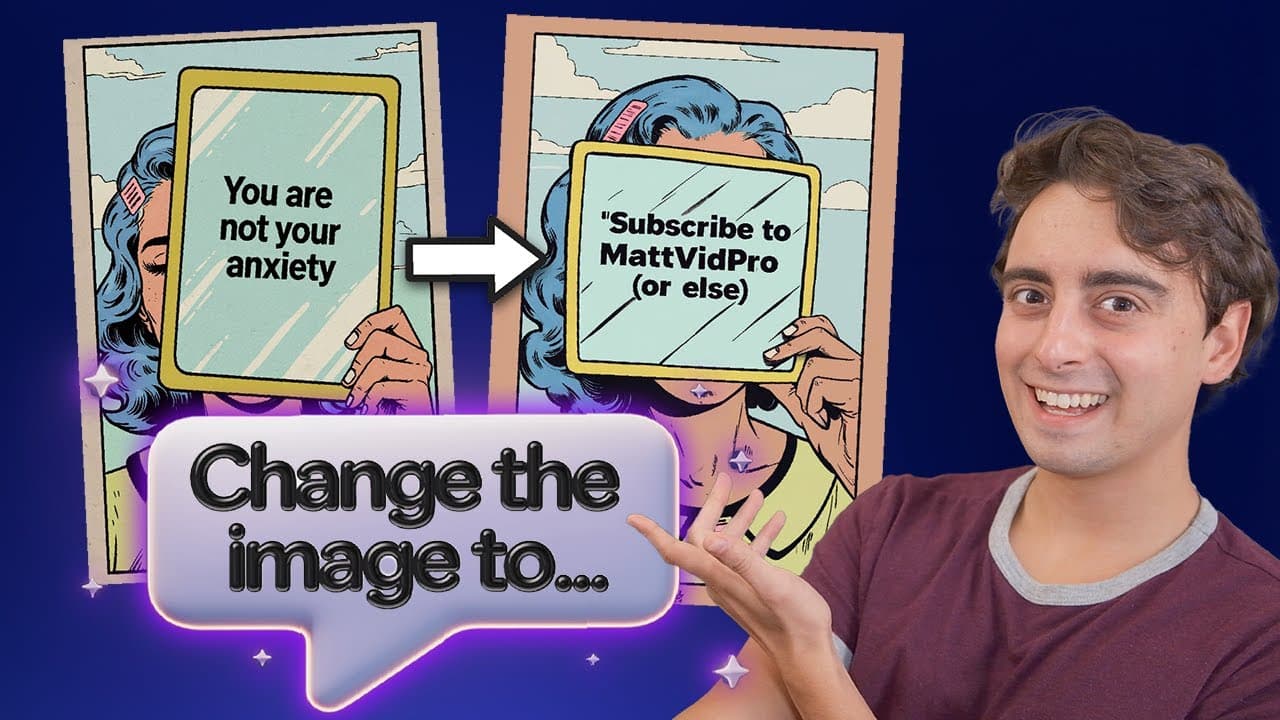
Playground Design is a user-friendly AI-based design tool that simplifies creating complex designs through natural language prompts. It allows users to make logos, posters, and thumbnails easily, making it accessible even for those new to AI. Compared to other tools, Playground AI stands out for its simplicity and efficiency, offering a glimpse into the future of AI in design.
Transcript
this this right here is a perfect representation of why AI democratization is so awesome playground Design This is an AI based designer that is incredibly easy to use I mean not just among AI tools but in general among design tools as a whole this is probably the easiest way to do Advanced things I've seen let me show you how it works let's say I w... Read More
Key Insights
- Playground Design is an AI-based tool that simplifies complex design tasks through natural language prompts.
- Users can create logos, posters, and thumbnails easily, making it accessible to those unfamiliar with AI.
- Compared to other AI tools, Playground AI stands out for its simplicity and efficiency.
- The tool allows for advanced customization while maintaining the original design style.
- Playground Design supports various design scenarios, including social media posts and YouTube thumbnails.
- The platform offers limited free use with paid plans for more extensive features.
- AI technology in design is advancing rapidly, making tools like Playground Design more powerful and user-friendly.
- The video encourages viewers to try the tool and share their creations, highlighting community engagement.
Install to Summarize YouTube Videos and Get Transcripts
Explore YouTube Video Summarizer or Get YouTube Transcript Extractor
Questions & Answers
Q: How does Playground Design simplify graphic design?
Playground Design simplifies graphic design by utilizing natural language prompts, allowing users to create complex designs like logos and thumbnails without needing advanced skills. This approach makes the tool accessible to beginners, enabling them to produce high-quality designs efficiently while maintaining the original style.
Q: What makes Playground AI stand out from other AI tools?
Playground AI stands out due to its simplicity and efficiency in design creation. Unlike other AI tools that require technical knowledge or prompting skills, Playground AI allows users to interact with the tool using straightforward text prompts, making it user-friendly and accessible to a broader audience.
Q: What are the limitations of Playground Design's free version?
Playground Design's free version offers a limited number of uses, restricting the extent to which users can explore its features. For more comprehensive access, including advanced customization options and additional templates, users need to subscribe to the paid plans, which offer more extensive capabilities.
Q: How does Playground Design handle style consistency in designs?
Playground Design maintains style consistency by using AI to adhere to the original design's style, colors, and elements. The tool can modify specific aspects, such as text or objects, without altering the overall aesthetic, ensuring that the final output remains cohesive and visually appealing.
Q: What advanced features does Playground Design offer?
Playground Design offers advanced features like logo and thumbnail creation, social media post designs, and the ability to modify existing templates. It also includes a resize feature for aspect ratio adjustments and supports natural language prompts for seamless design customization, making it versatile for various design tasks.
Q: How does Playground Design compare to Ideogram AI?
Compared to Ideogram AI, Playground Design is more user-friendly and requires less technical knowledge. While Ideogram AI may offer powerful image generation capabilities, Playground Design excels in ease of use, allowing users to create and customize designs using simple text prompts, making it ideal for beginners.
Q: Why is AI democratization important in design tools?
AI democratization is crucial in design tools because it makes advanced technology accessible to a wider audience, including those without technical expertise. By simplifying the design process, tools like Playground Design empower more people to engage in creative tasks, fostering innovation and inclusivity in the design industry.
Q: What future developments are anticipated for AI in design?
Future developments for AI in design are expected to include even more refined tools that offer greater ease of use and customization. As AI technology advances, design tools will likely become more intuitive, allowing users to produce high-quality designs effortlessly, regardless of their experience level, further democratizing the creative process.
Summary & Key Takeaways
-
Playground Design is an AI-based tool that simplifies complex design tasks through natural language prompts, making it accessible even for beginners. Users can create logos, posters, and thumbnails easily, maintaining original design styles. The tool stands out for its simplicity and efficiency, offering a glimpse into the future of AI in design.
-
Compared to other AI tools like Ideogram AI and ChatGPT, Playground AI is more user-friendly and efficient. It supports various design scenarios, including social media posts and YouTube thumbnails, and allows for advanced customization. The platform offers limited free use with paid plans for more features.
-
AI technology in design is advancing rapidly, making tools like Playground Design increasingly powerful and user-friendly. The video encourages viewers to try the tool and share their creations, highlighting community engagement and the potential of AI democratization in design.
Read in Other Languages (beta)
Share This Summary 📚
Summarize YouTube Videos and Get Video Transcripts with 1-Click
Try YouTube Summary with ChatGPT & Claude or YouTube Transcript Generator
Explore More Summaries from MattVidPro 📚

Summarize YouTube Videos and Get Video Transcripts with 1-Click
Try YouTube Summary with ChatGPT & Claude or YouTube Transcript Generator