How to Automate AI Ad Creation with n8n
TL;DR
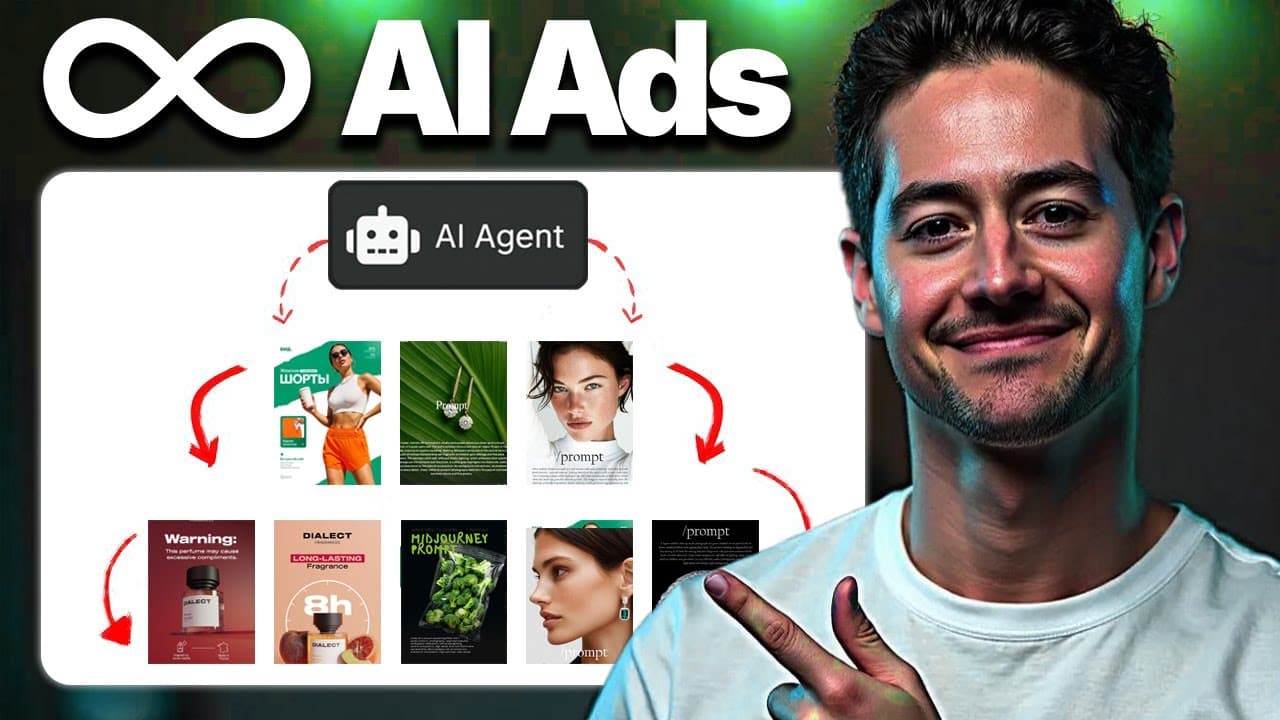
Build the workflow in n8n by scraping static Facebook ads through Apify, organizing the source files in Google Drive and Sheets, analyzing each image with OpenAI, and generating remixed creatives with GPT Image 1. Because bulk outputs vary in quality, generate multiple variants from every source ad, select the strongest results manually, and pass the organized assets to a PPC team or client.
Transcript
What's going on everybody? In this video, I'm going to show you an end toend ad library scraper and then AI image spinner system that I built entirely in NADN. If you guys stick until the end, I will be giving you guys the free template down below. This system is a live build, so I actually run you guys through my logic. I keep in any detours that ... Read More
Key Insights
- The workflow is divided into setup and production stages. The setup stage creates a Google Drive folder and a Google Sheet with tracking headers, while the production stage scrapes ads, analyzes images, creates prompts, generates variants, and stores the resulting assets.
- Apify supplies the Facebook Ad Library data through a rented scraper. Because n8n does not provide a built-in Apify module in the demonstrated setup, the workflow connects to the scraper through an HTTP request configured from Apify's API documentation.
- The Facebook Ad Library search URL determines which advertisements enter the collection process. Search terms can target a market such as agencies, but irrelevant results and video advertisements may still appear, so the workflow needs filtering before image analysis and generation.
- Static image ads are the intended inputs for this workflow. The creator filters out videos because the available technology is described as insufficient for reliably recreating or spinning video advertisements, although other platforms and formats could potentially be explored separately.
- OpenAI vision analysis converts each collected advertisement into a description that can be reused as a generation prompt. The description is then spun by changing elements of the creative, giving the image model instructions for producing customized variants from the source advertisement.
- GPT Image 1 receives the original image and a spun prompt through an edit endpoint. The generated result is saved as a new advertisement, allowing the workflow to retain useful aspects of an existing creative while producing a modified asset for another brand or offer.
- Bulk generation addresses inconsistent output quality by creating many alternatives from each source. The demonstrated approach may produce 3, 4, 10, or 500 variants, after which a person reviews the results and chooses the strongest creative instead of expecting a perfect first attempt.
- Google Drive and Google Sheets provide the workflow's organizational layer. Source ads, remade images, and tracking information remain accessible in a structured system that can support review, performance tracking, and handoff to a PPC team member or client.
Install to Summarize YouTube Videos and Get Transcripts
Explore YouTube Video Summarizer or Get YouTube Transcript Extractor
Questions & Answers
Q: How do you automate AI ad creation with n8n?
Create an initial n8n flow that makes a Google Drive folder and a Google Sheet with the required tracking headers. Use an HTTP request to run a Facebook Ad Library scraper on Apify, download suitable static images, and analyze each one with OpenAI. Spin the resulting descriptions into new prompts, send those prompts and images to the GPT Image 1 edit endpoint, then save and log the outputs.
Q: How does the n8n workflow collect Facebook ads?
The workflow starts with a Facebook Ad Library search URL based on a chosen term, such as agency. That URL is submitted to a Facebook Ad Library scraper available through Apify. Because the demonstrated n8n environment lacks a built-in Apify module, an HTTP request calls the scraper through its API. The returned records include advertisement links, image data, advertiser information, categories, and other available fields.
Q: Why does the workflow filter out video advertisements?
The system is designed around static image analysis and image editing, so video advertisements do not fit its main processing path. The creator says that video recreation or spinning could be attempted, but considers the technology insufficient for producing consistently strong results at that point. Filtering videos keeps the workflow focused on assets that OpenAI vision and the GPT Image 1 edit endpoint can process as demonstrated.
Q: How are source ads converted into new AI creatives?
Each source image is downloaded and analyzed with an OpenAI vision model, which produces a description of the advertisement. The workflow then spins that description by modifying its wording or creative instructions. It submits the original image together with the spun prompt to the GPT Image 1 edit endpoint. The returned image becomes a remade advertisement that can be stored, reviewed, and used as a candidate creative.
Q: Why should the workflow generate several variants per ad?
AI-generated creatives do not always look polished or remain sufficiently close to their sources on the first attempt. The workflow manages that limitation by producing several alternatives from every source advertisement. The creator suggests quantities such as 3, 4, 10, or 500 variants. A person can then compare the results, choose the best image, and move that selected creative into the campaign or client handoff process.
Q: How are generated ads organized and tracked?
The workflow creates a dedicated Google Drive folder for storing source information and generated assets. It also creates a Google Sheet with headers that support structured tracking. Each remade advertisement can be listed beside its source, along with the information needed for review and later performance tracking. This organization makes the outputs easier to give to a PPC team member or deliver to a client.
Q: Can the workflow scrape ad platforms besides Facebook?
The demonstrated build uses a Facebook Ad Library scraper, but the Apify marketplace shown in the walkthrough also contains scrapers for Google, LinkedIn, and Twitter ads. The creator also considers potential applications involving Instagram, Reddit, Quora, and static Snapchat advertisements. These alternatives are presented as possibilities rather than completed integrations, so each would require an appropriate scraper and adjustments to the n8n workflow.
Q: What parts of PPC agency work could this automation reduce?
The creator estimates that the system could eliminate 60 to 70% of an entire PPC agency's job because agency work often includes finding competitor advertisements, identifying creatives that appear to work, and manually producing variations. The automation performs much of that collection, analysis, prompt creation, generation, storage, and tracking, while leaving a person responsible for reviewing outputs and selecting the strongest candidates.
Summary & Key Takeaways
-
The automation begins by creating a Google Drive folder and a Google Sheet with tracking headers. It then calls an Apify Facebook Ad Library scraper through an HTTP request in n8n, retrieves ad records and image URLs, excludes unsuitable formats such as videos, and organizes the collected source material for later processing.
-
Each downloaded image is analyzed with an OpenAI vision model to produce a reusable description. The workflow then spins that description into modified prompts and sends the source image with a spun prompt to the GPT Image 1 edit endpoint, producing new advertisements that preserve useful elements while adapting the creative.
-
Generated ads are saved in a designated Google Drive folder and recorded beside their sources in Google Sheets. Since individual generations may not look polished, the system can create 3, 4, 10, or 500 variants per source. A person then selects the strongest option for a client or PPC campaign.
Read in Other Languages (beta)
Share This Summary 📚
Summarize YouTube Videos and Get Video Transcripts with 1-Click
Try YouTube Summary with ChatGPT & Claude or YouTube Transcript Generator
Explore More Summaries from Nick Saraev 📚
Summarize YouTube Videos and Get Video Transcripts with 1-Click
Try YouTube Summary with ChatGPT & Claude or YouTube Transcript Generator