Introduction and basic bot - making Discord bots with Discordpy p.1
TL;DR
Learn how to install and use Discord Pie 1.0 to create bots for Discord servers.
Transcript
what's going on everybody and welcome to a discord pie tutorial discord pies used to make BOTS in this cord so that's what we're gonna be working on and let's just go ahead and jump into it so first of all as one does when they're trying to install things they go to the documentation and lo and behold this is not what you want so currently the disc... Read More
Key Insights
- 🤖 Discord Pie is a versatile Python library for creating bots that can automate tasks, interact with users, and perform various functions within a Discord server.
- 🥶 Installation of Discord Pie 1.0 can be tricky, as the official documentation may lead to the older version 0.16 instead of the desired version.
- 🥶 Cloning the GitHub repository is recommended for a hassle-free installation of Discord Pie 1.0.
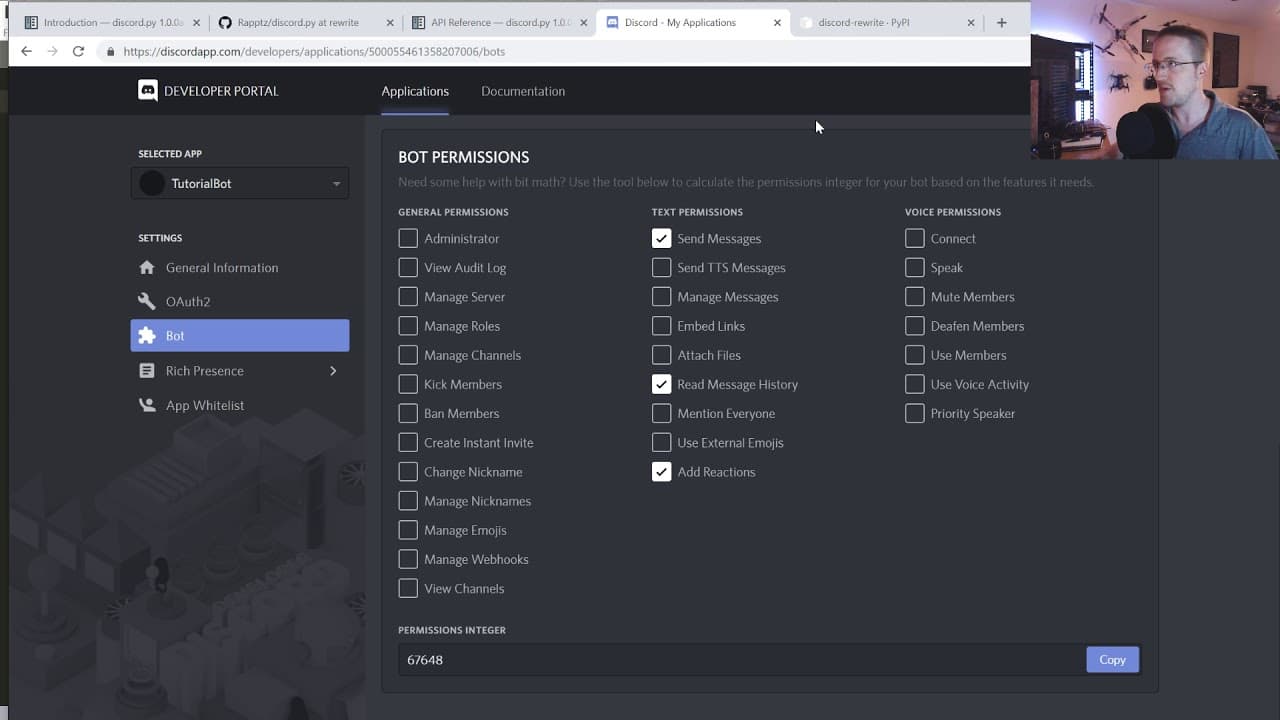
- 🤖 To create a Discord application and a bot, users need to go to the Discord Developer Portal, create an application, add a bot, and authorize it to join their server.
Install to Summarize YouTube Videos and Get Transcripts
Explore YouTube Video Summarizer or Get YouTube Transcript Extractor
Questions & Answers
Q: What is Discord Pie and what is its purpose?
Discord Pie is a Python library used to create bots for Discord servers. It allows users to automate tasks, interact with users, and perform various functions within a Discord server.
Q: How do I install Discord Pie 1.0?
To install Discord Pie 1.0, it is recommended to clone the GitHub repository or download the zip file. Then, use the command-line interface to run "pip install -r requirements.txt" to install the necessary dependencies.
Q: How do I create a Discord application and a bot within it?
Go to discordapp.com/developer/applications and click on "Create an application." Add a name for the application and copy the client ID. Then, go to the "Bot" section, click "Add Bot," and copy the bot token. Configure the required bot permissions, and save the permissions integer.
Q: How can I authorize the bot to join my Discord server?
Use the provided URL with the permissions integer and client ID to authorize the bot on your server. Click on the link, verify that you are not a robot, and authorize the bot to join the server.
Q: How can I make the bot respond to specific messages?
In the code, you can define specific commands or phrases to trigger the bot's response. For example, you can use an if statement to check if a certain phrase is in the message content and have the bot respond accordingly.
Summary & Key Takeaways
-
The video tutorial covers the installation process for Discord Pie 1.0 and explains the differences between versions.
-
It recommends cloning the GitHub repository to ensure the installation of the correct version.
-
The tutorial provides step-by-step instructions for setting up a Discord application and a bot within it.
-
It demonstrates how to write basic code to log in to the bot and respond to messages.
Read in Other Languages (beta)
Share This Summary 📚
Summarize YouTube Videos and Get Video Transcripts with 1-Click
Try YouTube Summary with ChatGPT & Claude or YouTube Transcript Generator
Explore More Summaries from sentdex 📚






Summarize YouTube Videos and Get Video Transcripts with 1-Click
Try YouTube Summary with ChatGPT & Claude or YouTube Transcript Generator