How to Replace Video Characters Offline with Mocha
TL;DR
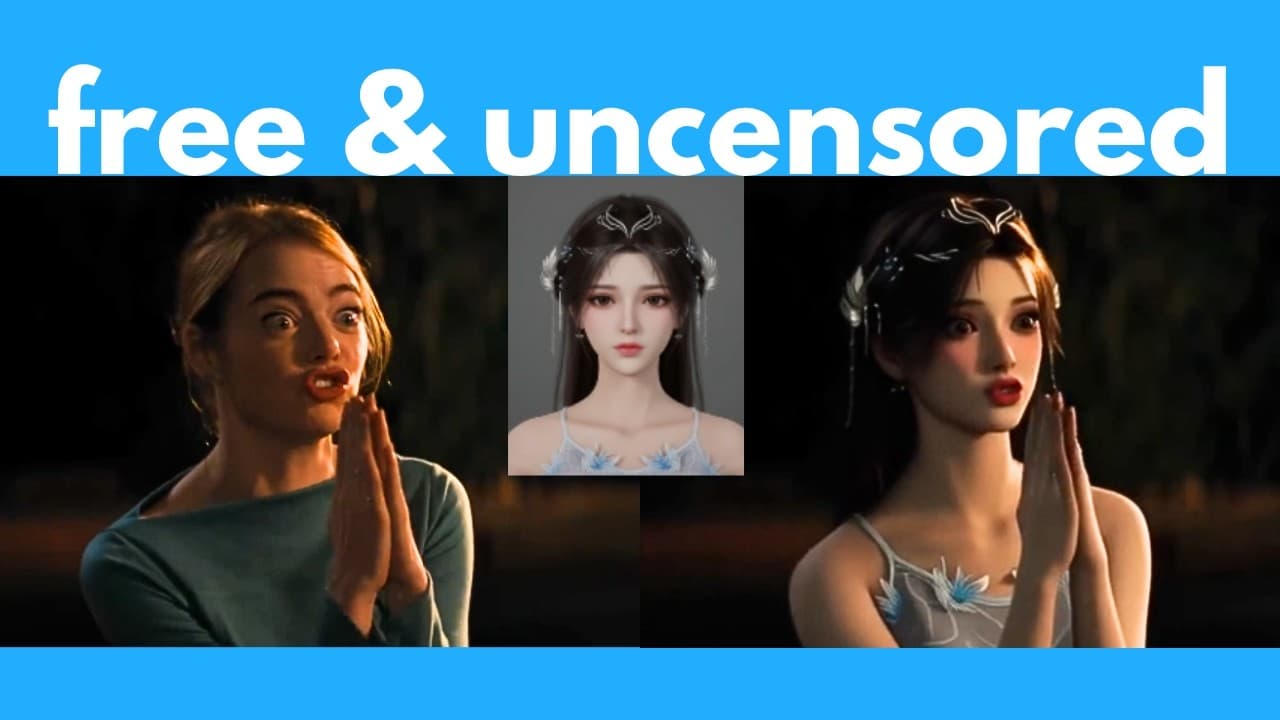
Mocha replaces a character in an existing video using a single reference image while preserving the original performance, background, subtitles, lighting, and colors. It is free, open source, and can run offline through a prebuilt ComfyUI workflow using the WanVideoWrapper, with a quantized FP8 model available for systems with limited VRAM.
Transcript
What if we could take an existing video and then swap the character out with a new character using a reference image? Well, that's exactly what this new AI called Mocha does. This is a free and open-source AI tool by this orange team. And this allows you to replace any character in an existing video just with a reference image of your new character... Read More
Key Insights
- Mocha is a free, open-source AI tool that replaces a character in an existing video using a reference image. It follows the original subject’s movements while leaving the broader composition intact, making it useful for controlled character transfer rather than generating an entirely new scene.
- Mocha preserves performance details including body movements, hand gestures, facial expressions, and lip movements. The examples show that a replacement character can reproduce both large actions and subtle expressions from the source performer, including talking and coordinated full-body motion.
- Mocha works by segmenting the original character and replacing only that subject. In an example containing subtitles, the text remained unchanged, demonstrating that the workflow can preserve background elements instead of unnecessarily regenerating the complete video frame.
- Mocha matches the white balance and colors of the original footage so the inserted character blends with the scene. In the comparisons presented, it handled scene color more consistently than WanAnimate and Kling, including footage with a light bulb moving in different directions.
- Mocha can transfer uncommon character designs, including masked figures and stylized 3D or anime characters. The demonstrations indicate that it retains important reference-image features more effectively than WanAnimate in some cases, particularly when the character has an unusual face or appearance.
- Mocha has limitations when a reference character contains intricate design elements. In the anime demonstration, it reproduced the character and hair reasonably well, but omitted sleeves and did not fully recreate a gold head accessory, showing that fine costume details may be lost.
- ComfyUI provides an offline interface for running Mocha through a prebuilt workflow. Its plugin system can improve workflow efficiency, while automatic offloading can move part of a model to the CPU when the complete model does not fit into available GPU memory.
- The quantized FP8 Mocha model is 14 GB, compared with approximately 28 GB for the original model. The presenter reports that the smaller model fits on a 16 GB GPU and suggests that 12 GB might work with offloading, while explicitly noting that this is unconfirmed.
Install to Summarize YouTube Videos and Get Transcripts
Explore YouTube Video Summarizer or Get YouTube Transcript Extractor
Questions & Answers
Q: How does Mocha replace a character in an existing video?
Mocha uses an image of the desired character as a reference, segments the original subject from an existing video, and generates the new character in that subject’s place. The replacement follows the source performance, including body motion, hand gestures, facial expressions, and lip movements. It also attempts to preserve the background, subtitles, lighting, colors, and other surrounding elements.
Q: What parts of the original video can Mocha preserve?
Mocha can preserve the original scene while changing its main character. The examples retain backgrounds, subtitles, motion, and scene composition, while the generated character follows the original subject’s performance. Mocha also matches the source video’s white balance and colors. One personal demonstration even retained a visually appropriate reflection of the replacement character on a table.
Q: Is Mocha better than WanAnimate for character replacement?
In the comparisons presented, Mocha handled white balance, scene colors, and visual blending more consistently than WanAnimate. It also reproduced a masked reference character more successfully in one example where WanAnimate struggled. These results come from the examples shown in the tutorial, and the strongest claimed advantage is Mocha’s ability to preserve the original scene’s color characteristics.
Q: Can Mocha transfer facial expressions and lip movements?
Mocha can transfer talking, lip motion, and subtle facial expressions from the original performer to the replacement character. The demonstrations also show coordinated hand gestures, full-body movement, and other performance details. This makes the tool useful for character replacement and lip-sync work in which the generated subject needs to follow an existing actor’s timing and physical performance.
Q: What limitations does Mocha have with detailed characters?
Mocha may fail to reproduce every small feature of a complicated reference design. In the anime test, the tool transferred the new character and recreated the hair reasonably well, but it omitted the character’s sleeves and did not accurately preserve the gold pin on her head. The result suggests that broad identity and motion can transfer better than intricate costume details.
Q: How do you install Mocha in ComfyUI?
Start with an existing ComfyUI installation, then clone Kijai’s ComfyUI-WanVideoWrapper repository into the custom nodes folder. If the wrapper is already installed, open its folder in a command prompt and run git pull. Fresh installations also require the packages listed in requirements.txt, installed through the Python executable included with the Windows portable version of ComfyUI.
Q: How do you load the Mocha character replacement workflow?
Download the Mocha replace subject version two JSON file from the example workflows folder in the ComfyUI-WanVideoWrapper repository. After starting ComfyUI, drag and drop that JSON file onto the interface to load the prebuilt nodes. Red outlines indicate missing nodes, which can usually be addressed by updating WanVideoWrapper or using ComfyUI Manager to install missing custom nodes.
Q: Which models are required to run Mocha offline?
The workflow requires the Mocha model, a Wan 2.1 VAE for video encoding and decoding, and a UMT text encoder shown in the referenced model repository. The tutorial uses Kijai’s 14 GB quantized FP8 Mocha model instead of the original model, which is approximately 28 GB. It specifically selects the BF16 Wan 2.1 VAE rather than the Wan 2.2 version.
Summary & Key Takeaways
-
Mocha transfers a reference character into an existing video while following the original subject’s body movements, hand gestures, facial expressions, and lip movements. It segments and replaces the subject while retaining surrounding elements such as backgrounds and subtitles, and it adjusts the generated character to match the scene’s white balance and colors.
-
The demonstrations show Mocha handling realistic footage, anime, masked characters, complicated lighting, and reflections. It generally preserved character identity and motion well, although intricate anime clothing details were imperfect. In comparisons shown in the tutorial, Mocha blended characters into the original scenes more consistently than WanAnimate and Kling, particularly in color and white balance.
-
The offline setup uses ComfyUI and Kijai’s ComfyUI-WanVideoWrapper. Users install or update the wrapper, install its requirements, download the prebuilt Mocha replacement workflow, and add the required models. The tutorial recommends a 14 GB quantized FP8 Mocha model instead of the original model, which is approximately 28 GB.
Read in Other Languages (beta)
Share This Summary 📚
Summarize YouTube Videos and Get Video Transcripts with 1-Click
Try YouTube Summary with ChatGPT & Claude or YouTube Transcript Generator
Explore More Summaries from AI Search 📚


Summarize YouTube Videos and Get Video Transcripts with 1-Click
Try YouTube Summary with ChatGPT & Claude or YouTube Transcript Generator