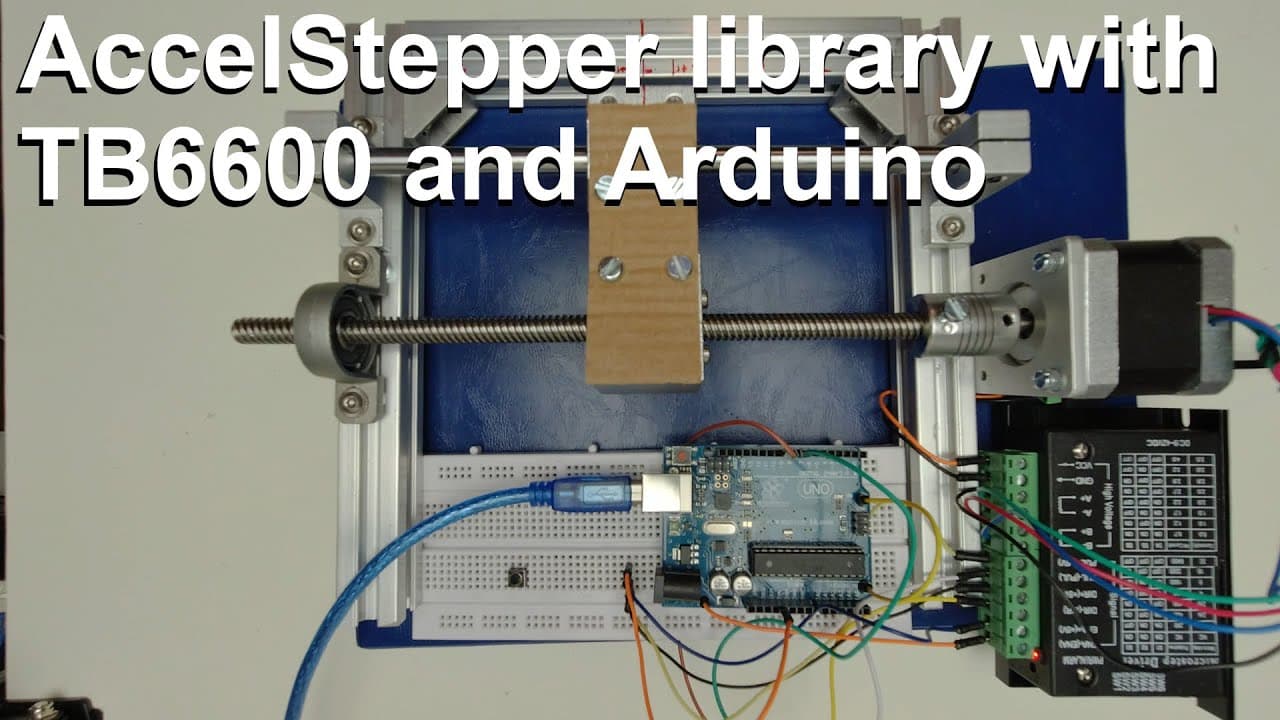
Arduino with AccelStepper library and TB6600 stepper motor controller
TL;DR
An updated Arduino stepper motor code demonstration, enabling precise movement control.
Transcript
welcome everyone this is another introduction video for the access step per library I made this video because I updated my source code for the Arduino and I had some new ideas so I cleaned up the code and implemented some more stuff but I'm strictly just utilizing the functions which are implemented in the access wrapper library so I haven't done a... Read More
Key Insights
- 🧑🦼 The updated Arduino stepper motor control utilizes the Access Stepper Library, which provides essential functions for precise movement.
- 👻 The integration of non-blocking instructions allows concurrent sensor reading and motor control, enhancing system efficiency.
- 👤 Users can navigate relative and absolute motions, making it adaptable for different operational needs and setups.
- ✋ A robust series of commands is provided to facilitate user interactions, such as getting feedback on current positions and stopping the motor dynamically.
- 👨💻 The code encourages a clean layout and organization, making it accessible even for users who may not have vast programming experience.
- 🧑🦼 The motor’s movement is controlled by the number of steps, which must be accurately calculated based on the threaded rod's specifications.
- 🦾 The content emphasizes the importance of safety features in controlling stepper motors to prevent potential mechanical issues and ensure smooth operation.
Install to Summarize YouTube Videos and Get Transcripts
Explore YouTube Video Summarizer or Get YouTube Transcript Extractor
Questions & Answers
Q: What is the main purpose of the updated Arduino code demonstrated in the video?
The updated Arduino code is designed to enhance the control of a stepper motor using the Access Stepper Library. It showcases how to implement various movement commands, ensuring precise movements in both relative and absolute positions while maintaining a clear structure for users to follow.
Q: How does the block of code ensure non-blocking motor control while reading sensors?
The code utilizes non-blocking functions that allow the microcontroller to handle multiple processes simultaneously, such as reading sensors, while the motor is running. This is crucial for preventing system interruptions and ensuring smooth operation without stalling the stepper motor.
Q: What are the differences between relative and absolute position commands?
Relative position commands allow the motor to step a certain number of steps from its current position, which can accumulate over multiple commands. In contrast, absolute position commands instruct the motor to move to a specific position on a scale, which means it will not move if already located there, preventing unintended overshooting.
Q: What safety features are integrated into the stepper motor control code?
The code includes several safety features, such as the immediate stopping of the motor when specific commands are issued, as well as the ability to reset the motor's position to a new home location. These features help prevent mechanical failures and ensure user safety during operation.
Q: Can the library be adapted for different mechanical setups?
Yes, the library is versatile and can be customized for various mechanical setups by adjusting parameters such as the threaded rod type and pitch, allowing users to convert step counts into meaningful distance units that fit their projects.
Q: What should users consider when setting the ‘home’ position in the system?
Users need to consider their mechanical setup's limitations and ensure that the motor can accurately return to the zero position. Any mechanical errors could prevent the motor from reaching the designated home position, leading to potential misalignments in future movements.
Summary & Key Takeaways
-
This content provides an introduction to an updated Arduino source code for controlling a stepper motor using the Access Stepper Library, emphasizing the integration of new functions for enhanced performance.
-
The tutorial demonstrates various movement commands, including relative and absolute positioning, along with safety features like immediate motor stop commands for user convenience and system protection.
-
Viewers are encouraged to utilize the clean, organized code as a foundation for their own projects, with links provided for direct access to the source code.
Read in Other Languages (beta)
Share This Summary 📚
Summarize YouTube Videos and Get Video Transcripts with 1-Click
Try YouTube Summary with ChatGPT & Claude or YouTube Transcript Generator
Explore More Summaries from Curious Scientist 📚

![Building a Peltier cooler-based cooling box - First iteration, improvements [Part 2/6] thumbnail](/_next/image?url=https%3A%2F%2Fi.ytimg.com%2Fvi%2F0YlNw0EGnzI%2Fhqdefault.jpg&w=750&q=75)


Summarize YouTube Videos and Get Video Transcripts with 1-Click
Try YouTube Summary with ChatGPT & Claude or YouTube Transcript Generator