How to Save Hours with a ChatGPT YouTube-to-Blog Automation Workflow
TL;DR
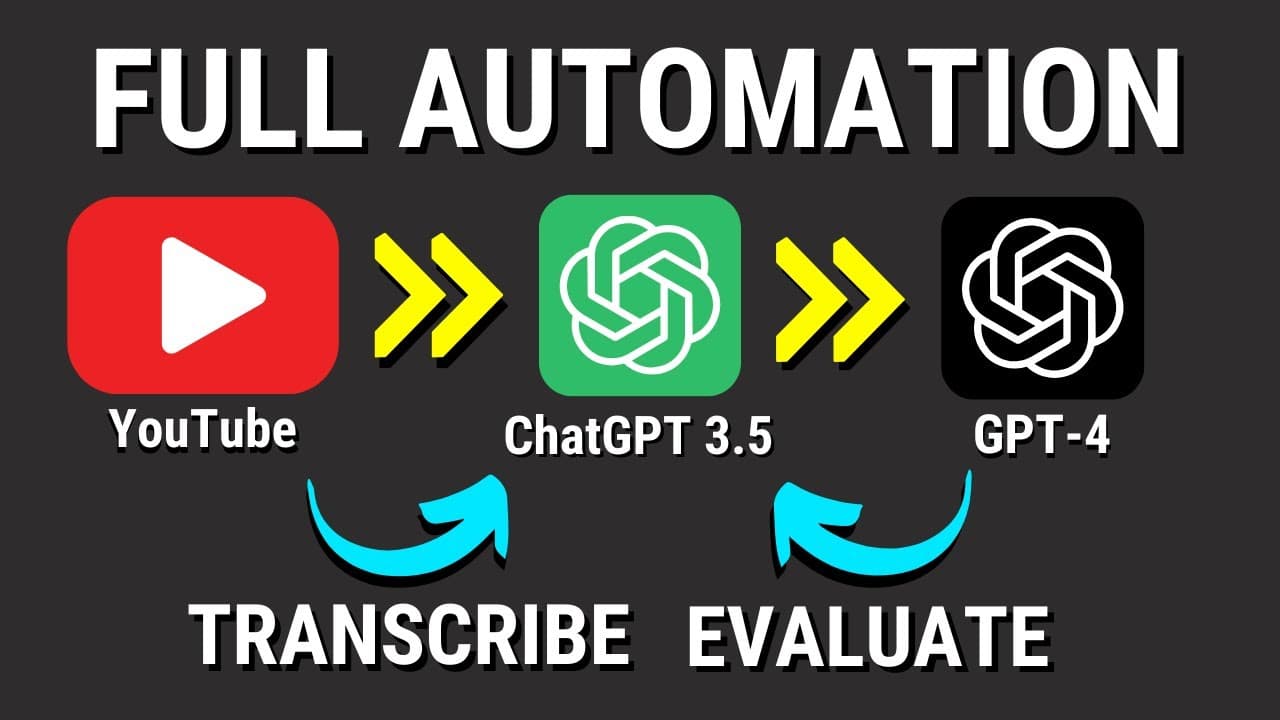
You can automate turning a YouTube URL into a polished blog post by transcribing it with OpenAI Whisper, drafting with ChatGPT 3.5, and using GPT-4 to score and improve it until it reaches 90. The demonstrated iPhone 15 review conversion took about seven minutes and cost just under a dollar. Read on to understand the workflow, its Python components, and how low-scoring drafts are revised.
Transcript
let's start by looking at a quick flow of how this automation process works so basically you need to start with a YouTube url uh for me I mostly use my own videos but you can use other videos as I will show you soon this YouTube url is going to be transcribed by open a eyes whisper chat gbt 3.5 is going to take that transcription and in this case w... Read More
Key Insights
- 😒 The automation process uses AI to transcribe YouTube videos and generate blog posts, saving time and effort for content creators.
- 🏣 The generated blog posts are evaluated based on their quality, ensuring they meet a certain standard before being saved.
- 👤 The automation process can be used with the user's own videos, but due credit should be given if using external content.
- 🇨🇷 The cost of using this automation process is relatively low, with the demonstrated example costing just under a dollar.
- 💁 The generated blog posts can be saved and used for various purposes, such as social media or other content formats.
- ❓ The process includes options for improvement suggestions and critical analysis, ensuring the content meets the required standards.
- 👨💻 The Python code provided includes various libraries and functions that facilitate the automation process.
Install to Summarize YouTube Videos and Get Transcripts
Explore YouTube Video Summarizer or Get YouTube Transcript Extractor
Questions & Answers
Q: How does the ChatGPT YouTube-to-blog automation workflow work?
The workflow downloads a YouTube video, converts it to MP3, and transcribes it with OpenAI Whisper. ChatGPT 3.5 turns the transcription into a blog post, while GPT-4 evaluates the draft from 0 to 100 and triggers revisions when its score is below 90.
Q: What happens when the generated blog post scores below 90?
The workflow switches to GPT-4 to examine the transcription and write another draft. It evaluates the revised post again and continues improving it until the final version reaches a score of 90, after which the post is saved.
Q: How long does the workflow take to create a blog post?
The demonstrated conversion of an iPhone 15 review took around seven minutes. The resulting article covered areas such as design, display, and performance and received a final rating of 90.
Q: How much does this AI automation workflow cost to run?
The demonstrated example cost just under a dollar. The presenter notes that the workflow had also been run once because errors occurred, which affected the displayed usage change.
Q: What functions are included in the Python automation code?
The code includes functions for opening and saving files, calling ChatGPT, extracting a draft's rating, and generating improvement suggestions. It also downloads a YouTube video, converts it to MP3, divides large content into chunks for transcription, and saves the final approved post.
Q: What prompts does the workflow use to write and evaluate the article?
The writing prompt assigns the model the role of an AI journalist at a tech magazine and asks for an insightful, engaging blog post with first-person thoughts. The evaluation prompt assigns GPT-4 the roles of professional tech writer, editor, and SEO expert, asks for critical feedback, and requests a score from 0 to 100.
Q: Can the finished blog post be reused for other content?
Yes. After the post reaches the required rating and is saved, its text can be repurposed for formats such as social media and audio.
Q: Can this workflow be used with someone else's YouTube video?
The workflow can process other creators' videos, as demonstrated with an iPhone 15 review from another tech channel. However, the presenter recommends using it primarily with your own videos and giving credit when using someone else's content.
Summary & Key Takeaways
-
The automation process begins with inputting a YouTube URL, which is transcribed using AI.
-
The transcribed text is used to write a blog post, which is then evaluated using AI.
-
If the post's rating is above 90, it is saved and can be used for other purposes like social media.
Read in Other Languages (beta)
Share This Summary 📚
Summarize YouTube Videos and Get Video Transcripts with 1-Click
Try YouTube Summary with ChatGPT & Claude or YouTube Transcript Generator
Explore More Summaries from All About AI 📚


Summarize YouTube Videos and Get Video Transcripts with 1-Click
Try YouTube Summary with ChatGPT & Claude or YouTube Transcript Generator