Can Apple Vision Pro Replace Your Computer?
TL;DR
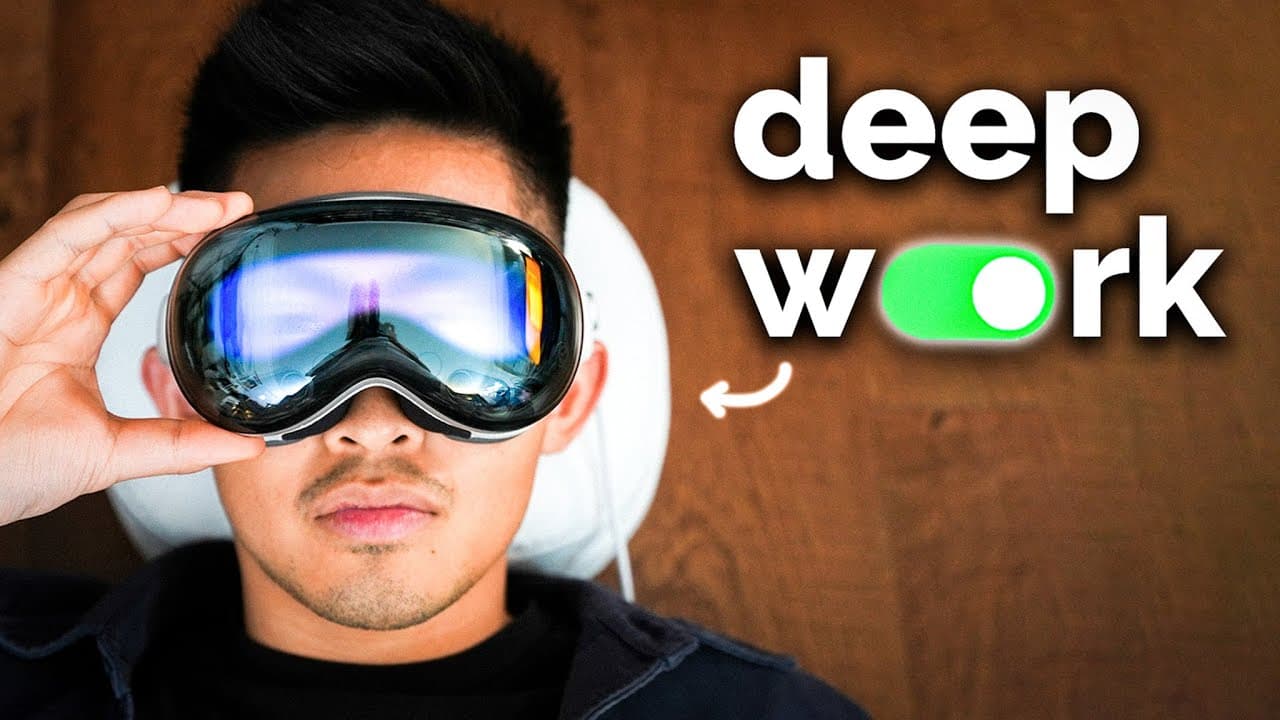
The Apple Vision Pro offers a unique, immersive experience that can extend your workspace with virtual monitors, providing high-definition visuals. While it shows potential for replacing traditional setups, current limitations such as eye fatigue and limited app availability suggest it's not yet a complete substitute for a computer. However, it offers promising features for future productivity enhancements.
Transcript
this is the Apple Vision Pro and I just got one to see if it could transform my productivity and workspace as someone who really values being intentional with technology and how I use it at first glance The Vision Pro is almost sort of dystopian like you're literally strapping a television to each eye and it's probably what you would imagine as lik... Read More
Key Insights
- Apple Vision Pro is a high-definition VR headset that extends workspace with virtual monitors.
- Build quality of the Vision Pro is exceptional, offering a futuristic experience.
- Virtual monitors can be positioned around the user, providing flexibility in workspace setup.
- Eye fatigue occurs after extended use, but users may adapt over time.
- Current app availability is limited, requiring a MacBook for optimal workflow.
- Vision Pro offers privacy benefits by displaying content on virtual monitors only visible to the user.
- The spatial video feature creates immersive, three-dimensional environments.
- Vision Pro can potentially replace traditional workstations, offering infinite virtual monitors.
Install to Summarize YouTube Videos and Get Transcripts
Explore YouTube Video Summarizer or Get YouTube Transcript Extractor
Questions & Answers
Q: How does the Apple Vision Pro enhance productivity?
The Apple Vision Pro enhances productivity by providing high-definition virtual monitors that can be positioned around the user. This setup offers flexibility and privacy, as the content is only visible to the user. It allows for an extended workspace, making it possible to have multiple monitors without physical space limitations.
Q: What are the limitations of using the Apple Vision Pro as a computer replacement?
The limitations include eye fatigue after prolonged use and a limited app ecosystem, which means users still need a MacBook for certain tasks. While the Vision Pro offers a high-definition visual experience, it's not yet a complete substitute for traditional computers due to these constraints.
Q: Can you use the Apple Vision Pro for video conferencing?
Yes, the Apple Vision Pro can be used for video conferencing. It allows users to walk around and position the video feed in different locations, creating a more immersive experience. However, the avatars used in conferencing are still somewhat unnatural, which may affect the overall experience.
Q: How does the spatial video feature work in the Apple Vision Pro?
The spatial video feature in the Apple Vision Pro creates three-dimensional environments that users can interact with. It allows users to view videos as if they are happening in the same room, providing a more immersive and realistic experience. This feature has potential applications in virtual training and collaboration.
Q: Is the Apple Vision Pro suitable for long-term use?
While the Apple Vision Pro offers a unique and immersive experience, it may not be suitable for long-term use due to eye fatigue. Users report discomfort after extended periods, although they may adapt over time. The current first-generation model may not be ideal for continuous use as a primary workstation.
Q: What is the build quality of the Apple Vision Pro like?
The build quality of the Apple Vision Pro is exceptional, offering a premium and futuristic experience. Users describe it as one of the most advanced pieces of technology they own, with a design that feels robust and well-crafted. The headset itself is comfortable, though it may leave marks after extended use.
Q: Can the Apple Vision Pro be used for entertainment purposes?
Yes, the Apple Vision Pro can be used for entertainment, such as watching movies or playing games. Its high-definition visuals and spatial video feature create an immersive experience. However, the current focus seems to be on productivity, and the entertainment content available may be limited until more media is developed for the platform.
Q: How does the Apple Vision Pro handle multitasking?
The Apple Vision Pro handles multitasking by allowing users to open multiple virtual monitors and position them around their workspace. This setup provides the flexibility to manage different tasks simultaneously, similar to having multiple physical monitors. The virtual monitors maintain their position, even when moving around, enhancing the multitasking experience.
Summary & Key Takeaways
-
The Apple Vision Pro provides an immersive workspace experience with its high-definition virtual monitors. Users can position these monitors around them, offering flexibility and privacy in their setup. However, eye fatigue and limited app availability mean it can't fully replace traditional computers yet.
-
Despite its futuristic design and functionality, the Vision Pro isn't without its drawbacks. Eye fatigue is a common issue, and the current app ecosystem is limited, necessitating the use of a MacBook for certain tasks. Over time, users may adapt to the Vision Pro, reducing fatigue.
-
The Vision Pro's spatial video feature offers a unique three-dimensional viewing experience, hinting at future potential for virtual training and collaboration. While it isn't a complete replacement for a computer, its innovative features suggest it could be a viable productivity tool in the future.
Read in Other Languages (beta)
Share This Summary 📚
Summarize YouTube Videos and Get Video Transcripts with 1-Click
Try YouTube Summary with ChatGPT & Claude or YouTube Transcript Generator
Explore More Summaries from Reysu 📚




Summarize YouTube Videos and Get Video Transcripts with 1-Click
Try YouTube Summary with ChatGPT & Claude or YouTube Transcript Generator