how I learned to type faster passively (100-170wpm)
TL;DR
Learn to type faster using a Japanese compact keyboard.
Transcript
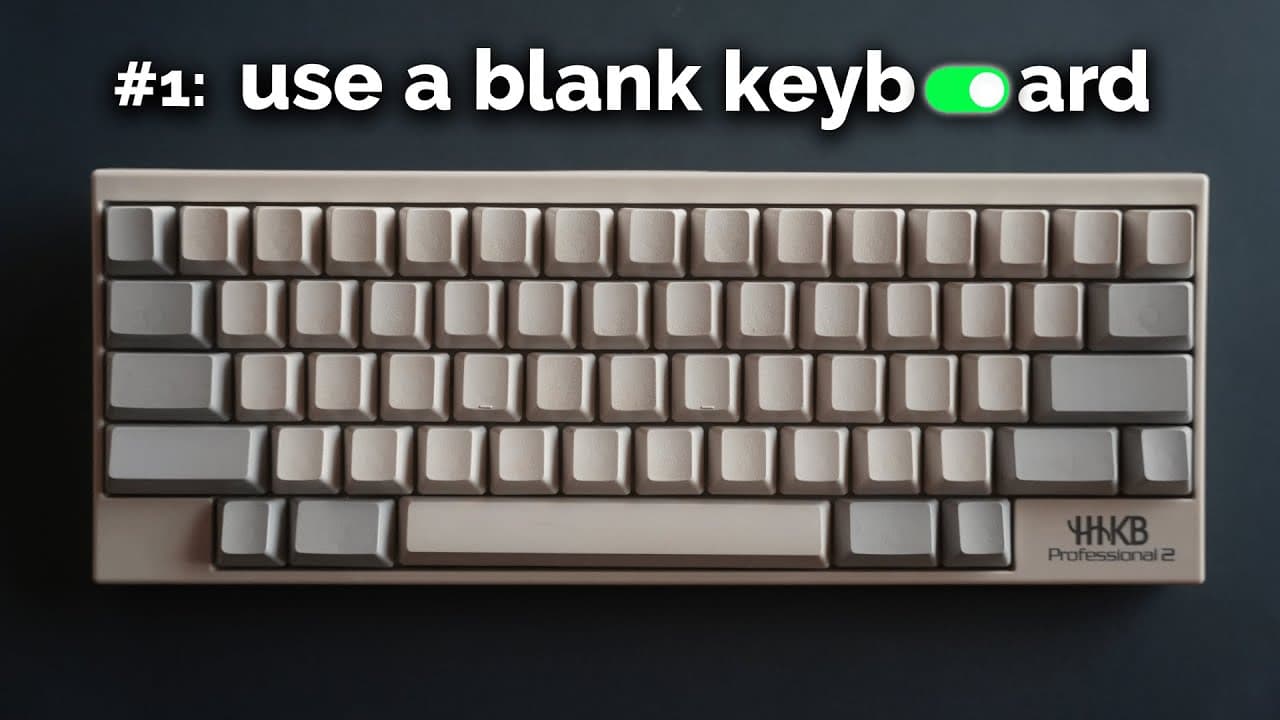
This is a Japanese keyboard that's designed to help you type faster. It has a super compact layout, there are no labels on any of the key caps and just by using this consistently I've nearly doubled my typing speed passively. In the previous video I took a test randomly, like I never even go on these sites to practice and I got nearly 170 words... Read More
Key Insights
- The Happy Hacking Keyboard (HHKB) is designed to enhance typing speed and ergonomics by minimizing hand movement.
- Using blank keycaps is recommended for passive improvement in typing speed, as it forces users to learn key positions.
- Typing without looking at your hands and using keyboard shortcuts can significantly improve efficiency and speed.
- The HHKB's compact layout, known as the 60% layout, removes unnecessary keys to reduce hand movement and increase speed.
- Practicing typing without a mouse encourages familiarity with keyboard shortcuts, enhancing overall computer navigation skills.
- Customizing keyboard shortcuts and text replacements can streamline workflows and improve productivity.
- The HHKB is ideal for coding and writing but not optimal for gaming due to its unique layout.
- Adopting efficient finger movements, similar to playing a musical instrument, can enhance typing speed and reduce effort.
Install to Summarize YouTube Videos and Get Transcripts
Explore YouTube Video Summarizer or Get YouTube Transcript Extractor
Questions & Answers
Q: What is the Happy Hacking Keyboard (HHKB) and why is it recommended?
The Happy Hacking Keyboard (HHKB) is a compact keyboard designed to enhance typing speed and ergonomics. It minimizes hand movements by removing unnecessary keys, making it ideal for coding and writing. Its design encourages users to type without looking at the keyboard, which passively improves typing speed over time.
Q: How does using blank keycaps improve typing speed?
Using blank keycaps forces users to learn key positions without relying on visual cues. This practice helps develop muscle memory, allowing users to type faster without needing to look at the keyboard. Over time, this leads to a significant improvement in typing speed and efficiency.
Q: What are some tips for typing faster without deliberate practice?
Some tips for typing faster include minimizing finger movement, typing without looking at your hands, and using keyboard shortcuts. Additionally, practicing typing without using a mouse and learning the positions of function keys can further enhance typing speed and efficiency.
Q: How can keyboard shortcuts improve productivity?
Keyboard shortcuts allow users to perform tasks more quickly and efficiently by reducing reliance on the mouse. They streamline workflows by enabling faster navigation and execution of commands. Customizing shortcuts and text replacements can further enhance productivity by tailoring them to specific needs and frequently used actions.
Q: Why is the HHKB layout not ideal for gaming?
The HHKB's compact 60% layout removes certain keys commonly used in gaming, such as dedicated arrow keys and function keys. This layout prioritizes typing speed and efficiency over gaming needs, making it less suitable for gamers who require quick access to these keys during gameplay.
Q: What role does minimizing finger movement play in typing speed?
Minimizing finger movement reduces the effort required to type and allows for faster key presses. Similar to playing a musical instrument, efficient finger movements enable users to type quickly and effortlessly. By keeping fingers close to the home row and minimizing unnecessary movement, typing speed can be significantly increased.
Q: How can custom text replacements enhance typing efficiency?
Custom text replacements allow users to quickly input frequently used phrases, URLs, or emojis by typing a short acronym or symbol. This feature saves time and reduces repetitive typing, enhancing overall efficiency. Users can customize replacements to suit their specific needs, further streamlining their workflow.
Q: What are some benefits of using the HHKB for extended periods?
The HHKB is designed for durability and comfort, making it suitable for extended use. Its ergonomic layout reduces hand strain, and its durable keycaps withstand long-term use without degradation. This makes it an excellent choice for professionals who spend significant time typing, such as programmers and writers.
Summary & Key Takeaways
-
The video showcases the benefits of using the Happy Hacking Keyboard (HHKB) to increase typing speed passively. It emphasizes the importance of minimizing hand movement and using blank keycaps to improve typing skills. The HHKB's compact layout is highlighted as a key factor in enhancing typing efficiency.
-
The speaker shares tips for improving typing speed, such as typing without looking at the keyboard and using keyboard shortcuts. They also discuss the advantages of using text replacements and custom shortcuts to enhance productivity. The HHKB is praised for its durability and ergonomic design.
-
The video explains how the HHKB's 60% layout removes unnecessary keys, making it ideal for coding and writing. It encourages viewers to use their keyboard over the mouse to increase familiarity with shortcuts. The speaker also shares personal experiences and tips for optimizing typing speed and efficiency.
Read in Other Languages (beta)
Share This Summary 📚
Summarize YouTube Videos and Get Video Transcripts with 1-Click
Try YouTube Summary with ChatGPT & Claude or YouTube Transcript Generator
Explore More Summaries from Reysu 📚


Summarize YouTube Videos and Get Video Transcripts with 1-Click
Try YouTube Summary with ChatGPT & Claude or YouTube Transcript Generator