How to Choose the Best Productivity Keyboard
TL;DR
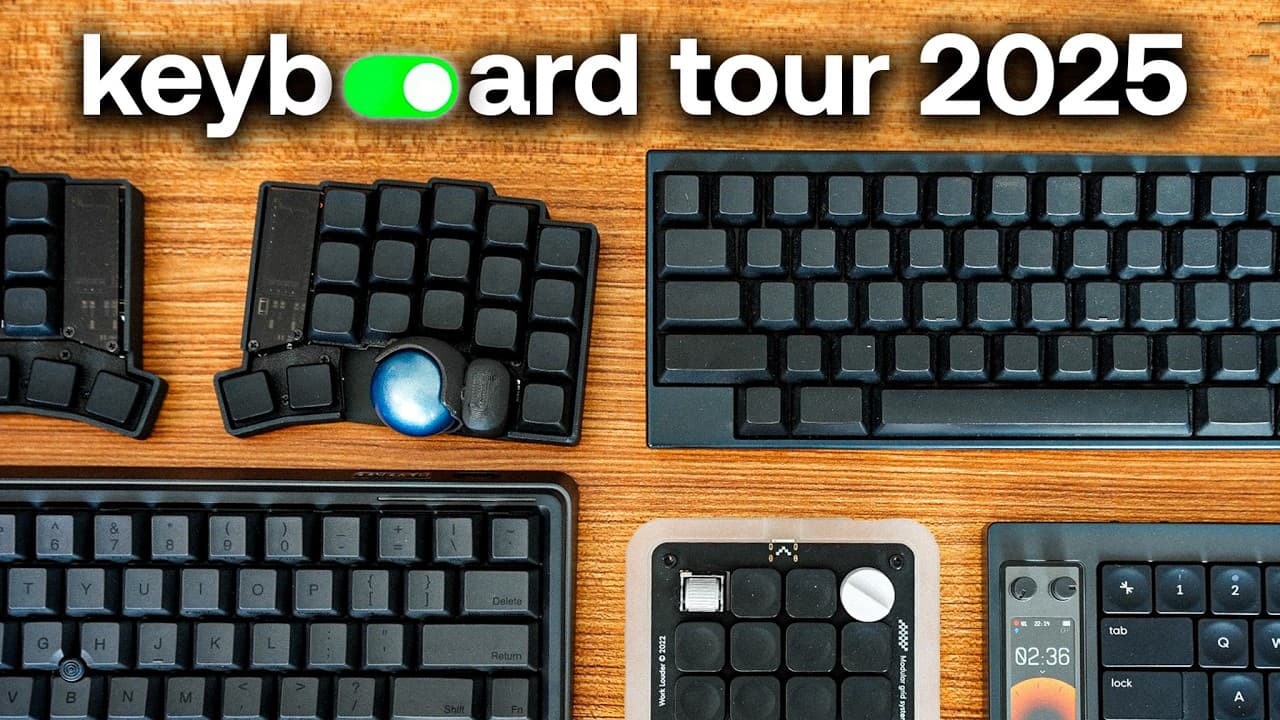
Choosing the right productivity keyboard can significantly enhance your workflow by improving ergonomics and offering unique features like keyboard shortcuts and trackballs. This video reviews six keyboards ranging from $100 to $500, highlighting their unique features and suitability for different tasks, from coding to general computer work.
Transcript
As someone who works a lot at the computer, I've tested a few pretty unique productivity keyboards. For me, I found that the keyboard that you use actually has a pretty big impact on your workflow, not just for ergonomics, but also for keyboard shortcuts and the unique features of each keyboard. So In this video, I want to share with you six be... Read More
Key Insights
- The Keyball 39 is an ergonomic split keyboard with a trackball, allowing users to keep hands in a neutral position and avoid using a mouse.
- Home row mods can transform the center row of a keyboard into shortcut keys, enhancing productivity by minimizing hand movement.
- The Carpio wrist rests by Delta Hub improve ergonomic positioning, reducing the risk of wrist pain and carpal tunnel syndrome.
- The Nomad keyboard includes a built-in Pomodoro Timer, clock, and customizable knobs, making it versatile for various applications.
- The Creator Micro is designed for creative work, offering programmable keys and knobs to streamline tasks in software like Adobe Premiere.
- The Happy Hacking Professional 2 is a compact, durable keyboard ideal for coding, known for its blank version that encourages touch typing.
- The Lenovo Thinkpad keyboard is low-profile, silent, and portable, featuring a red dot for cursor control, making it suitable for general work.
- The HHKB Studio combines features of the Happy Hacking and Thinkpad keyboards, offering a high-quality build with a trackpoint for precision.
Install to Summarize YouTube Videos and Get Transcripts
Explore YouTube Video Summarizer or Get YouTube Transcript Extractor
Questions & Answers
Q: How does the Keyball 39 keyboard improve productivity?
The Keyball 39 is an ergonomic split keyboard featuring a trackball, which allows users to control the cursor without moving their hands to a mouse. This design keeps hands in a neutral position, reducing strain and improving typing efficiency. It also supports alternative layouts like Dvorak for faster typing, though it requires a learning curve.
Q: What are home row mods and how do they enhance keyboard use?
Home row mods allow the center row of a keyboard to function as shortcut keys when held down, rather than just typing letters. For example, pressing and holding the 'D' key can act as a command key. This setup reduces hand movement and increases efficiency, making it easier to execute frequent commands quickly.
Q: How do Carpio wrist rests help prevent wrist pain?
Carpio wrist rests, made by Delta Hub, position the user's hands in a more ergonomic posture, reducing wrist strain during prolonged computer use. By providing support and elevating the wrists, these rests help prevent issues like carpal tunnel syndrome, making them beneficial for anyone spending long hours typing or using a keyboard.
Q: What features does the Nomad keyboard offer?
The Nomad keyboard includes a built-in display with apps such as a Pomodoro Timer, clock, and a Tamagotchi pet. It also features customizable knobs that can be programmed for different applications, such as adjusting volume or navigating within editing software. These features aim to enhance productivity and offer a unique user experience.
Q: What makes the Creator Micro keyboard suitable for creative work?
The Creator Micro is designed for creative tasks, offering programmable keys and knobs that can be customized for specific software like Adobe Premiere and Figma. This allows users to streamline their workflow by assigning frequent actions to these controls, making tasks like video editing and design work more efficient and intuitive.
Q: Why is the Happy Hacking Professional 2 keyboard ideal for coding?
The Happy Hacking Professional 2 is compact and durable, designed specifically for coding. Its blank version encourages touch typing, which can lead to faster typing speeds and improved efficiency. The keyboard's layout also supports numerous shortcuts, making it easier for programmers to execute commands without looking at the keys.
Q: What are the benefits of the Lenovo Thinkpad keyboard?
The Lenovo Thinkpad keyboard is low-profile and silent, making it ideal for environments where noise is a concern, such as during Zoom meetings. It features a red dot for cursor control, eliminating the need to switch between a mouse and keyboard. Its portability and wireless option make it convenient for on-the-go use.
Q: What are the key features of the HHKB Studio keyboard?
The HHKB Studio combines the compact layout of the Happy Hacking keyboard with the trackpoint feature of the Thinkpad keyboard. It offers high build quality and precision cursor control, making it suitable for users seeking a premium typing experience. The keyboard also includes hidden features for scrolling, enhancing its functionality.
Summary & Key Takeaways
-
The Keyball 39 is an ergonomic split keyboard with a trackball, allowing users to keep their hands in a neutral position and avoid using a mouse. It supports layouts like Dvorak for faster typing but requires a learning curve. Home row mods can transform the center row into shortcut keys.
-
The Carpio wrist rests by Delta Hub improve ergonomic positioning, reducing the risk of wrist pain and carpal tunnel syndrome. The Nomad keyboard includes a built-in Pomodoro Timer, clock, and customizable knobs, making it versatile for various applications, although not all users may find the Pomodoro Timer useful.
-
The Creator Micro is designed for creative work, offering programmable keys and knobs to streamline tasks in software like Adobe Premiere. The HHKB Studio combines features of the Happy Hacking and Thinkpad keyboards, offering a high-quality build with a trackpoint for precision, though it comes at a higher price.
Read in Other Languages (beta)
Share This Summary 📚
Summarize YouTube Videos and Get Video Transcripts with 1-Click
Try YouTube Summary with ChatGPT & Claude or YouTube Transcript Generator
Explore More Summaries from Reysu 📚




Summarize YouTube Videos and Get Video Transcripts with 1-Click
Try YouTube Summary with ChatGPT & Claude or YouTube Transcript Generator