How to Create a Room Portfolio with Three.js and Blender
TL;DR
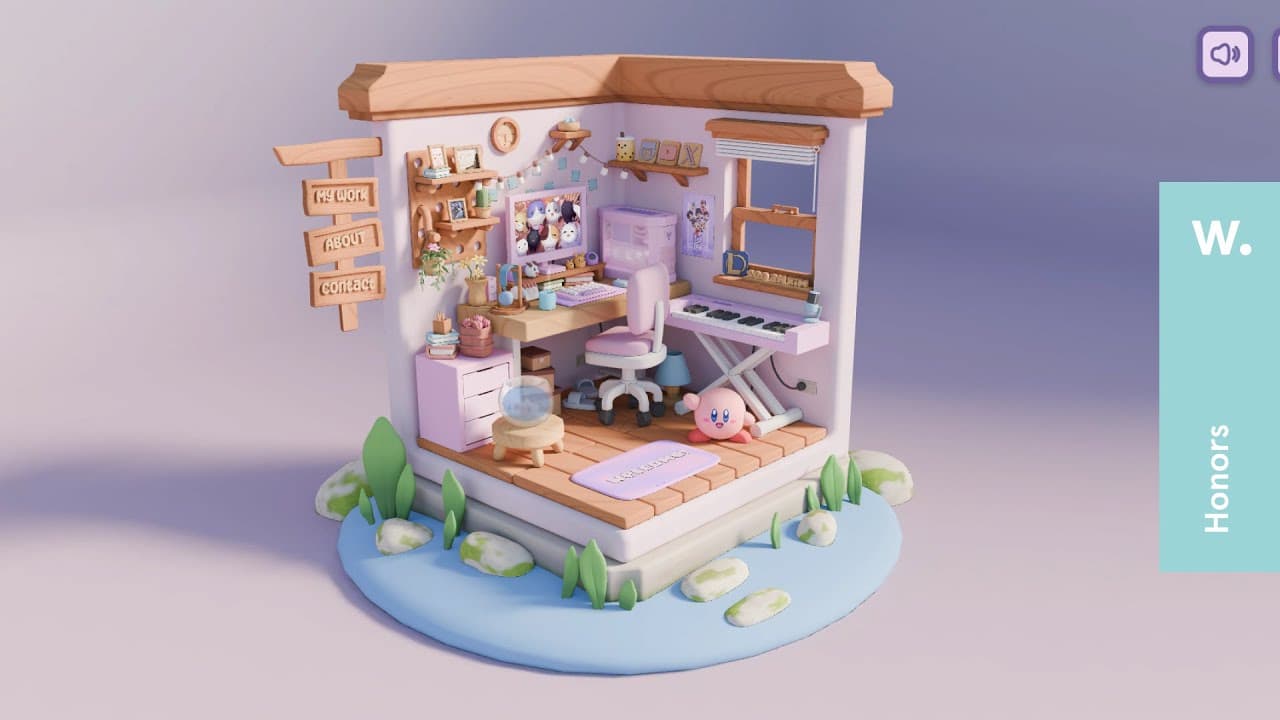
Learn to create a cute room portfolio using Three.js and Blender. This beginner-friendly course covers modeling various objects like desks, computers, and chairs, and animating them to create an interactive room. By the end, you'll have a room portfolio ready to showcase or deploy online.
Transcript
hey everyone welcome back to another video thanks very much for stopping by so without further Ado let me just refresh the page and show you what we'll be creating today so small loading screen hover enter hit enter that just says hello changes a little bit small little animation there and then we have these objects animating in to catch the user a... Read More
Key Insights
- Three.js is a powerful library for creating 3D content on the web.
- Blender is used for modeling and texturing assets in this project.
- The course assumes basic knowledge of Blender and Three.js.
- A variety of objects are modeled including desks, chairs, and computers.
- Animations are used to enhance user interaction and engagement.
- Shaders are not covered in detail but are mentioned for advanced effects.
- The course includes deploying the project online using GitHub and Vercel.
- Loop tools and extra mesh objects are useful Blender add-ons for modeling.
Install to Summarize YouTube Videos and Get Transcripts
Explore YouTube Video Summarizer or Get YouTube Transcript Extractor
Questions & Answers
Q: How to create a room portfolio using Three.js and Blender?
To create a room portfolio using Three.js and Blender, start by modeling objects like desks, chairs, and computers in Blender. Use Three.js to animate and render these objects on the web. The course covers various modeling techniques and animations to enhance user interaction.
Q: What knowledge is required for this Three.js and Blender course?
The course assumes a basic understanding of Blender and Three.js. Familiarity with modeling, texturing, and basic 3D concepts in Blender is expected. Additionally, a basic knowledge of JavaScript and web development will be helpful for integrating Three.js.
Q: What are some key modeling techniques covered in the course?
The course covers modeling techniques such as using Loop tools and extra mesh objects in Blender. It includes creating various objects like desks, chairs, computers, and decorative items. Techniques for creating smooth surfaces, bevels, and using solidify and subdivision modifiers are discussed.
Q: How are animations implemented in the room portfolio?
Animations in the room portfolio are implemented using Three.js. The course demonstrates how to animate objects to enhance user interaction, such as animating computer fans, creating hover effects, and using GSAP for smooth transitions and modal animations.
Q: Are shaders covered in this course?
Shaders are mentioned but not covered in detail in this course. The instructor plans to cover shaders in a future video. However, the course does provide a basic understanding of how shaders can be used for advanced visual effects in Three.js projects.
Q: What deployment options are discussed in the course?
The course discusses deploying the room portfolio online using GitHub and Vercel. It provides a step-by-step guide on pushing your project to GitHub and using Vercel for hosting, making your 3D room portfolio accessible to others on the web.
Q: What are some recommended Blender add-ons for this project?
Recommended Blender add-ons for this project include Loop tools and extra mesh objects. Loop tools assist in creating smooth and precise mesh loops, while extra mesh objects provide additional primitives for modeling. These add-ons enhance modeling efficiency and precision.
Q: How does the course handle user interactions in the room portfolio?
User interactions in the room portfolio are handled using Three.js and GSAP. The course demonstrates how to implement raycasting for detecting user clicks and hovers, and how to use GSAP for smooth animations and transitions, creating an engaging and interactive user experience.
Summary & Key Takeaways
-
This course teaches you how to create a room portfolio using Three.js and Blender. You'll model various objects like desks, computers, and chairs, and learn to animate them for an interactive experience. The course is beginner-friendly but assumes basic knowledge of Blender and Three.js.
-
While shaders are not covered in detail, you will explore using animations and shaders for advanced effects. The course concludes with deploying your room portfolio online using GitHub and Vercel, making it accessible to others.
-
Blender add-ons like Loop tools and extra mesh objects are highlighted for their utility in modeling. By the end of the course, you'll have a fully functional and visually appealing room portfolio to showcase your 3D modeling and web development skills.
Read in Other Languages (beta)
Share This Summary 📚
Summarize YouTube Videos and Get Video Transcripts with 1-Click
Try YouTube Summary with ChatGPT & Claude or YouTube Transcript Generator
Explore More Summaries from Andrew Woan 📚
Summarize YouTube Videos and Get Video Transcripts with 1-Click
Try YouTube Summary with ChatGPT & Claude or YouTube Transcript Generator