How to Build an Everyday iPad Productivity System
TL;DR
Use an iPad as a focused workspace for research, planning, writing, creative work, and lightweight editing while keeping distracting work apps on other devices. A keyboard, Apple Pencil, Obsidian, Things, Sidecar, Universal Control, AirDrop, and temporary windowed multitasking create a portable system that works independently or alongside a Mac.
Transcript
So, for me the iPad is the Swiss Army knife of my devices. It's what turns me into a productivity ninja and I use it to run my projects with apps like Things and Obsidian. The form factor makes it ultra-portable for planning and staying organized and it has enough power where I don't need a traditional computer when the going gets tough. Today, I'm... Read More
Key Insights
- Portability is central to the iPad workflow because the device remains thin and light even when paired with the Magic Keyboard. The keyboard adds backlit keys, adjustable viewing angles, a trackpad, and a stable platform for working on a lap, couch, desk, or at meetings.
- The battery supports extended mobile work and can be charged through either the iPad USB-C port or the Magic Keyboard connection. The iPad can also provide a quick battery boost to an iPhone when the two devices are connected with a USB-C cable.
- The nano-texture display reduces glare while preserving vivid colors and clean blacks. Combined with the Apple Pencil, the screen supports precise photo touch-ups, handwritten Spotlight searches, electronic PDF signatures, and direct annotation of screenshots sent from a Mac.
- A distraction-free iPad is created by excluding work email, Slack, delivery tracking, and alert applications. Keeping those services on an iPhone or Apple Watch gives the tablet a distinct purpose centered on research, inspiration, planning, writing, and occasional entertainment.
- Multiple input methods make the iPad adaptable to different tasks. The keyboard and trackpad suit sustained writing, touch is often faster for navigation and photo browsing, and the Apple Pencil provides the precision required for handwriting, annotation, signatures, and detailed creative adjustments.
- Sidecar and Universal Control solve different multi-device needs. Sidecar turns the iPad into an extended Mac display, while Universal Control preserves native macOS and iPadOS interfaces and lets one mouse and keyboard move between them, including copying on one device and pasting on the other.
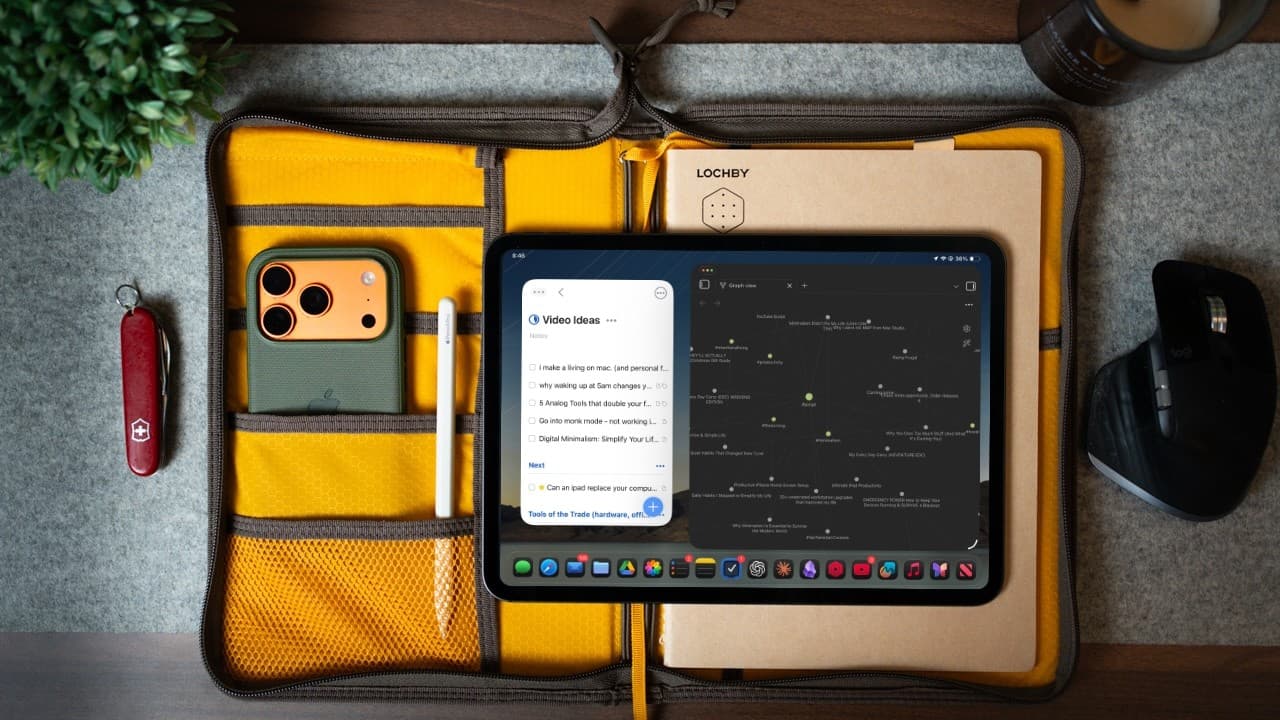
- Windowed apps are most useful as an optional mode rather than the permanent interface. Full-screen apps support focused work, but windowed multitasking can be enabled from Control Center when a reference and a related document, such as a building video and materials list, must remain visible together.
- Obsidian and Things divide knowledge management from task management. Obsidian stores notes, script ideas, thumbnails, titles, descriptions, hashtags, and publishing dates, while Things maintains channel tasks, video ideas, online discoveries, brainstorms, and other sources of creative inspiration.
Install to Summarize YouTube Videos and Get Transcripts
Explore YouTube Video Summarizer or Get YouTube Transcript Extractor
Questions & Answers
Q: How can an iPad be used as a focused productivity device?
An iPad can become a focused productivity device by giving it a clearly limited role. Keep work email, Slack, delivery tracking, and alert applications on an iPhone or Apple Watch. Use the iPad primarily for research, inspiration, planning, writing, and occasional entertainment. Full-screen applications and quick corner access to a new note help preserve attention and capture ideas without disrupting the current task.
Q: What accessories make an iPad more useful for daily work?
The Magic Keyboard and Apple Pencil make the iPad more flexible for everyday work. The keyboard provides backlit keys, adjustable display angles, a trackpad, and a stable base for desks, laps, or couches. The Pencil supports signatures, handwriting, screenshot annotation, and precise photo edits. A zippered case can hold the iPad, attached Pencil, journal, and pen securely in one portable package.
Q: How does the Apple Pencil improve an iPad workflow?
The Apple Pencil improves tasks that benefit from handwriting or precise control. It can sign PDFs electronically, avoiding the need to print and scan documents, and it enables fine photo adjustments in Lightroom that are difficult with a finger. It also supports handwritten Spotlight searches and annotations. Mac screenshots can appear on the iPad for markup, with completed changes returning immediately to the Mac.
Q: What is the difference between Sidecar and Universal Control?
Sidecar uses the iPad as an additional display for a Mac, extending the Mac desktop and providing more screen space, especially when traveling with a smaller laptop. Universal Control keeps macOS running on the Mac and iPadOS running on the iPad. A single mouse and keyboard can control both devices, and content can be copied on one device and pasted on the other through iCloud synchronization.
Q: When should windowed apps be enabled on an iPad?
Windowed apps should be enabled when a task requires two sources to remain visible at once. One example is watching a garden-building video on one side while creating a materials list on the other. The mode does not need to remain active by default because full-screen apps and simple app switching provide a cleaner environment for most focused work. It can be activated quickly from Control Center.
Q: Why use AirDrop instead of waiting for cloud synchronization?
AirDrop is useful when a file needs to move immediately between Apple devices. It transfers directly between devices instead of sending the file to the cloud and downloading it again. The workflow is helpful when a photo taken on an iPhone or iPad must reach Lightroom on a Mac quickly, or when another file needs to move to the iPad without first organizing it in the Files app.
Q: How are Obsidian and Things used in this iPad system?
Obsidian functions as a second brain for notes, brainstorming, scripts, and video records. A completed publishing record can include the thumbnail, title, description, hashtags, and publication date. Things handles channel-related tasks and maintains lists of video ideas, discoveries, brainstorms, and random inspiration. Separating reference material from actionable tasks keeps creative knowledge organized while preserving a clear list of work to complete.
Q: How can Final Cut Pro for iPad support short-form video production?
Final Cut Pro for iPad can provide a fast workflow for shorts and reels without replacing a Mac for complex projects. Footage can be recorded with an iPhone on a tripod and brought directly into Final Cut Pro on the iPad for a multicamera edit. The creator can cut clips, add text, and publish from the tablet, or return the finished file to Photos for Mac synchronization, management, and backup.
Summary & Key Takeaways
-
The iPad serves as a portable productivity device that combines a touchscreen, trackpad, keyboard, and Apple Pencil. The Magic Keyboard improves stability and typing, while long battery life, USB-C charging, automatic iPhone hotspot connections, and a protective carrying case make the complete setup practical for meetings, planning, research, and travel.
-
Focus comes from deliberately limiting what is installed. Work email, Slack, delivery tracking, and alert apps remain on the iPhone or Apple Watch, leaving the iPad for research, inspiration, planning, writing, and entertainment. Quick Notes and full-screen apps reduce interruptions, while windowed apps can be enabled temporarily when simultaneous tasks are necessary.
-
Apple ecosystem features connect the iPad to a broader workflow. Sidecar adds a second Mac display, Universal Control operates macOS and iPadOS with one keyboard and mouse, and AirDrop transfers files directly. Obsidian organizes notes and publishing records, Things stores channel tasks and ideas, and Final Cut Pro supports efficient short-form video production.
Read in Other Languages (beta)
Share This Summary 📚
Summarize YouTube Videos and Get Video Transcripts with 1-Click
Try YouTube Summary with ChatGPT & Claude or YouTube Transcript Generator