What's on My iPhone X - 2018 Edition
TL;DR
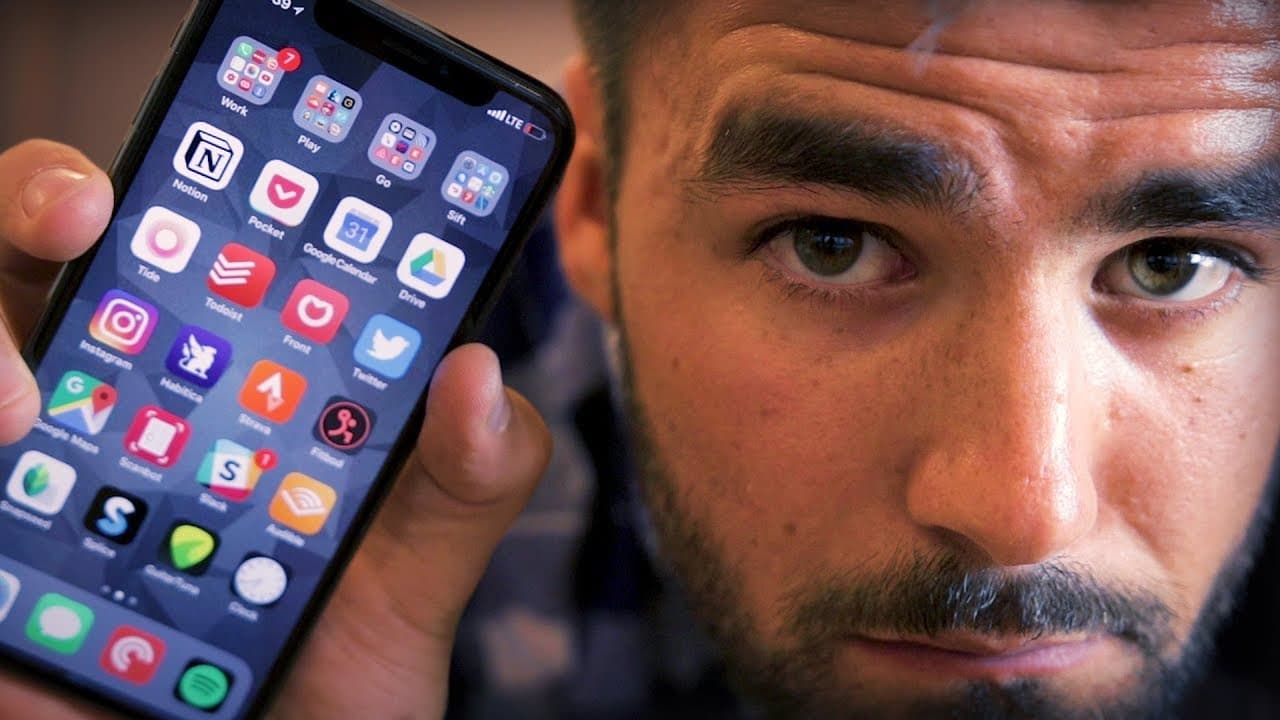
The iPhone X setup centers on Notion, Pocket, Google Calendar, Google Drive, Tide, Todoist, and Front for writing, reading, planning, focus, lists, and team email. The home screen retains four folders named Work, Play, Go, and Sift, while frequently used workflow apps remain outside them. Read on for the specific features, integrations, prices, and productivity methods behind these choices.
Transcript
- I'm gonna be honest here. When it comes to my work, if I were forced to choose between my laptop and my iPhone, I would absolutely choose my laptop. This is where the majority of my high-quality, high-intensity work gets done. That being said, my iPhone has become a bigger part of my workflow in recent months and it's definitely a big part of my ... Read More
Key Insights
- 💦 The content creator prefers his laptop for high-quality work, but his iPhone has become a more significant part of his workflow and lifestyle.
- 😀 Notion is an app he recommends as an Evernote replacement, offering features like markdown support and collaborative editing.
- 😘 Google Drive is favored over Dropbox due to its integration with Google Docs and Sheets and its lower cost for students.
- 😀 Slack is considered the best team communication app, and Audible is the content creator's go-to platform for audiobooks.
- 👏 The content creator uses apps like Snapseed and Splice for photo and video editing for Instagram.
Install to Summarize YouTube Videos and Get Transcripts
Explore YouTube Video Summarizer or Get YouTube Transcript Extractor
Questions & Answers
Q: What is on the creator's iPhone X in the 2018 edition?
The featured workflow apps include Notion, Pocket, Google Calendar, Google Drive, Tide, Todoist, and Front. The home screen also uses four folders named Work, Play, Go, and Sift, while the most important apps remain outside those folders.
Q: Why does the creator use Notion instead of Evernote?
Notion provides features the creator wanted but found lacking in Evernote, including markdown support and real-time collaborative editing. It also supports databases and works with the creator's Windows, Mac, and iPhone workflow.
Q: How does Pocket support offline reading?
Pocket automatically downloads saved web articles to the phone for offline reading. This lets the creator read them on a plane or during downtime without needing an internet connection.
Q: Why did the creator switch from Dropbox to Google Drive?
The creator considers Dropbox and Google Drive similar in most features, but his team frequently uses Google Docs and Sheets. He also cites Google's $2-per-month plan for a hundred gigabytes, compared with Dropbox's $10-per-month terabyte plan after its free tier.
Q: How does the Tide app support the Pomodoro technique?
Tide runs a 25-minute timer during which the creator focuses exclusively on one chosen task. It also plays ambient music, rain, or nature sounds while the timer runs.
Q: What does the creator use Todoist for?
The creator uses Todoist for personal lists, especially packing lists and a shared grocery list. An Amazon Echo integration synchronizes spoken shopping-list additions with Todoist.
Q: Why does the creator use Front for email?
Front lets the creator share an inbox without giving a helper access to his Gmail inbox or password. Team members can be assigned specific emails and discuss questions through internal comments without replying to the sender.
Q: Does the creator prefer working on his iPhone X or laptop?
He would choose his laptop because most of his high-quality, high-intensity work happens there. Even so, the iPhone has become a larger part of his workflow in recent months and remains important to his lifestyle.
Summary & Key Takeaways
-
Definition: The iPhone X home screen organizes most apps into Work, Play, Go, and Sift folders, leaving frequently used workflow apps outside them.
-
Number: The home screen setup had remained largely unchanged for 2 1/2 years.
-
Tool: Notion supports markdown, databases, and real-time team collaboration across the creator's Windows, Mac, and iPhone workflow.
-
Tool: Pocket automatically downloads saved web articles so they remain readable without an internet connection.
-
Compare: Google Drive fits the team's frequent use of Google Docs and Sheets better than Dropbox.
-
Number: Google Drive offered a $2-per-month plan with a hundred gigabytes, while the cited Dropbox plan cost $10 per month for a terabyte.
-
Definition: The Pomodoro technique means focusing only on one selected task while a timer runs for 25 minutes.
-
Tool: Tide combines its focus timer with ambient music, rain, or nature sounds.
-
Tool: Todoist stores packing and grocery lists, including shopping items synchronized through an Amazon Echo integration.
-
Tool: Front provides a shared inbox, email assignments, and private team comments without requiring Gmail password access.
Read in Other Languages (beta)
Share This Summary 📚
Summarize YouTube Videos and Get Video Transcripts with 1-Click
Try YouTube Summary with ChatGPT & Claude or YouTube Transcript Generator
Explore More Summaries from Thomas Frank 📚



Summarize YouTube Videos and Get Video Transcripts with 1-Click
Try YouTube Summary with ChatGPT & Claude or YouTube Transcript Generator