How To Use Google Scholar | Writing A Literature Review
TL;DR
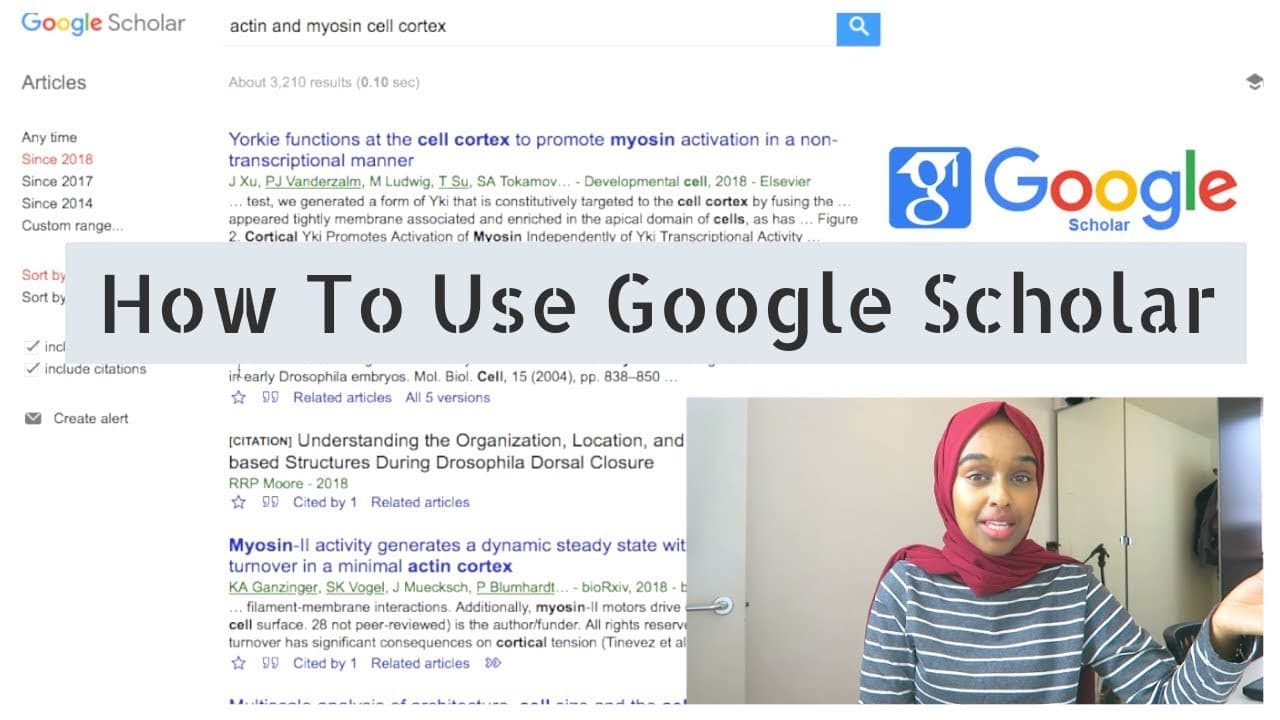
Use Google Scholar by entering detailed keywords, choosing AND or OR based on the relationship you need, filtering results by publication date, and following the “cited by” links of useful papers. Google Scholar contains mostly peer-reviewed articles, though not every result is peer reviewed. These techniques help build a relevant, current bibliography without becoming overwhelmed, so read on for a practical search workflow.
Transcript
hello everyone hope you guys are all doing well and welcome back to my channel so today I have turned my camera around and I want to make this video in a more casual and less sort of setup as I usually do with my latest video today's video I'm going to be talking about how to use Google Scholar in order to find some research journals or research pa... Read More
Key Insights
- ✍️ Google Scholar is a valuable tool for finding peer-reviewed research papers for academic writing.
- 👨🔬 Using specific keywords and operators can help refine search results on Google Scholar.
- 🧑🤝🧑 It is essential to consider the publication dates of the research papers and focus on the most recent ones for up-to-date information.
- 🥺 Exploring the "cited by" feature can lead to discovering more relevant and recent papers for further exploration.
- 🫠 Conceptual saturation, where too much information can be counterproductive, is worth considering when selecting the number of papers to read for research.
Install to Summarize YouTube Videos and Get Transcripts
Explore YouTube Video Summarizer or Get YouTube Transcript Extractor
Questions & Answers
Q: How do I use Google Scholar for a literature review?
Enter specific keywords for your topic, then refine the search with AND or OR and additional terms. Filter by publication date to prioritize recent work, and use the “cited by” feature to discover related papers that referenced a useful article.
Q: What is Google Scholar?
Google Scholar is a bibliographic database containing mostly peer-reviewed articles. It can help you find research journals, papers, and articles for dissertations, essays, or general background reading.
Q: Are all articles on Google Scholar peer reviewed?
No, the transcript says that most articles in Google Scholar are peer reviewed, but not every article is. You should therefore check the publication and review status of an individual result before relying on it.
Q: What does peer reviewed mean?
A peer-reviewed article has been evaluated by people other than its author. This process assesses whether the paper is suitable for publication and provides an additional check on its experiments and results.
Q: How should I use AND and OR in Google Scholar?
Use AND when you want results that combine multiple concepts, such as actin AND myosin. Use OR when either concept is acceptable, such as actin OR myosin.
Q: How can I narrow down Google Scholar results?
Add more keywords and detail to the search bar so the results match your topic more closely. You can then use the timeline controls to limit results to a more relevant publication period.
Q: Why should I filter Google Scholar results by date?
Filtering by date helps you focus on recent research when writing an essay, review, thesis, or dissertation. This matters because older findings may have been challenged or disproved by newer work.
Q: How does the “cited by” feature help find related papers?
The “cited by” link shows papers that have cited the article you are viewing. It lets you move forward from a useful paper to related and potentially more recent research, complementing the older sources found in that paper’s reference list.
Summary & Key Takeaways
-
Google Scholar is a bibliographic database for peer-reviewed articles, making it a useful tool for finding relevant research papers.
-
To search on Google Scholar, use specific keywords and differentiate between using "and" or "or" for more precise results.
-
Refine your search by using additional keywords, selecting a specific timeline, and exploring cited papers for further research.
Read in Other Languages (beta)
Share This Summary 📚
Summarize YouTube Videos and Get Video Transcripts with 1-Click
Try YouTube Summary with ChatGPT & Claude or YouTube Transcript Generator
Explore More Summaries from Dr Amina Yonis 📚

Summarize YouTube Videos and Get Video Transcripts with 1-Click
Try YouTube Summary with ChatGPT & Claude or YouTube Transcript Generator