How to Detect Corners in Images Using OpenCV
TL;DR
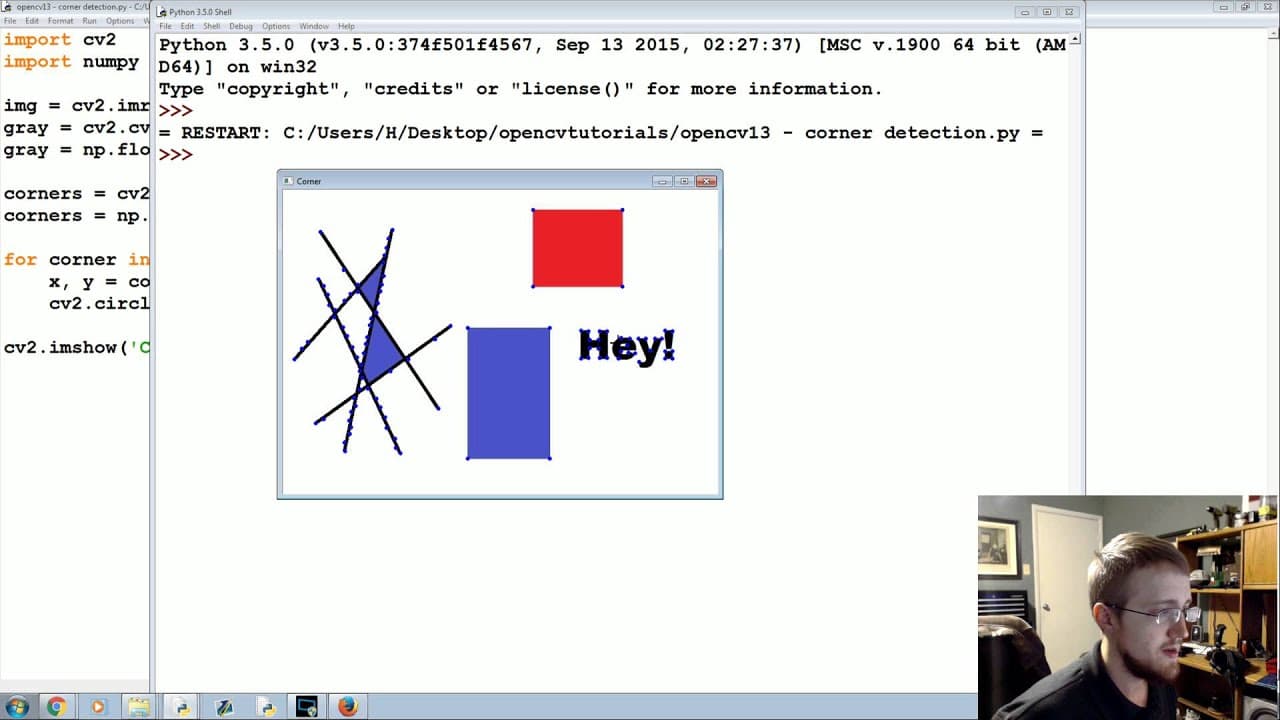
To detect corners in images using OpenCV, load your image and convert it to grayscale. Use the cv2.goodFeaturesToTrack() function to identify corners, customizing parameters such as the number of corners to find and the minimum distance between them. The detected corners can be visualized by drawing circles on the image, aiding in applications like 3D recreation and motion tracking.
Transcript
what's going on everybody welcome to another python with open CV tutorial in this tutorial what we're going to be talking about is Corner detection Corner detection can actually be used for quite a few things mainly we're going to see it in like three-dimensional Recreation you can see it in motion tracking and also it gets used in uh character rec... Read More
Key Insights
- ❓ Corner detection can be used for 3D recreation, motion tracking, and character recognition.
- ❓ Converting an image to grayscale simplifies the corner detection process.
- ❓ OpenCV provides the
cv2.goodFeaturesToTrack()function for corner detection. - #️⃣ The number and quality of detected corners can be controlled by adjusting parameters like the number of corners to find and the minimum distance between corners.
- 💯 Corner detection is not limited to perfect corners and can detect corners in objects with jagged edges or aliasing issues.
- 🕵️ Detected corners can be visualized by drawing circles on the image at the corner locations.
- 💻 Corner detection is a fundamental step in many computer vision tasks.
Install to Summarize YouTube Videos and Get Transcripts
Explore YouTube Video Summarizer or Get YouTube Transcript Extractor
Questions & Answers
Q: What are some applications of corner detection?
Corner detection can be used for tasks such as 3D recreation, motion tracking, and character recognition. It helps in identifying key points in an image that can aid in these processes.
Q: How does corner detection work?
Corner detection algorithms analyze the intensity gradients in an image to identify areas where these gradients undergo significant changes, indicating the presence of corners. OpenCV provides a function called cv2.goodFeaturesToTrack() that performs this corner detection.
Q: Why is converting the image to grayscale necessary?
Converting the image to grayscale simplifies the corner detection process by reducing the dimensionality of the image from RGB to a single channel. It allows the algorithm to focus on the intensity changes across the image.
Q: Can corner detection accurately detect all corners in an image?
Corner detection algorithms are designed to detect corners, but their accuracy depends on the quality of the image and the parameters used. In some cases, aliasing or noise in the image can affect the accuracy of corner detection.
Summary & Key Takeaways
-
Corner detection is a technique used to find corners in an image, which can be useful for tasks like 3D recreation, motion tracking, and character recognition.
-
The tutorial demonstrates how to import the necessary libraries, load an image, convert it to grayscale, and detect corners using the OpenCV library.
-
The detected corners are then visualized by drawing circles on the image, allowing for easy identification of corner points.
Read in Other Languages (beta)
Share This Summary 📚
Summarize YouTube Videos and Get Video Transcripts with 1-Click
Try YouTube Summary with ChatGPT & Claude or YouTube Transcript Generator
Explore More Summaries from sentdex 📚





Summarize YouTube Videos and Get Video Transcripts with 1-Click
Try YouTube Summary with ChatGPT & Claude or YouTube Transcript Generator